




Touchscreen augmented reality displays blend physical and digital worlds through interactive technology that overlays computer-generated content onto real-world environments, enabling users to engage with information in ways that traditional static displays cannot achieve. These sophisticated systems combine responsive touch interfaces with AR capabilities, creating immersive experiences where users manipulate virtual objects, explore layered information, and interact with digital content positioned within their physical surroundings.
Walk through modern museums, educational institutions, or innovative corporate spaces and you’ll encounter increasingly sophisticated interactive technology: touchscreens that recognize gestures and respond instantly, AR overlays that bring historical artifacts to life with contextual information, and mixed-reality experiences where digital content seamlessly integrates with physical exhibits creating engagement that holds attention far longer than passive displays ever could.
This comprehensive guide explores how touchscreen augmented reality displays work, their applications across educational and institutional environments, implementation considerations, and why organizations embracing this technology report engagement rates substantially higher than traditional recognition and information delivery methods—demonstrating the transformative potential of combining touch interaction with augmented reality capabilities.
Modern touchscreen AR technology represents the convergence of multiple innovations: high-resolution displays, accurate touch detection, spatial computing, real-time rendering, and intuitive interface design working together to create experiences that feel natural despite their technical sophistication.

Advanced touchscreen displays create intuitive interfaces where users naturally explore content through familiar touch gestures
Understanding Touchscreen Augmented Reality Technology
Before exploring specific applications and benefits, understanding how touchscreen AR displays function and what distinguishes them from conventional interactive displays helps organizations evaluate whether this technology aligns with their engagement goals.
What Is a Touchscreen Augmented Reality Display?
Touchscreen augmented reality displays are interactive systems that combine large-format touch-sensitive screens with AR software capabilities, enabling users to view and manipulate digital content that appears to exist within or in front of the physical display—creating layered experiences where touch gestures control virtual objects, reveal hidden information, or trigger contextual enhancements to displayed content.
Core Technology Components
Complete touchscreen AR systems integrate several sophisticated elements:
- Multi-touch displays: Commercial-grade touchscreens detecting multiple simultaneous touch points with high precision
- AR rendering engine: Software platforms generating realistic three-dimensional graphics in real-time
- Spatial computing: Systems tracking user position and perspective to adjust displayed content appropriately
- Gesture recognition: Technology interpreting touch patterns—taps, swipes, pinches, rotations—as intentional commands
- Content management systems: Cloud-based platforms enabling remote content updates and display management
- Network connectivity: Reliable connections supporting data synchronization and remote administration
This integration creates systems that respond instantly to user input while maintaining visual coherence between digital overlays and physical display surfaces—essential for creating believable augmented reality experiences.
How AR Touchscreens Differ from Standard Interactive Displays
Many organizations have implemented basic touchscreen displays showing simple interactive content. Touchscreen augmented reality systems provide fundamentally different capabilities creating richer engagement:
Key Distinctions
- Dimensional depth: AR creates illusion of three-dimensional objects existing in or beyond screen surface versus flat two-dimensional graphics
- Spatial awareness: AR systems understand object relationships and perspective, adjusting displays as users move or interact
- Layered information: Multiple information layers revealed progressively through interaction versus single-depth content presentations
- Object manipulation: Users rotate, scale, and reposition virtual objects naturally versus simply selecting from menus
- Contextual enhancement: AR overlays add meaning to existing content without replacing underlying displays
- Immersive storytelling: Three-dimensional narratives engage users emotionally beyond what flat content achieves
Research on immersive display technology indicates that AR-enhanced touchscreens increase user engagement duration by 40-60% compared to traditional flat interactive displays, demonstrating the fundamental behavioral difference this technology creates.

Natural touch interaction combined with AR visualization creates intuitive exploration of complex information
The Evolution of Interactive Display Technology
Understanding how touchscreen augmented reality displays emerged from earlier technologies provides context for their current capabilities and future potential.
From Static Displays to Interactive Touchscreens
Traditional recognition and information displays evolved through several distinct phases, each expanding engagement possibilities:
Generation 1: Static Physical Displays
Early recognition relied entirely on physical artifacts—plaques, trophy cases, printed posters—offering zero interactivity and strictly limited information capacity. Visitors walked past these displays, occasionally pausing to read visible text, but engagement remained brief and passive.
Generation 2: Digital Signage
Non-interactive digital screens introduced dynamic content through slideshows and video, increasing visual appeal but maintaining passive viewing relationships. Organizations could update content remotely, but users still lacked control over what information they accessed or how they explored available content.
Generation 3: Basic Touchscreens
Simple touch interfaces enabled users to control content selection, search databases, and navigate information hierarchies—transforming passive viewers into active participants. Engagement duration increased substantially as users explored content matching personal interests rather than consuming whatever happened to display.
Generation 4: Augmented Reality Touchscreens
Modern AR-enabled systems add dimensional depth, spatial computing, and immersive visualization to proven touch interaction paradigms—creating experiences that feel fundamentally different from earlier flat interactive displays while maintaining intuitive control through familiar gestures.
Explore the evolution of interactive touchscreen technology across educational environments demonstrating this technological progression.
Current State of AR Display Technology in 2025
Augmented reality touchscreen displays have matured substantially, moving from experimental installations to practical systems deployed across diverse institutional environments.
Technical Capabilities
Modern AR touchscreen systems deliver impressive performance:
- High-resolution displays (4K and 8K) rendering detailed three-dimensional graphics
- Sub-100-millisecond touch response creating perception of direct manipulation
- Realistic lighting and shadow effects integrating digital content with physical displays
- Smooth animations maintaining 60+ frames per second during interaction
- Multi-user support enabling simultaneous interaction from different positions
- Mobile integration extending experiences beyond physical displays through smartphones
Accessibility and Adoption
Decreasing costs and improved ease of implementation have accelerated adoption. Where early AR systems required custom development and significant technical expertise, modern platforms like Rocket Alumni Solutions provide turnkey solutions specifically designed for educational and institutional recognition—bringing advanced technology within reach of organizations lacking extensive technical resources.

Strategic placement in high-traffic areas ensures maximum engagement with AR-enhanced recognition displays
Key Applications of Touchscreen AR Displays
While augmented reality touchscreens can serve numerous purposes, certain applications deliver particularly high value for schools, universities, museums, and community organizations.
Enhanced Recognition and Hall of Fame Displays
Athletic and academic recognition represents one of the most impactful applications of touchscreen AR technology in educational environments.
Immersive Achievement Visualization
AR-enhanced recognition systems create experiences impossible with traditional displays:
- Three-dimensional athlete and honoree profiles appearing to emerge from screens
- Interactive statistics and achievements displayed as floating data visualizations users manipulate
- Championship trophies and awards rendered in realistic 3D enabling examination from all angles
- Historical photographs enhanced with AR overlays providing context and additional information
- Team formations and play diagrams users can rotate and explore spatially
- Timeline visualizations showing career progression and achievement accumulation three-dimensionally
Learn about advanced approaches to digital hall of fame displays incorporating immersive visualization technology.
Multi-Sport Recognition Integration
Comprehensive AR systems celebrate excellence across entire athletic programs:
- Sport-specific interfaces adapting visualizations appropriately for different activities
- Interactive record boards where users trigger AR animations showing record-setting performances
- Championship season documentation with AR-enhanced game highlights and tournament brackets
- Position-specific achievements visualized through contextual graphics and spatial comparisons
- Historical era exploration revealing how uniforms, equipment, and play styles evolved
Discover specialized athletic recognition approaches demonstrating comprehensive documentation strategies.

AR displays integrate seamlessly with existing architectural elements and school branding
Interactive Museum and Historical Exhibits
Museums and historical societies leverage touchscreen AR to bring artifacts and history to life through contextual digital enhancement.
Artifact Enhancement and Contextualization
AR overlays add layers of meaning to physical or photographed artifacts:
- Historical objects appearing in original contexts through AR reconstruction
- Cutaway views revealing internal structures and hidden details
- Temporal sequences showing how artifacts changed or degraded over time
- Scale comparisons helping viewers understand actual artifact dimensions
- Usage demonstrations animating how historical tools and objects functioned
- Cultural context visualizations placing artifacts within broader historical narratives
Immersive Historical Narratives
AR enables storytelling approaches impossible with static exhibits:
- Historical figures appearing as three-dimensional presentations sharing first-person accounts
- Battle or event recreations users explore from multiple perspectives
- Architectural reconstructions showing buildings as they appeared in different eras
- Geographic overlays displaying how territories and boundaries evolved
- Population and demographic visualizations bringing statistical history to life
- Comparative timelines enabling users to explore synchronous events across different locations
Campus Tours and Admissions Experiences
Universities and schools implement AR touchscreens to create engaging prospective student and family experiences.
Interactive Campus Navigation
AR-enhanced campus directories provide superior wayfinding:
- Three-dimensional campus maps users rotate and zoom to understand building relationships
- Virtual pathways overlaid on maps showing optimal routes to different destinations
- Building information revealing on demand when users touch specific campus structures
- Historical overlays showing campus evolution and planned future developments
- Student life visualizations displaying typical activity patterns throughout campus
- Accessibility information helping visitors identify wheelchair-accessible routes
Explore comprehensive campus tour technology enhancing prospective student engagement.
Program and Facility Showcases
AR demonstrations bring academic and athletic programs to life:
- Laboratory and facility virtual tours showing spaces not accessible during physical visits
- Equipment and technology demonstrations revealing program capabilities
- Student project showcases displaying work three-dimensionally
- Research visualization making complex academic work understandable
- Career pathway displays showing professional trajectories of graduates
- Competitive success documentation celebrating championship achievements

Intuitive AR interfaces encourage exploration without requiring instructions or assistance
Alumni Engagement and Development
Digital recognition platforms with AR capabilities create powerful alumni connection tools supporting institutional advancement objectives.
Enhanced Alumni Profiles
AR technology enriches alumni recognition beyond flat biography presentations:
- Career timeline visualizations showing professional progression three-dimensionally
- Achievement networks revealing connections between alumni in same industries or locations
- Geographic distribution maps displaying where alumni live and work globally
- Legacy visualizations showing multi-generational family connections to institutions
- Impact metrics demonstrating alumni contributions to professions and communities
- Video testimonials integrated with profile data creating comprehensive portraits
Learn about alumni recognition strategies that strengthen institutional connections.
Development and Fundraising Support
AR-enhanced displays support advancement through engaging donor recognition:
- Donor recognition walls where contributions visualize impact through AR graphics
- Named opportunity presentations showing how gifts would be recognized permanently
- Impact visualizations demonstrating what philanthropy accomplishes
- Historical giving patterns revealing institutional support evolution
- Reunion engagement tools connecting class cohorts and encouraging participation
- Legacy giving promotions through generational storytelling and visualization
Technical Implementation Considerations
Successful touchscreen AR deployment requires addressing multiple interconnected technical, design, and operational factors.
Hardware Selection and Specifications
Display hardware fundamentally impacts user experience quality, maintenance requirements, and long-term satisfaction.
Touchscreen Display Requirements
Critical hardware specifications for AR applications:
- Display size: 55-75 inches for lobby installations; larger formats for expansive spaces requiring distance viewing
- Resolution: Minimum 4K (3840x2160) for crisp AR graphics; 8K preferred for larger displays
- Touch technology: Projected capacitive (PCAP) or infrared multi-touch supporting complex gestures
- Brightness: 400-600 nits ensuring visibility in ambient lighting conditions
- Refresh rate: 60Hz minimum for smooth AR animation; 120Hz preferred for advanced applications
- Commercial grade: Displays rated for continuous operation in public environments
- Processing power: Dedicated graphics hardware supporting real-time 3D rendering
Computing Infrastructure
AR rendering demands substantial computing resources:
- High-performance processors (Intel Core i7/i9 or AMD Ryzen 7/9 minimum)
- Dedicated graphics cards (NVIDIA RTX or AMD Radeon supporting real-time 3D)
- 16-32GB RAM supporting complex scene rendering
- Solid-state storage ensuring rapid content loading
- Reliable network connectivity enabling cloud content synchronization
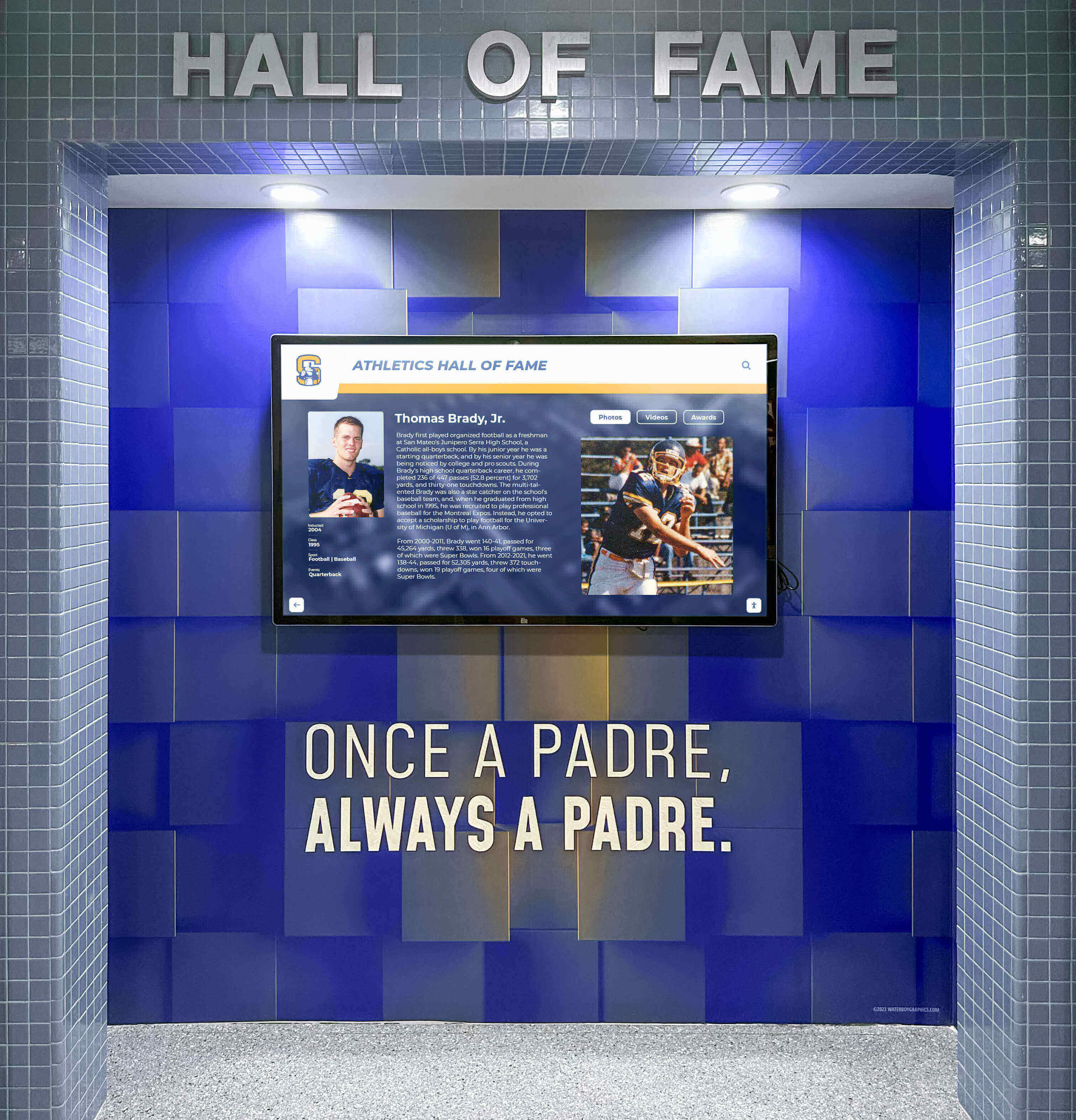
Professional installation ensures displays integrate architecturally while delivering optimal performance
Software Platform Selection
Organizations evaluating AR touchscreen solutions face varying software options with different capabilities, ease of use, and support models.
Purpose-Built vs. Custom Development
Purpose-Built Recognition Platforms:
Solutions designed specifically for educational and institutional recognition provide significant advantages:
- Pre-configured AR templates reducing implementation complexity
- Cloud-based content management requiring no technical expertise
- Proven interface patterns optimized through extensive user testing
- Specialized support understanding institutional needs and constraints
- Regular platform updates adding features and improving performance
- Favorable educational pricing structures
- Integration capabilities with information systems when desired
Custom Development:
Bespoke AR applications require substantial investment:
- Months of development time before deployment
- Significant upfront development costs
- Ongoing maintenance requiring technical expertise
- Complex content management procedures
- Limited support beyond original developers
- Difficulty implementing future enhancements
Organizations implementing solutions like Rocket Alumni Solutions benefit from proven platforms specifically optimized for recognition applications—delivering sophisticated AR capabilities without requiring custom development or ongoing technical expertise.
Content Development and Management
Compelling AR experiences require high-quality three-dimensional content and systematic management processes.
AR Content Creation
Developing engaging AR content involves multiple specialized steps:
- Three-dimensional modeling creating virtual objects and environments
- Texture mapping applying realistic surface details to 3D models
- Lighting design ensuring AR content integrates visually with displays
- Animation development creating smooth, realistic motion
- Interaction design defining how users manipulate virtual objects
- Quality assurance testing AR content across different viewing conditions
Content Management Workflow
Systematic processes ensure content remains current and high-quality:
- Standardized templates maintaining visual consistency across different content types
- Version control tracking content changes and enabling rollback when necessary
- Approval workflows ensuring quality before public deployment
- Analytics integration revealing which AR features engage users most effectively
- Remote update capabilities enabling instant content refreshes
- Backup procedures protecting against data loss
Cloud-based platforms dramatically simplify content management by enabling updates from any internet-connected device without requiring physical display access or technical expertise—essential for sustainable long-term operation.
Design Principles for Effective AR Touchscreen Experiences
Technical capability alone doesn’t guarantee engagement—thoughtful design ensuring intuitive interaction and meaningful content determines success.
Intuitive Gesture-Based Interaction
AR touchscreen interfaces must feel natural despite technical sophistication, requiring careful attention to interaction design.
Natural Gesture Mapping
Successful AR interfaces leverage gestures users already understand:
- Single tap: Select objects or trigger actions
- Drag: Rotate three-dimensional objects to examine from different angles
- Pinch: Scale objects larger or smaller for detailed examination
- Swipe: Navigate between different content items or categories
- Two-finger rotate: Adjust viewing angle on complex three-dimensional visualizations
- Long press: Reveal additional information or contextual menus
Clear Affordances and Feedback
Users need clear signals indicating what interactions are possible:
- Visual highlights showing interactive elements when users approach
- Subtle animations suggesting objects can be manipulated
- Immediate visual feedback confirming gesture recognition
- Smooth, fluid responses creating perception of direct manipulation
- Error recovery enabling users to undo accidental actions
- Tutorial animations demonstrating interaction possibilities
Learn detailed approaches to touchscreen experience design creating intuitive engagement.

Responsive touch detection enables precise content selection and manipulation
Progressive Information Disclosure
Effective AR interfaces reveal complexity gradually rather than overwhelming users with simultaneous information.
Layered Content Architecture
Well-designed AR experiences organize information hierarchically:
Layer 1 - Attract Mode:
- Animated AR content drawing attention when displays sit unused
- Featured highlights showcasing compelling content encouraging exploration
- Clear prompts inviting interaction through recognizable touch gestures
Layer 2 - Category Navigation:
- Clear content organization with 3-5 primary categories
- AR-enhanced visual differentiation making categories instantly recognizable
- Brief descriptions communicating what each section contains
Layer 3 - Content Overview:
- Lists or galleries showing available content within categories
- Sufficient information enabling informed selection without overwhelming detail
- AR previews hinting at detailed content available through further interaction
Layer 4 - Detailed Content:
- Comprehensive information satisfying deep interest in specific topics
- Full AR visualization capabilities enabling thorough exploration
- Related content suggestions encouraging continued engagement
This progressive approach prevents overwhelming initial presentations while still providing access to extensive information through intuitive, manageable steps.
Accessibility and Inclusive Design
AR touchscreen experiences must remain usable by diverse audiences including users with varying physical and cognitive capabilities.
Visual Accessibility
- High contrast ensuring visibility for users with reduced vision
- Scalable text and interface elements accommodating different visual acuity
- Color-blind friendly palettes avoiding color as sole information channel
- Adjustable AR intensity for users sensitive to visual complexity
Motor Accessibility
- Generous touch targets accommodating reduced fine motor control
- Simplified gesture alternatives to complex multi-finger interactions
- Adjustable display heights enabling wheelchair accessibility
- Time-unlimited interaction preventing forced progression
Cognitive Accessibility
- Clear, plain language avoiding unnecessary jargon
- Consistent interface patterns throughout application
- Obvious navigation enabling confident exploration
- Help features providing assistance without requiring external support
Explore comprehensive accessibility considerations for interactive display design.
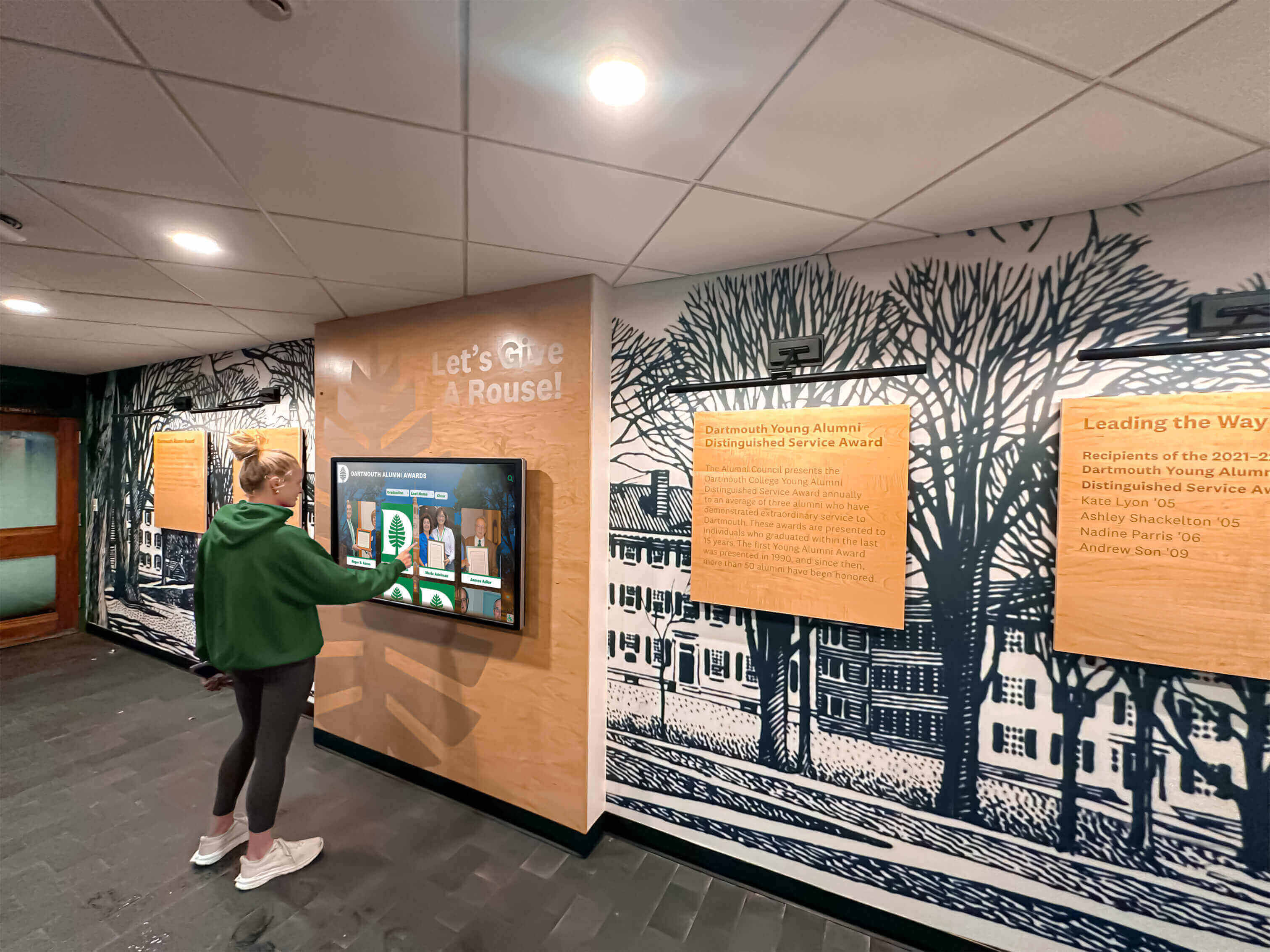
Well-designed interfaces enable confident interaction across all age groups and technical comfort levels
Measuring AR Touchscreen Impact and Engagement
Understanding whether AR touchscreen implementations achieve intended objectives requires systematic measurement combining quantitative analytics and qualitative assessment.
Quantitative Engagement Metrics
Modern AR platforms provide detailed data revealing actual usage patterns and engagement depth.
Critical Performance Indicators
Usage Frequency:
- Daily interactions showing community adoption rates
- Unique vs. repeat users revealing breadth vs. depth of engagement
- Peak usage times informing content scheduling and updates
- Comparison to foot traffic showing penetration rates
Engagement Depth:
- Average session duration (target: 4-7 minutes for AR-enhanced displays)
- AR feature utilization rates showing which capabilities users explore
- Content depth reached indicating thorough vs. superficial exploration
- Gesture diversity revealing interface mastery and comfort
Content Performance:
- Most-viewed content categories and individual items
- AR feature engagement showing which enhancements resonate
- Search patterns revealing user interests and navigation preferences
- Social sharing frequency indicating memorable discoveries
Technical Performance:
- Touch and gesture recognition accuracy
- Rendering frame rates ensuring smooth AR visualization
- Network performance supporting reliable content delivery
- System uptime confirming operational reliability
Qualitative Impact Assessment
Analytics reveal behavior patterns but not underlying motivations, satisfaction, or cultural impact—qualitative assessment provides essential context.
Stakeholder Feedback Collection
Direct Observation:
- Watching actual interactions identifying pain points and confusion
- Noting which AR features users discover spontaneously vs. overlook
- Observing social behaviors during interaction
- Identifying technical issues affecting real-world experience
Survey and Interview Feedback:
- User satisfaction assessments comparing to expectations
- Comprehension testing ensuring AR enhancements clarify rather than confuse
- Preference data revealing most valued features
- Improvement suggestions from actual users
Cultural Impact Indicators:
- Enhanced institutional pride observable in community communications
- Increased awareness of recognized achievements and history
- Strengthened alumni connections measured through participation metrics
- Improved external perception during tours and community events
Regular assessment enables continuous refinement ensuring AR touchscreen investments achieve maximum impact while remaining aligned with evolving institutional priorities.
Budget and Investment Considerations
AR touchscreen implementations require careful financial planning and realistic expectation-setting about total ownership costs.
Total Cost of Ownership
Initial Implementation Investment
Hardware Costs:
- Commercial AR-capable touchscreen displays: $8,000-$18,000 per unit
- Computing hardware supporting 3D rendering: $2,000-$4,000 per display
- Mounting and installation: $1,500-$3,500 per display
- Network infrastructure if needed: $1,000-$3,000
Software and Content:
- Recognition platform licensing: $3,000-$6,000 initial setup
- AR content development: $5,000-$15,000 depending on complexity
- Design and customization: $2,000-$5,000
Typical single-display AR implementation: $22,000-$50,000 Typical multi-display implementation (3-5 units): $60,000-$150,000
Ongoing Annual Costs
- Platform subscription and hosting: $2,400-$4,800 per year
- Content management and updates: $2,000-$5,000 per year
- Technical support and maintenance: $1,500-$3,000 per year
- Hardware warranty and insurance: $800-$1,500 per year
Typical annual operating costs: $6,700-$14,300 per year
While representing significant investment, AR touchscreen systems deliver value across multiple institutional objectives simultaneously—recognition, engagement, alumni connection, recruiting, and cultural development—making per-objective costs reasonable when benefits are comprehensively assessed.
Funding Strategies
Capital Campaign Integration
- Digital recognition technology as named giving opportunities
- Memorial recognition honoring community members
- Class gift initiatives from graduating cohorts
- Reunion fundraising from anniversary classes
Institutional Budget Allocation
- Technology infrastructure budget allocations
- Recognition and engagement program enhancements
- Facilities improvement project integration
- Advancement and development infrastructure investments
Many organizations report that tangible, visible AR touchscreen installations generate donor enthusiasm exceeding expectations—the impressive technology and clear institutional benefit create compelling fundraising narratives.
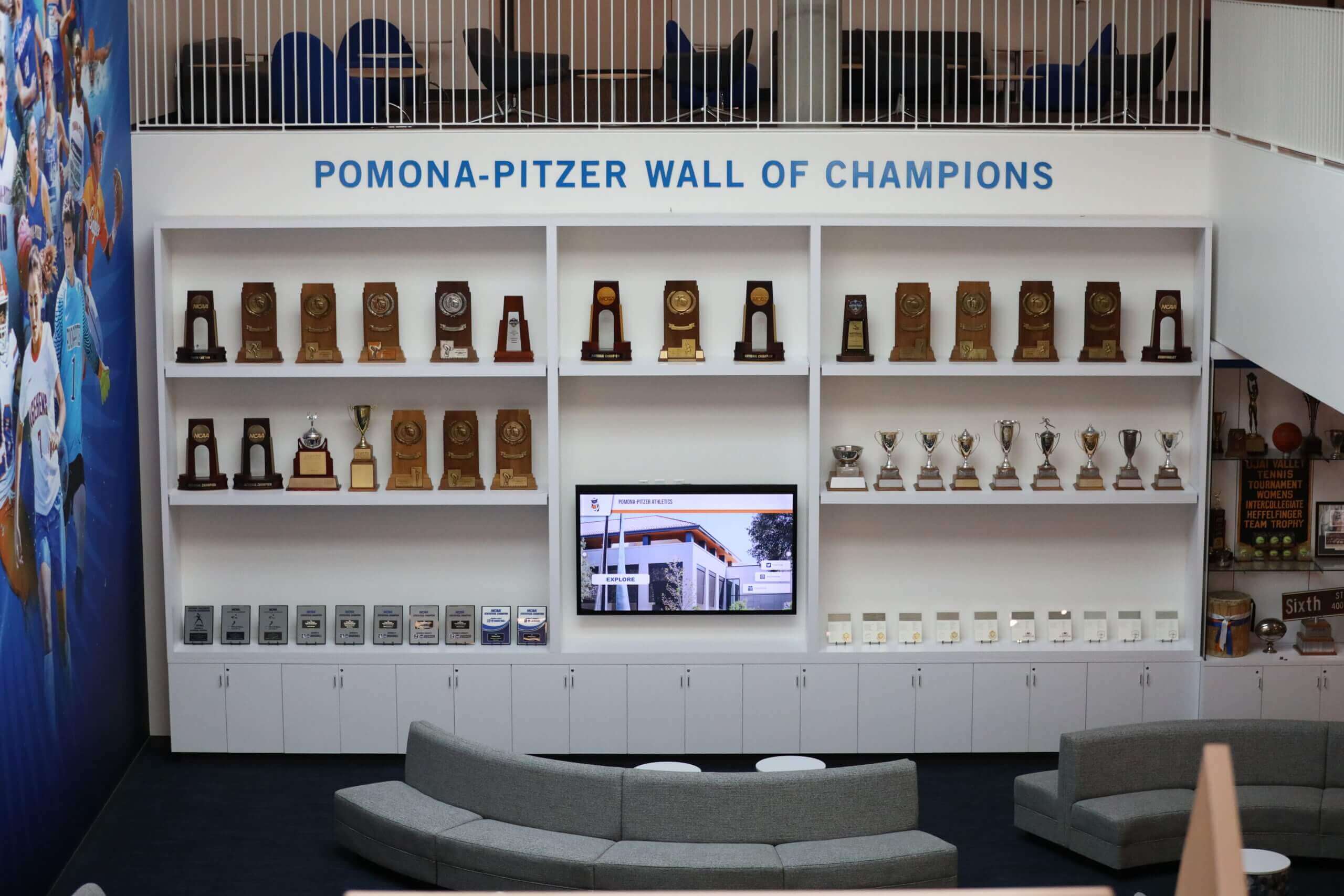
Integrated recognition spaces combining AR displays with traditional elements create destinations where communities gather
Future Trends in AR Touchscreen Technology
Understanding emerging developments helps organizations plan investments remaining relevant and valuable long-term.
Advanced AR Capabilities
Emerging Technology Integration
Next-generation AR touchscreens will incorporate enhanced capabilities:
- Artificial intelligence personalizing experiences based on user behavior and preferences
- Holographic displays creating true three-dimensional images floating beyond screen surfaces
- Haptic feedback providing tactile responses to virtual object manipulation
- Eye-tracking enabling gaze-directed interaction supplementing touch
- Voice control supporting hands-free navigation and accessibility
- Extended reality (XR) integration bridging physical displays and mobile AR applications
Multi-User and Social Experiences
Collaborative Interaction
Future AR systems will better support simultaneous multi-user engagement:
- Multiple users interacting with same AR content from different positions
- Collaborative manipulation of virtual objects requiring coordination
- Social discovery features showing what other users are exploring
- Shared experiences enabling group learning and engagement
- Competitive elements gamifying interaction and encouraging repeated visits
Integration with Broader Digital Ecosystems
Connected Recognition Platforms
AR touchscreen displays will increasingly connect with comprehensive institutional systems:
- Mobile applications enabling continued AR exploration beyond physical displays
- Social media integration amplifying recognition reach
- Student information systems automatically updating achievement recognition
- Alumni databases enriching profiles with additional context
- Analytics platforms providing comprehensive engagement insights across channels
Solutions like Rocket Alumni Solutions provide platforms supporting integrated approaches—enabling organizations to implement AR-enhanced recognition while building broader capabilities supporting multiple institutional objectives simultaneously.
Conclusion: Transforming Engagement Through AR Touchscreen Technology
Touchscreen augmented reality displays represent more than impressive technology demonstrations—they’re practical tools transforming how institutions recognize achievement, engage communities, and communicate complex information through immersive experiences that hold attention far longer than traditional static or flat interactive displays.
When organizations implement AR touchscreens thoughtfully—with clear objectives, quality content, intuitive design, and sustained management—they create recognition and information systems that delight users while achieving measurable engagement goals. The combination of familiar touch interaction with dimensional AR enhancement creates experiences that feel natural despite technical sophistication, enabling confident exploration across all age groups and technical comfort levels.
Transform Recognition with Touchscreen AR Technology
Discover how modern AR-enhanced interactive displays can help you create immersive recognition experiences that engage your entire community through intuitive technology combining touch interaction with augmented reality visualization.
Explore AR Display SolutionsThe strategies explored in this comprehensive guide provide frameworks for implementing touchscreen AR technology that honors human interaction patterns while delivering measurably superior engagement. From hardware selection and software platform evaluation to content development and ongoing optimization, these approaches overcome traditional limitations while creating experiences impossible with conventional recognition methods.
Whether your organization seeks to replace underperforming existing displays, implement new recognition technology for the first time, or enhance current systems with AR capabilities, prioritizing intuitive design and quality content ensures technology investments achieve intended objectives rather than creating expensive installations that communities ignore.
Your institution deserves recognition and engagement technology that combines proven touch interaction with immersive AR visualization. Organizations implementing solutions like Rocket Alumni Solutions benefit from professionally designed platforms optimized specifically for educational and institutional recognition—delivering sophisticated AR capabilities without requiring custom development or ongoing technical expertise.
Ready to explore how touchscreen augmented reality displays can transform your recognition program? Professional AR-enhanced platforms provide the design expertise, proven interface patterns, quality content development, and ongoing support ensuring your investment delivers sustained community engagement for years to come.































