




Every August and September, athletic programs across the country stage their version of the same event: players arrive in uniform, photographers set up backdrops, coaches hand out clipboards, and the sports media day rush begins. When it works, the session produces a season’s worth of usable content—headshots, action shots, player bios, team rosters—all captured in a few hours before the season tips off. When it doesn’t, coordinators spend the next three months tracking down missing information, resizing inconsistent photos, and manually re-entering data that was already collected on paper.
The gap between a chaotic sports media day and a smooth one usually comes down to workflow design, not effort. Schools that treat media day as an isolated photo event collect photos. Schools that treat it as the first step in a content pipeline collect photos and build the raw material for digital displays, athlete profile pages, hall of fame nominations, end-of-season recognition programs, alumni archives, and donor recognition content—all from the same two-hour session.
This guide breaks down how to run a sports media day as a complete content capture workflow: what to collect, how to organize it, and how to connect what you capture to the recognition systems your school will rely on all year.
Running a well-structured sports media day is the single highest-leverage investment an athletic department can make in its annual content calendar. The content captured in one morning powers everything from game-night programs and website rosters to video wall displays and permanent hall of fame profiles.

A dedicated video and photo capture session gives schools the raw content library they need to power recognition displays, athlete profile pages, and seasonal media throughout the year
What a Sports Media Day Actually Produces (And What Schools Miss)
Most athletic programs walk away from media day with two things: team photos and individual headshots. Both are genuinely useful. Neither is sufficient for a modern recognition program that spans digital displays, interactive kiosks, alumni pages, and seasonal content calendars.
The Standard Media Day Deliverables
A traditional sports media day typically produces:
- Team photograph in full uniform, suitable for print programs and social media
- Individual headshots against a consistent backdrop for rosters and game programs
- Action photos if a second photographer is available during warm-ups or drills
- Coach headshots for media guides and website staff pages
These outputs serve their immediate purpose well. The problem is that they expire quickly. Headshots become outdated when uniforms change. Action shots lack the metadata (player name, jersey number, sport, year, school) that makes them reusable for recognition content downstream.
What High-Performing Athletic Programs Add
Schools that build content pipelines from their sports media day add several layers:
Structured player information capture. Rather than relying on coaching staff to email rosters later, high school media days now include brief intake stations where athletes (or team managers) confirm or update their biographical data—name pronunciation, graduation year, hometown, jersey number, position, prior achievements, and sport history. Capturing this at the session ensures the data is accurate and immediately paired with the corresponding photo.
Multi-format photo capture. Beyond the standard headshot, a second frame captures the athlete holding a small placard with their number and name—useful for digital display matching. A third frame captures the athlete from the waist up with school colors prominent, sized for landscape crop display on video walls and lobby screens.
Short-form video clips. Even a 15-second clip of each athlete introducing themselves (“Hi, I’m Marcus Williams, number 34, defensive end, class of 2027”) creates evergreen content for digital lobby displays, highlight reels, and virtual hall of fame profiles. A phone on a tripod is sufficient.
Signed release documentation. A simple one-page media release signed during check-in removes the friction of tracking down permission forms before publishing any content later in the year.
The Sports Media Day Workflow Checklist
The following workflow is designed for athletic directors, communications staff, and advancement teams running a single-day or multi-day capture session for multiple sports programs.
Pre-Event Planning (2–3 Weeks Before)
Scheduling and coordination:
- Set a firm date in late summer before competitive seasons begin—ideally before the first official practice under state athletic association rules to ensure full roster availability
- Schedule each team in 30–45 minute blocks with buffer time between groups to reset equipment
- Coordinate with fall sport coaches first; spring and winter sports can schedule separate sessions later in their preseason
- Assign a student aide or team manager from each program to shepherd their team through stations
- Notify parents if student athletes are under 18 and will appear in published content; distribute media release forms in advance for return on media day
Equipment and space setup:
- Reserve a large gymnasium, weight room, or outdoor turf area depending on weather
- Designate separate stations: backdrop photo station, check-in/data capture station, video clip station (optional), document collection station
- Confirm lighting conditions at each station—portable LED panels improve headshot consistency dramatically compared to overhead gymnasium fluorescents
- Prepare a standard sports media day backdrop in school colors (plain banners work; logo backdrops are more professional)
- Test camera settings in the actual space before athlete arrival
Data collection templates:
- Build or download an athlete intake form capturing: first name, last name, preferred name, grade level, graduation year, jersey number, primary sport, secondary sports, position/event, hometown, and any notable achievements (prior varsity letters, academic awards, milestones approaching this season)
- Pre-populate the form with existing roster data from the previous season so athletes only need to confirm or update rather than starting from scratch
- Consider a QR code linking to a digital intake form athletes can complete in advance from their phones
Media Day Station Setup
Station 1: Check-In and Data Confirmation
Every athlete starts here. A staff member or student aide confirms the athlete’s information against the pre-populated roster, flags anything missing or incorrect, and distributes wristbands or cards indicating which stations they’ve completed. This station collects signed media releases and flags athletes whose information needs coach verification.
Station 2: Individual Photo Capture
A consistent backdrop, consistent lighting, and a consistent distance from the camera produce photos that actually work across multiple use cases. Key variables to lock in:
- Camera height at athlete eye level for portraits (not below, which distorts; not above, which diminishes)
- Framing that includes head and shoulders with comfortable breathing room on all sides
- At least three frames per athlete: relaxed portrait, slight smile, looking off-camera (give digital display designers options)
- A separate frame with jersey number visible—useful for display content matching
Resist the temptation to rush. An extra 60 seconds per athlete invested in consistent framing saves hours of post-processing and re-shooting.
Station 3: Team Photo
Organize athletes by height and position. Coaches and support staff stand with the team. Capture multiple frames to account for blinking. Clearly label the photo files by sport, team name, and year immediately—a folder of photos named “IMG_4823.jpg” is a recognized headache for content teams managing large rosters.
Station 4: Video Intake (Optional but High-Value)
A phone or tablet on a tripod with a neutral background and consistent lighting is sufficient. Athletes record a 10–15 second introduction: name, jersey number, position, and class year. These clips index easily against profile photos and create evergreen content for digital lobby displays, highlight reels, and virtual recognition platforms. The time investment is minimal; the downstream value is significant.
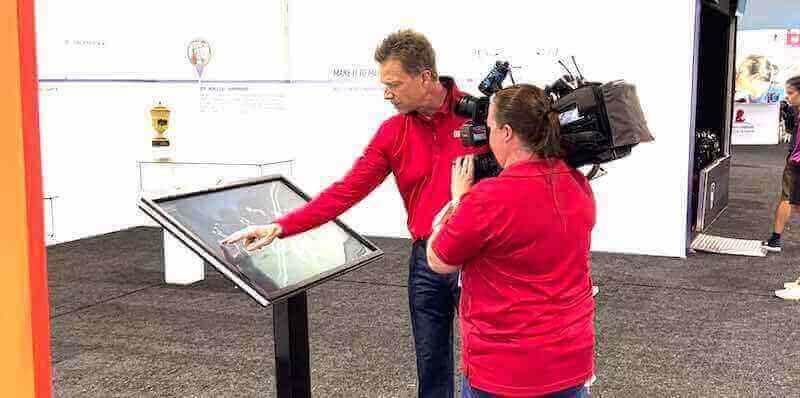
Short video clips captured during media day pair with headshots to create rich, searchable athlete profiles that power interactive touchscreen displays throughout the year
Post-Event Processing (Within One Week)
The faster content gets processed after media day, the more useful it is before the season starts. Schools that wait until October to process August media day photos find they’ve missed the first month of content calendar opportunities.
File organization:
- Create a folder structure by sport, team, and year immediately after the event
- Rename all files using a consistent convention:
LastName_FirstName_Jersey_Sport_Year.jpg - Back up all raw files to cloud storage before any editing begins
Photo culling and editing:
- For each athlete, select the single best frame for official use plus one alternate
- Apply consistent color correction and crop across all headshots—uniformity matters for display context
- Export in multiple formats: high-resolution for print, web-optimized for websites, square crop for social media, landscape crop for video walls and lobby screens
Data entry and matching:
- Transfer athlete intake form data into the athletic department’s roster management system, website CMS, and any recognition platform currently in use
- Match each athlete’s file names to their data record to make future content pulls faster
Release documentation:
- File signed media releases by sport and year in a physical or digital archive
- Flag any athlete for whom a release was not obtained and follow up with coaches before publishing any content
Connecting Media Day Content to Year-Round Recognition
The real value of a well-run sports media day extends far beyond the season it precedes. Content captured in August can serve programs for three to four years—appearing in end-of-season recognition events, senior tributes, athletic hall of fame nominations, alumni communications, and permanent digital displays.
Athlete Profile Pages and Digital Rosters
Schools with website content management systems can use media day photos and intake data to build individual athlete profile pages—brief bios with headshots, position, and achievement history—that grow over a student’s career. A freshman profile updated each year through senior season becomes a compelling archive by graduation. These profiles also simplify hall of fame nominations for eligible alumni by providing documented achievement histories that don’t depend on coaches’ memories.
For schools exploring how to build and display comprehensive achievement archives, hall of fame display tools for athletics cover the full spectrum of platforms from physical panels to interactive touchscreen kiosks.
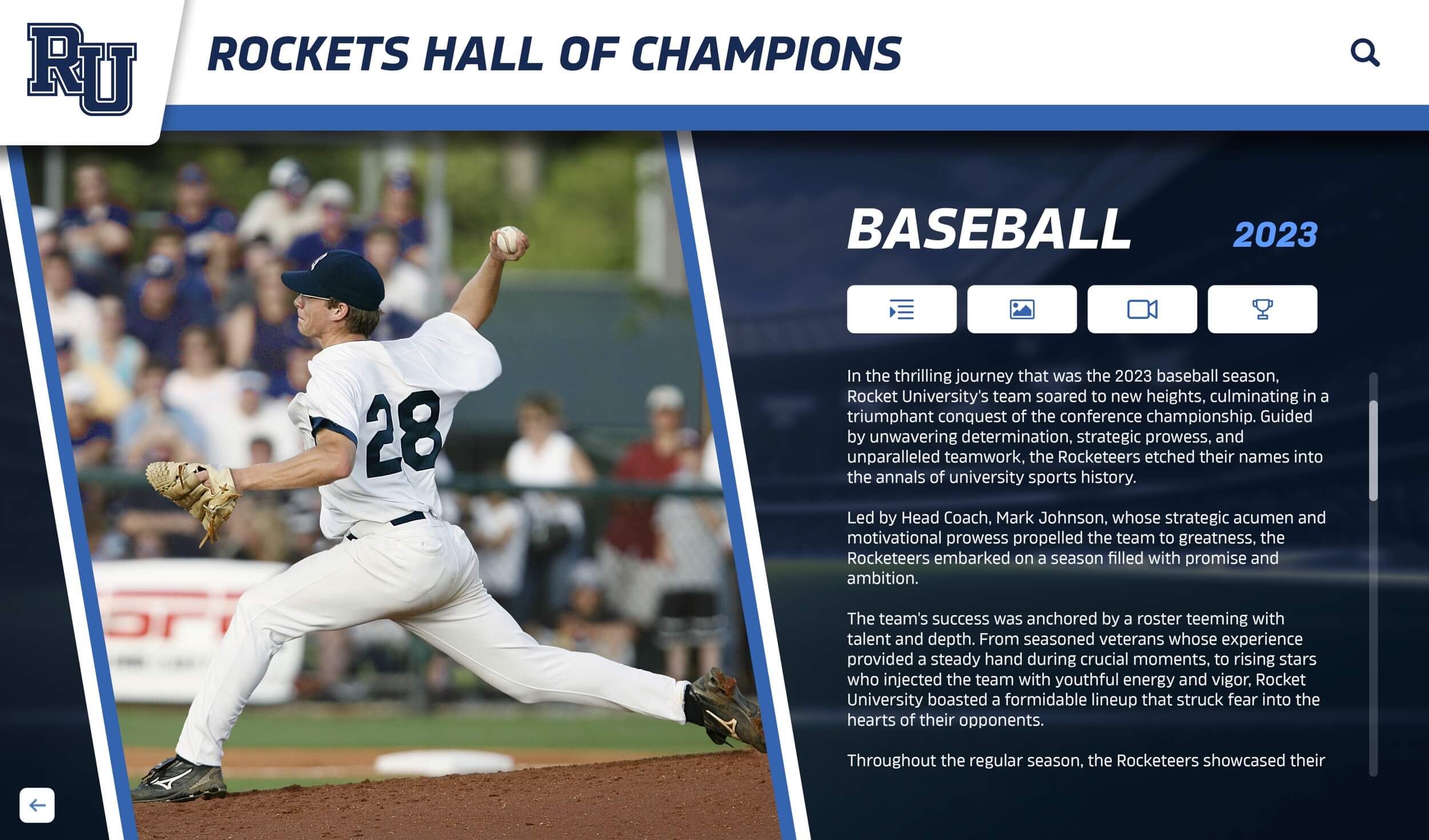
Photos captured during sports media day become the foundation of permanent athlete profiles on interactive digital displays that students, families, and alumni access year-round
Digital Video Wall and Lobby Display Content
High-traffic school spaces—main lobbies, gymnasium entrances, fieldhouse corridors—increasingly feature digital displays cycling through athletic recognition content. The photos and player info captured on media day feed directly into these systems, providing a steady content library for the entire season.
Effective digital display content from media day includes:
- Rotating roster cards: Athlete headshot, name, jersey number, sport, and position displayed as a clean graphic
- Achievement callouts: As the season progresses, overlay milestone achievements (first start, record-breaking performance, team captain designation) onto the athlete’s media day photo
- Countdown or season-launch content: Early in the season, media day team photos cycle as hype content building anticipation before the first game
- Senior recognition: As the season closes, senior athlete photos from media day become the visual anchor for end-of-season tribute content
Schools using interactive touchscreen displays can structure media day content into searchable athlete profiles that students, families, and visitors browse in real time. Interactive displays that pull from a structured content library—exactly the kind media day produces—allow visitors to select a sport, browse the roster, and view individual athlete profiles without staff involvement.
End-of-Season Awards and Banquets
Most athletic recognition events—awards banquets, letter ceremonies, senior tributes—require quality photos of each honoree. Programs that ran an organized sports media day have high-resolution, consistent headshots ready for every athlete being recognized. Programs that didn’t are often scrambling to source acceptable photos from parents’ phone cameras or mid-game action shots that don’t crop cleanly.
Beyond photos, the player information captured during media day populates award program booklets, projection slides, and video tribute reels without requiring coaches to re-enter information they already provided in August.
For inspiration on structuring end-of-season award categories that complement media day recognition content, youth sports awards ideas offers a broad framework applicable from middle school through varsity competition.
Hall of Fame and Alumni Recognition Programs
Athletic hall of fame nominations typically require photographs, statistical records, and biographical information about candidates—exactly what a well-documented sports media day produces over four years of a student’s career. Schools with structured content archives from previous media days can build nomination packages for outstanding alumni from their existing files rather than hunting through yearbook archives or contacting families for photos.
Digital hall of fame platforms, including interactive touchscreen kiosks installed in school lobbies and fieldhouses, allow inducted athletes to be presented with the same quality content captured during their active careers. A hall of fame induction featuring a high-resolution headshot, career statistics, and a video introduction clip is qualitatively different from a wall plaque with a photocopied yearbook portrait.
For more on building comprehensive recognition archives that connect current athletes to alumni programs, hall of fame tools for athletics and donors compares the leading digital platforms schools are using to manage these programs.
Sports Media Day Backdrop and Setup Best Practices
The sports media day backdrop is one of the most visible elements of the session—and one of the most commonly underprepared. A consistent, well-branded backdrop anchors every photo to the school’s visual identity and produces a professional result that holds up across all downstream uses.
Backdrop Options by Budget
Low budget: A solid-color seamless paper backdrop in the school’s primary color ($30–80 from photography supply retailers) produces clean, professional results. Avoid gray or white when the school’s uniform is gray or white.
Mid budget: A fabric banner with the school logo, mascot, or athletic program branding ($150–400 from print shops) adds institutional identity without heavy investment. These pack and reuse across multiple seasons.
High budget: A custom step-and-repeat banner featuring the school’s athletic logo, conference affiliation, and sponsor logos ($300–700) mirrors the media environment of collegiate and professional teams. Appropriate for large programs, booster-funded departments, and schools that share the backdrop with media partners.
Common Setup Mistakes to Avoid
- Inconsistent lighting: Athletes photographed in gym fluorescent lighting look dramatically different from those shot near windows. Use consistent artificial lighting at every athlete station.
- Changing distances: If athletes stand at varying distances from the backdrop, crop sizes and depth of field shift across the set. Mark a floor spot and keep it consistent.
- Clutter in frame: Make sure no equipment, coaching staff, or other athletes appear in the background of individual headshots.
- No designated shooter: Assigning one primary photographer to all individual headshots ensures consistency. Rotating among multiple shooters mid-session creates noticeable variation in framing and exposure.
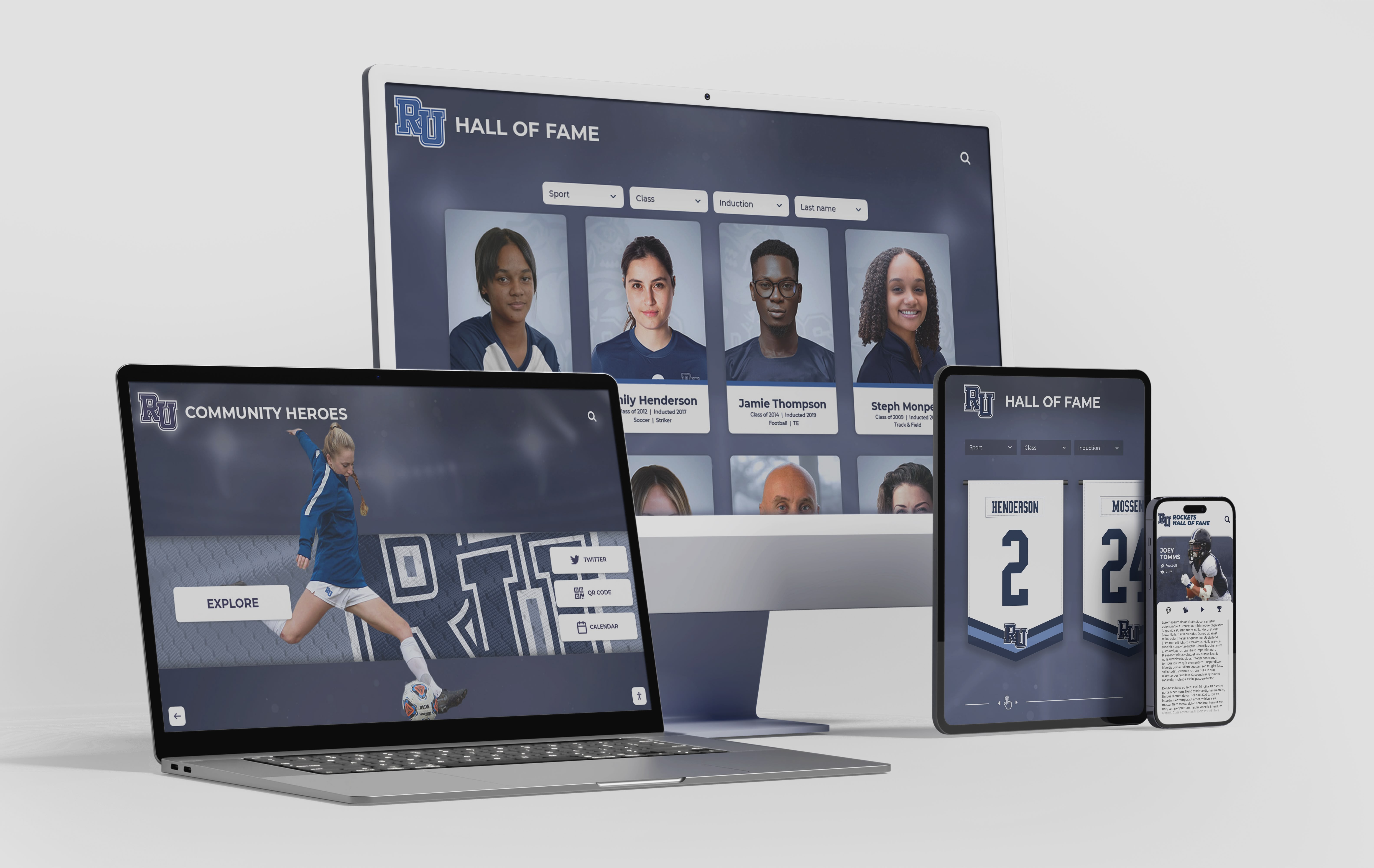
Athlete profiles built from sports media day content are accessible across platforms—from interactive lobby kiosks to mobile-friendly alumni websites
High School Media Day: Adapting for Smaller Athletic Departments
The workflow above is designed for programs with sufficient staff to run simultaneous stations. Most high school athletic departments operate with far fewer resources than a university communications team. The following adaptations maintain the core workflow without requiring dedicated staff at every station.
Single-Staff Media Day Adaptations
Run sequential, not parallel, stations. Rather than routing athletes through simultaneous stations, run them through a single linear flow: check-in → data confirmation → photo → release signature. This requires less supervision but extends the time per athlete.
Use pre-populated digital forms. Send athletes a link to a Google Form or similar tool in advance. By the time they arrive, the athletic director only needs to confirm data is correct rather than collecting it from scratch.
Enlist student help. Varsity captains or student council members can shepherd their teams through stations while the athletic director operates the camera. Journalism or photography students can assist with a second capture station if the program has the budget for a second camera body.
Batch by sport, not by individual. Process one team completely before moving to the next. It simplifies the day’s logistics and reduces the time any single team spends waiting.
Coordinating Across Multiple Sports
Fall sports typically occupy August and early September. Winter sports begin practicing in October or November. Spring sports start in February or March. This calendar creates natural windows for sport-specific media days rather than a single all-sports session, which can be logistically simpler for smaller departments.
The content management approach remains identical: consistent file naming, structured intake forms, and immediate processing after each session so the data pipeline stays current throughout the school year.
For schools developing recognition programs that span multiple sports and seasons, youth sports awards frameworks provides a comprehensive category framework applicable to media day content planning.
Integrating Media Day Content Into Digital Recognition Systems
The most significant shift in school athletic recognition over the past decade is the move from static, print-based content toward dynamic, updatable digital displays. A sports media day workflow designed for digital output—consistent file naming, structured metadata, multi-format exports—plugs directly into these systems in ways that paper-based workflows cannot.
Video Wall and Lobby Screen Integration
Schools using digital video walls and lobby display systems need a consistent content library to populate their screens throughout the season. Media day content provides that library. The practical requirements for display-ready content:
- Portrait-orientation crops for vertical display panels
- Landscape-orientation crops for horizontal lobby screens
- High-contrast text readable at viewing distances of 10–20 feet
- Metadata embedded in file names or EXIF data so content management systems can sort by sport, athlete, or year
Programs building interactive touchscreen experiences—where visitors can browse athlete profiles, view achievement records, or explore team histories—need the same underlying content: headshots, player data, and achievement records. A media day that captures all three creates the database from which these experiences are built.
The 10 best hall of fame tools for athletics reviews the interactive display platforms schools are currently deploying to connect media day content to permanent recognition experiences.
Donor Recognition and Advancement Integration
Athletic programs benefit from donor support in ways that extend well beyond game-night fundraising. Development offices and advancement teams increasingly look to athletic content—compelling photos of student athletes, highlight statistics, team achievement records—as storytelling assets for annual fund appeals, capital campaign materials, and major gift stewardship.
Media day content built to a professional standard gives advancement teams images they can actually use in print and digital donor communications. Schools that run a well-organized media day are better positioned to feature student athletes in endowment reports, alumni magazines, and major donor stewardship materials without requiring a separate content production effort.
For schools exploring how athletic recognition and donor engagement connect, hall of fame tools for donors and arts programs examines how institutions are using unified recognition platforms to serve both athletic and advancement objectives simultaneously.
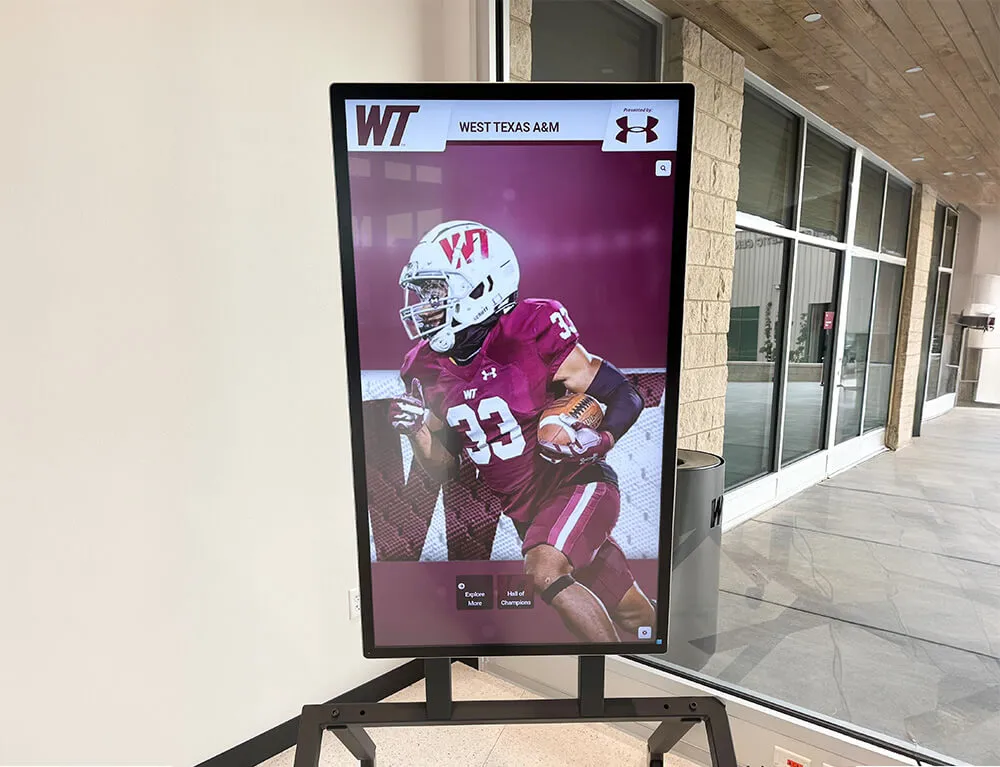
Lobby digital displays powered by media day content give athletes prominent visibility in their school's most-trafficked spaces, reinforcing recognition beyond game nights
Sports Media Day Poses and Athlete Direction
One underrated element of a successful sports media day is athlete direction—giving students specific poses and guidance rather than simply saying “stand here and look at the camera.” Most high school athletes are not experienced in front of a camera, and without brief direction, the resulting photos are stiff, unflattering, or inconsistent.
Effective Direction for Consistent Results
For standing headshots:
- Feet shoulder-width apart, weight slightly forward on the front foot
- Shoulders back, chin slightly toward the camera (prevents the double-chin effect common in direct head-on shots)
- Arms relaxed at sides or one hand on hip for a more confident posture
- Genuine smile or neutral expression—avoid the pained smile that comes from holding an expression too long
For team photos:
- Arrange taller athletes in back rows without placing shorter athletes in front corners, which creates uneven sightlines
- Have all athletes remove sunglasses and ensure uniform elements are consistent (all tucked, all untucked)
- Take at least six frames to account for blinking
- Verbal cue before each frame: “On three. One, two, three—” then delay the shutter slightly; athletes’ expressions look more natural after the anticipated moment passes
Sport-specific action poses:
- Football: hold ball or adopt pre-snap stance
- Basketball: ball in shooting position at chest height
- Baseball/softball: bat held naturally at side or ready position
- Soccer: ball at feet, body angled slightly
- Track: start position or confident forward stance with arms at sides
Consistent sport-specific poses make media day photos immediately usable as display content without requiring graphic design intervention to create context.
Connecting Media Day to Seasonal Recognition Calendars
A completed sports media day doesn’t close a content cycle—it opens one. The session produces raw assets that power recognition content throughout the school year when supported by a simple content calendar connecting media day deliverables to planned distribution moments.
A practical seasonal recognition calendar connected to media day content might look like this:
Week 1–2 of the season: Team photo and roster headshots published to the athletic website and athletic department social media accounts.
First home game: Lobby display updated with sport-specific athlete profiles using media day headshots.
Mid-season: Achievement overlay content added to media day photos as milestones occur (record breaks, all-conference nominations).
End of regular season: Senior athlete tribute content using media day photos as the visual anchor for recognition programming.
Awards banquet: Media day photos used in presentation slides, printed award booklets, and video tribute reels.
Spring/summer: Media day content reviewed for hall of fame nomination candidates; archive filed for alumni recognition use.
Following preseason: Media day process repeated, with new athlete intake capturing freshman additions and updating returning athlete information.
This calendar turns a single event into a year-round content engine without requiring additional production investment after the initial session.
For schools looking to expand their seasonal recognition approach beyond athletics into areas like alumni programs and reunion events, 10-year reunion planning traditions outlines how digital content archives from active years translate into reunion engagement decades later.
What Separates Good Sports Media Days from Great Ones
Looking across athletic programs of different sizes and resource levels, the programs with the strongest media day outputs share a few consistent practices that don’t require large budgets—they require planning decisions made in advance of the event.
They define end uses before setting up a single light. Schools that ask “where will this content appear, and what format does it need?” before the session make fundamentally different setup choices than schools that figure it out afterward. Display-ready content is shot to be display-ready, not retrofitted.
They close the loop on data immediately. Athlete information collected on paper and left for later entry is athlete information that will be incomplete or inaccurate by the time someone gets to it. The strongest programs enter intake data on the day of the event or within 48 hours.
They assign ownership. Someone is responsible for processing, filing, and distributing media day content by a specific deadline. Programs without clear ownership typically have content sitting on a card in a camera bag until it’s too late to be useful for early-season recognition.
They plan for multi-year use. A freshman athlete photographed in 2026 may appear on a digital hall of fame display in 2034. Programs that name files correctly and maintain organized archives create lasting value from a single session. Programs that don’t are starting from scratch each year.
For schools exploring how to build the digital infrastructure that makes multi-year content archives sustainable and usable, best hall of fame tools for athletics and recognition compares the tools that connect content archives to interactive recognition experiences.
And for a wider view of how athletic recognition connects to community identity, youth sports awards and recognition ideas provides a practical catalog applicable to programs at every level.
Ready to connect your sports media day content to a year-round digital recognition system? Rocket Alumni Solutions helps schools build interactive touchscreen displays, digital halls of fame, and athlete profile systems that turn media day assets into permanent, searchable recognition content visible in lobbies, fieldhouses, and hallways throughout the school year. Schedule a walkthrough to see how the platform works with content you’re already capturing.































