



First impressions matter—especially in educational settings where visitors form immediate perceptions about a school’s culture, values, and commitment to excellence. The moment someone walks through your school’s front entrance, they begin gathering information about your institution’s identity, priorities, and community spirit. Whether that visitor is a prospective family evaluating enrollment options, a community member attending an event, or a guest speaker arriving for a presentation, those critical first seconds in your lobby shape their entire experience.
Modern schools increasingly recognize that traditional static signage and bulletin boards no longer capture the dynamic, vibrant nature of contemporary educational environments. Today’s most forward-thinking institutions leverage interactive lobby touchscreens displaying school welcome videos that greet visitors with warmth, provide essential information, showcase achievements, and communicate school pride through engaging multimedia content that transforms anonymous lobby spaces into powerful storytelling environments.
A well-designed school welcome video displayed on lobby touchscreens creates immediate connection, communicates institutional values, provides helpful wayfinding information, highlights student and program achievements, and sets a professional, technology-forward tone that signals innovation and excellence to everyone who enters your building.
The shift from passive lobby signage to interactive video displays represents more than technological upgrade—it reflects fundamental changes in how schools communicate identity, engage visitors, and celebrate community. This comprehensive guide explores how schools effectively use lobby touchscreens to display welcome videos, the content strategies that make these videos effective, implementation considerations, and how interactive displays create welcoming environments that strengthen school culture while providing genuine utility to visitors.

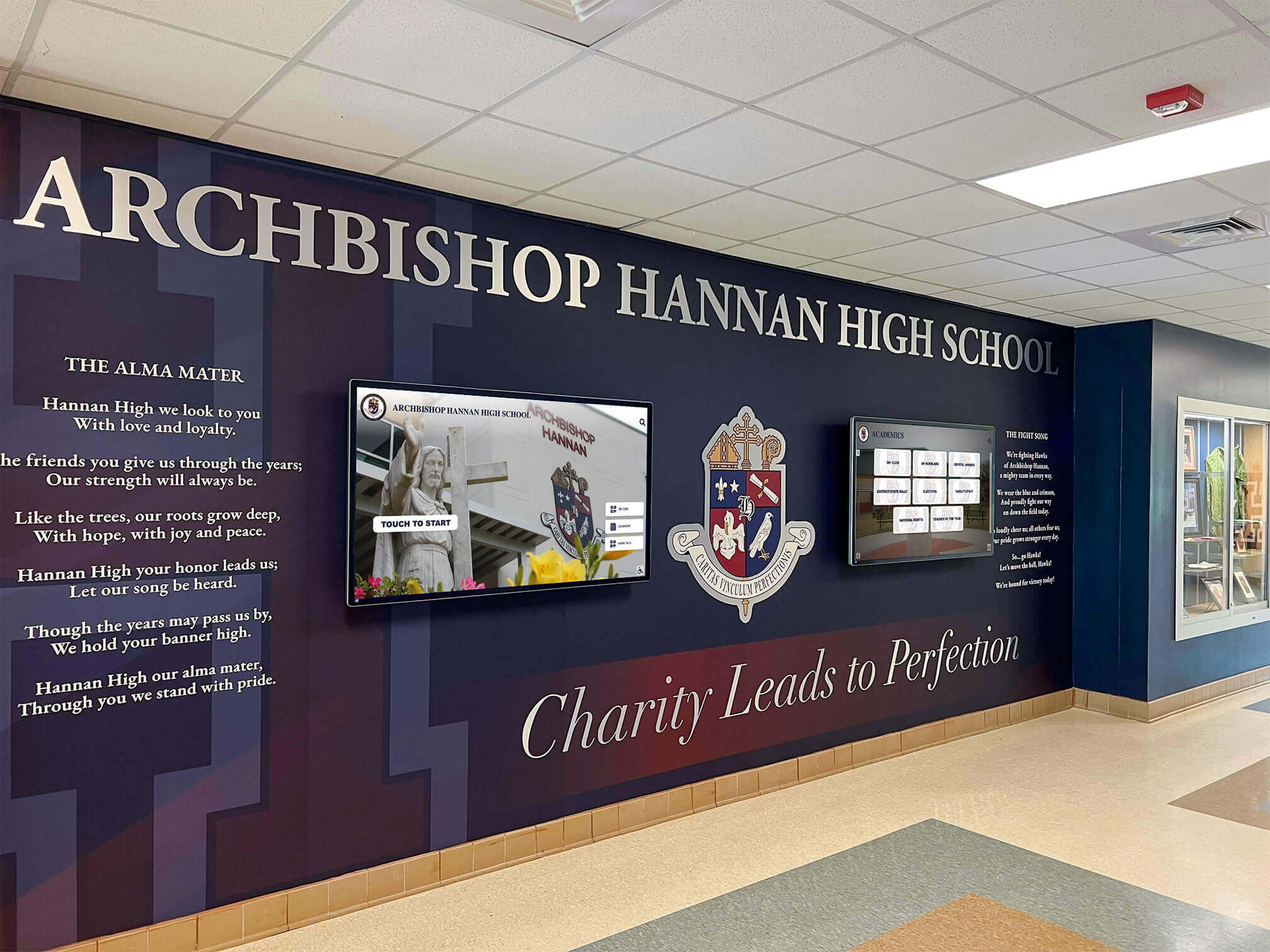
Modern school lobbies integrate digital touchscreens with architectural design elements to create welcoming environments that greet visitors with dynamic content
Why Schools Are Adopting Welcome Video Displays
Before examining specific implementation strategies, understanding the drivers behind this technology adoption helps schools evaluate whether lobby touchscreens with welcome videos align with their institutional goals and visitor experience priorities.
Creating Immediate Positive Impressions
The Psychology of First Moments
Psychological research consistently demonstrates that first impressions form within seconds and prove remarkably resistant to change. For schools competing for enrollment, seeking community support, or building partnerships, the initial lobby experience carries outsized importance compared to time spent.
School welcome videos create positive first impressions through:
- Professional presentation: High-quality video signals institutional investment and attention to detail
- Warmth and personality: Seeing students, staff, and campus life creates emotional connection beyond text alone
- Visual appeal: Motion, color, and multimedia content naturally attracts attention and engagement
- Information provision: Visitors immediately access helpful content without searching or waiting for assistance
- Technology demonstration: Interactive displays communicate innovation and forward-thinking educational approaches
Many schools report that prospective families specifically mention impressive lobby displays when explaining factors influencing enrollment decisions—demonstrating that welcome technology creates measurable impact on perceptions that drive institutional success.
Addressing Common Visitor Challenges
Solving Real Problems with Digital Solutions
Beyond aesthetics, effective school welcome videos solve practical problems that traditional signage cannot address efficiently:
Wayfinding Difficulties
- Large campus layouts confuse first-time visitors
- Multiple buildings and wings create navigation complexity
- Events in various locations require dynamic directional information
- Traditional maps become outdated as facilities change
Information Gaps
- Office hours vary by day and season
- Event schedules change frequently
- Important announcements need timely distribution
- Visitor policies require clear communication
Cultural Disconnection
- New families lack understanding of school traditions
- Community members have limited visibility into daily school life
- Alumni visiting campus after years away feel disconnected from current reality
- Prospective students can’t visualize themselves as part of the community
Interactive lobby touchscreens displaying welcome videos address these challenges by providing updated directional information, communicating current schedules and policies, showcasing authentic school culture through video, and creating self-service information access reducing front office demands.
Discover how schools extend recognition throughout facilities in school hallway remodeling ideas that create engaging environments beyond the main entrance.

Interactive touchscreens invite visitor engagement, allowing self-directed exploration of school history, achievements, and community information
Essential Components of Effective School Welcome Videos
Not all welcome videos achieve their intended purpose. The most effective school welcome videos incorporate specific elements that balance information delivery with emotional engagement while respecting visitors’ limited attention spans.
Opening Sequences That Capture Attention
The First 5-10 Seconds Matter Most
Lobby visitors typically won’t stop to watch lengthy content unless immediately engaged. Effective welcome videos open with attention-capturing elements that encourage continued viewing:
Visual Hooks
- Aerial campus footage establishing location and scope
- Energetic student activity showcasing vibrant school life
- Impressive facilities highlighting institutional investment
- Recognizable landmarks creating immediate context
Audio Considerations
- Welcoming music setting positive emotional tone
- Optional voiceover for accessibility and clarity
- Volume levels appropriate for public spaces
- Muted default with touch-to-activate audio options
Opening Messages
- Clear “Welcome to [School Name]” establishing context immediately
- Warm greeting from principal or school ambassador
- Brief mission or values statement communicating priorities
- Navigation invitation encouraging touchscreen interaction
The most successful opening sequences balance visual interest with clear purpose—visitors should immediately understand they’re watching intentional welcome content rather than promotional material or random campus footage.
Showcasing Student Life and Achievements
Authentic Representation of School Culture
Generic stock footage and scripted testimonials rarely create genuine connection. The most compelling school welcome videos feature authentic student experiences that communicate real culture rather than aspirational messaging disconnected from daily reality.
Content That Resonates
- Actual students in genuine classroom, athletic, and extracurricular settings
- Diverse representation showing inclusivity across demographics and interests
- Student voices describing their experiences in their own words
- Candid moments capturing authentic interactions and emotions
- Achievement celebrations highlighting real accomplishments
Schools with particularly effective welcome videos intentionally feature:
- Academic excellence: Classroom innovation, project-based learning, technology integration
- Athletic achievements: Game highlights, championship celebrations, team camaraderie documented through athletic recognition displays
- Arts programs: Performances, exhibitions, creative processes
- Community service: Student-led initiatives demonstrating values in action
- Special programs: STEM competitions, debate tournaments, unique curricular offerings
This balanced representation ensures diverse visitors see aspects of school life connecting to their particular interests while communicating comprehensive program quality across all domains.
Providing Practical Information and Navigation
Utility Beyond Inspiration
While emotional engagement matters, the most effective school welcome videos balance inspirational content with genuinely useful information that helps visitors accomplish their specific purposes for being on campus.
Essential Practical Elements
Wayfinding Support
- Interactive campus maps showing visitor location
- Building and office locations with directional guidance
- Parking information and accessibility routes
- Event-specific navigation for performances, games, and gatherings
Administrative Information
- Main office location and hours
- Check-in procedures and visitor policies
- Contact information for key departments
- Emergency protocols and safety information
Schedule and Calendar Content
- Daily schedule showing current period and bell times
- Upcoming events and activities
- Athletic schedule with game times and locations
- Arts performances and school calendar highlights
Interactive Features
- Touch navigation allowing visitors to explore specific interests
- Search functionality finding specific people, programs, or locations
- QR code generation sending maps or information to mobile devices
- Language options serving diverse community populations
The integration of practical utility with inspirational content creates balanced welcome experiences that serve both emotional and functional visitor needs—building positive impressions while genuinely helping people navigate campus and access needed information.
Learn how schools extend this approach throughout facilities with touchscreen building directory systems that provide comprehensive campus navigation.
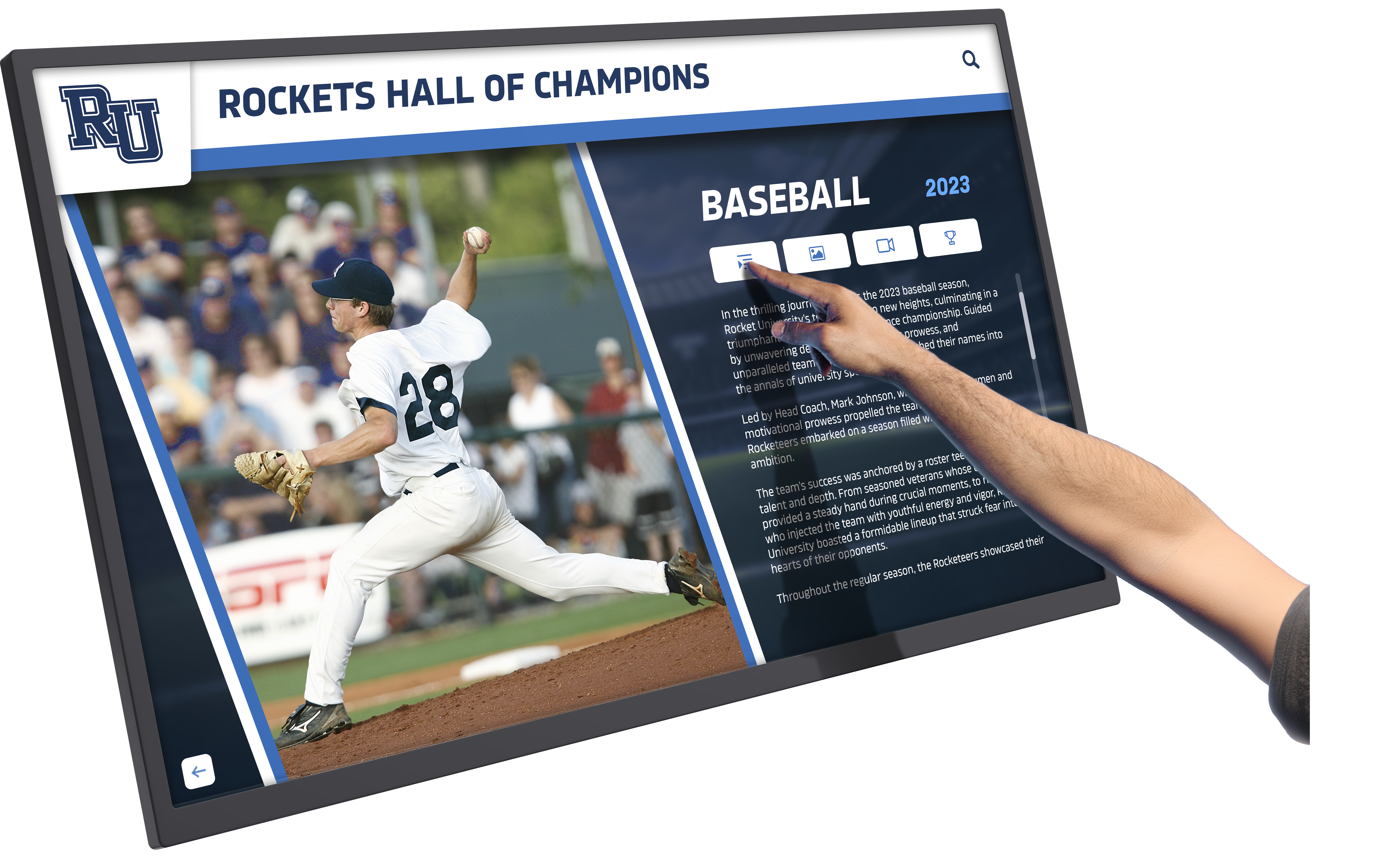
Touchscreen interactivity allows visitors to explore content matching their specific interests, from athletic achievements to academic programs
Designing Welcome Videos That Reflect School Identity
Generic welcome content fails to differentiate your school or communicate authentic institutional character. The most effective welcome videos deliberately reflect specific school identity through intentional design choices aligned with institutional values and community culture.
Visual Branding and Design Consistency
Creating Cohesive Institutional Identity
Your welcome video should feel unmistakably connected to your school’s broader brand identity—using consistent colors, fonts, logos, and design language that visitors recognize from your website, printed materials, and facility signage.
Design Elements Creating Brand Alignment
Color Schemes
- Primary school colors establishing immediate recognition
- Secondary accent colors matching existing branding
- Consistent color usage across graphics, text, and transitions
- Background colors complementing rather than competing with content
Typography Choices
- Font selections matching website and printed materials
- Consistent heading and body text hierarchies
- Readable sizes appropriate for viewing distance in lobby
- Limited font variety maintaining professional consistency
Logo Integration
- School logo placement establishing identity without overwhelming content
- Athletic logos representing specific program areas
- Mascot imagery reinforcing school spirit and tradition
- Consistent logo treatment across all video segments
Beyond technical consistency, effective design communicates institutional personality—whether your school projects traditional academic rigor, innovative creativity, athletic excellence, or values-centered community depending on your specific mission and positioning.
Incorporating School Traditions and Heritage
Honoring History While Communicating Current Excellence
Schools with rich traditions effectively weave historical elements into welcome videos, creating connection between past achievements and current excellence while helping visitors understand institutional continuity and values.
Historical Elements That Resonate
Founding Stories
- School establishment and mission origins
- Historical facilities and campus evolution
- Founding figures and their vision
- Significant historical milestones
Tradition Showcases
- Annual events unique to your school
- Rivalry history and championship legacy
- Traditional ceremonies and celebrations
- Alumni connections and multi-generational families
Heritage Displays
- Digital hall of fame content celebrating accomplished alumni
- Historical photos showing campus evolution
- Trophy and championship documentation
- Notable alumni achievements connecting past to present
This historical dimension proves particularly powerful for schools with established reputations—prospective families value joining institutions with demonstrated longevity and tradition, while current community members appreciate visible honoring of the heritage they’ve helped create.
Tailoring Content for Different Visitor Audiences
Recognizing Diverse Visitor Needs and Interests
Your school lobby hosts varied visitors with different information needs and decision criteria. The most sophisticated welcome video systems provide content pathways serving distinct audience segments rather than one-size-fits-all messaging.
Audience-Specific Content Strategies
Prospective Families
- Academic program overviews and achievement data
- Student support services and extracurricular opportunities
- College preparation and acceptance statistics
- Tour scheduling and admissions contact information
Current Parents and Guardians
- Event calendars and volunteer opportunities
- Parent organization information and meeting schedules
- Student recognition and achievement celebrations
- School news and upcoming activities
Community Members and Visitors
- Event information for public performances and games
- Facility rental information for community use
- Partnership opportunities and community programs
- School impact and community contribution highlights
Alumni and Former Community Members
- Alumni network and connection opportunities
- Heritage and historical content
- Current school achievements continuing legacy
- Giving opportunities and recognition for donor contributions
Interactive touchscreen technology enables visitor-directed navigation allowing each person to access content relevant to their specific purposes and interests rather than passive viewing of predetermined sequences serving no one particularly well.
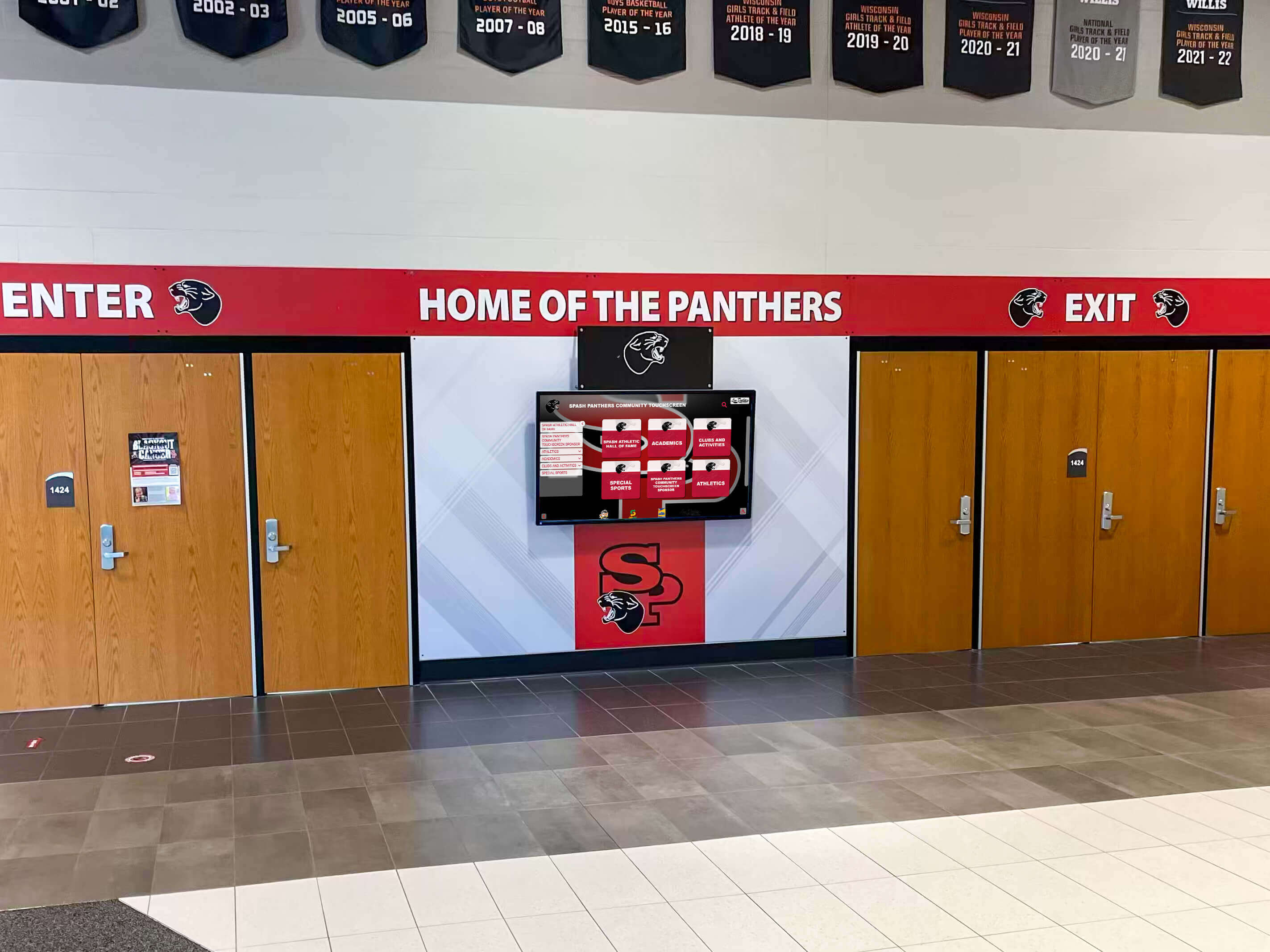
Strategic placement at entrance and exit points ensures maximum visibility for welcome content and school pride messaging
Technical Considerations for Lobby Touchscreen Installations
Successfully implementing lobby touchscreen displays requires addressing hardware selection, placement strategies, content management systems, and ongoing maintenance considerations that determine long-term effectiveness and sustainability.
Hardware Selection for Lobby Environments
Choosing Appropriate Display Technology
Not all touchscreen hardware performs equally in school lobby environments. Effective installations require equipment designed for continuous operation in public spaces with appropriate durability, image quality, and interactivity features.
Critical Hardware Specifications
Display Size and Resolution
- Screen size appropriate for typical viewing distance (typically 42"-75" for lobby installations)
- High-definition resolution ensuring crisp text and video quality
- Aspect ratio matching content design (16:9 standard for video)
- Brightness levels sufficient for ambient lobby lighting conditions
Touchscreen Technology
- Commercial-grade touch sensitivity supporting multi-user interaction
- Durable surface resisting scratching and damage from heavy use
- Anti-glare coating reducing reflection from windows and overhead lighting
- Fast response time creating responsive user experience
Durability Features
- Commercial or industrial-grade components rated for continuous operation
- Thermal management systems preventing overheating
- Protective enclosures or mounting solutions deterring damage
- Warranty coverage appropriate for institutional investment
Connectivity Requirements
- Network connectivity for content updates and remote management
- Media player compatibility with your content management system
- Audio output options for sound-enabled content
- Accessibility features supporting diverse user needs
Investment in appropriate commercial-grade equipment prevents the frustration and expense of replacing consumer-grade displays failing under institutional use patterns—proper hardware selections typically provide 5-10 years of reliable operation justifying higher initial costs.
Strategic Placement for Maximum Impact
Location Decisions Affecting Effectiveness
Even exceptional content and hardware deliver minimal value if placed where visitors won’t see or engage with displays. Strategic placement requires understanding traffic patterns and visitor behavior in your specific lobby environment.
Placement Considerations
High-Traffic Locations
- Main entrance sightlines capturing attention immediately upon entry
- Visitor sign-in areas where people naturally pause
- Waiting areas near main office where dwell time supports deeper engagement
- Corridors connecting parking to main office or other destinations
Viewing Conditions
- Wall positions avoiding glare from windows and overhead lighting
- Height placement appropriate for standing viewers (typically 48"-60" center height)
- Unobstructed viewing lines without furniture or architectural elements blocking sight
- Adequate spacing from high-volume doorways preventing crowding
Accessibility Factors
- ADA-compliant mounting heights for wheelchair users
- Clear floor space allowing approach and interaction
- Audio and visual accessibility features for users with disabilities
- Tactile elements or alternative formats as needed
Safety and Security
- Secure mounting preventing theft or vandalism
- Electrical access meeting code requirements
- Cable management preventing trip hazards
- Clear emergency exit paths maintained
Many schools benefit from professional space planning analysis assessing their specific lobby layout, traffic patterns, and architectural constraints to optimize placement delivering maximum visibility and engagement without compromising safety or accessibility.
Content Management and Update Workflows
Keeping Content Current and Relevant
Static welcome videos become quickly outdated as achievements accumulate, schedules change, and featured students graduate. Sustainable implementations require content management systems and workflows supporting regular updates without requiring technical expertise or excessive time investment.
Content Management Approaches
Cloud-Based Platforms
- Remote content updates without physical access to displays
- Scheduled content rotation showcasing different programs and achievements
- Template-based design enabling non-technical staff to create updates
- Multi-display management from centralized dashboard
Update Frequency Best Practices
- Major content refresh at least quarterly (ideally monthly)
- Event-specific content updates for performances, games, and activities
- Achievement highlights added as accomplishments occur
- Seasonal content reflecting current school year activities
Workflow Assignments
- Designated staff member(s) responsible for content updates
- Student media or technology classes creating content as learning projects
- Athletic directors contributing sports achievements and schedules
- Arts coordinators providing performance and exhibition content
- Principal or communications staff approving final content
Content Archiving
- Systematic organization of video segments and graphics
- Historical content preservation for anniversary celebrations
- Student work documentation for portfolio and recognition purposes
- Achievement records supporting hall of fame displays and alumni recognition
The most successful schools treat lobby displays as living communication platforms requiring ongoing attention rather than one-time technology projects—establishing clear responsibilities and regular update schedules ensures content remains current, relevant, and engaging year-round.
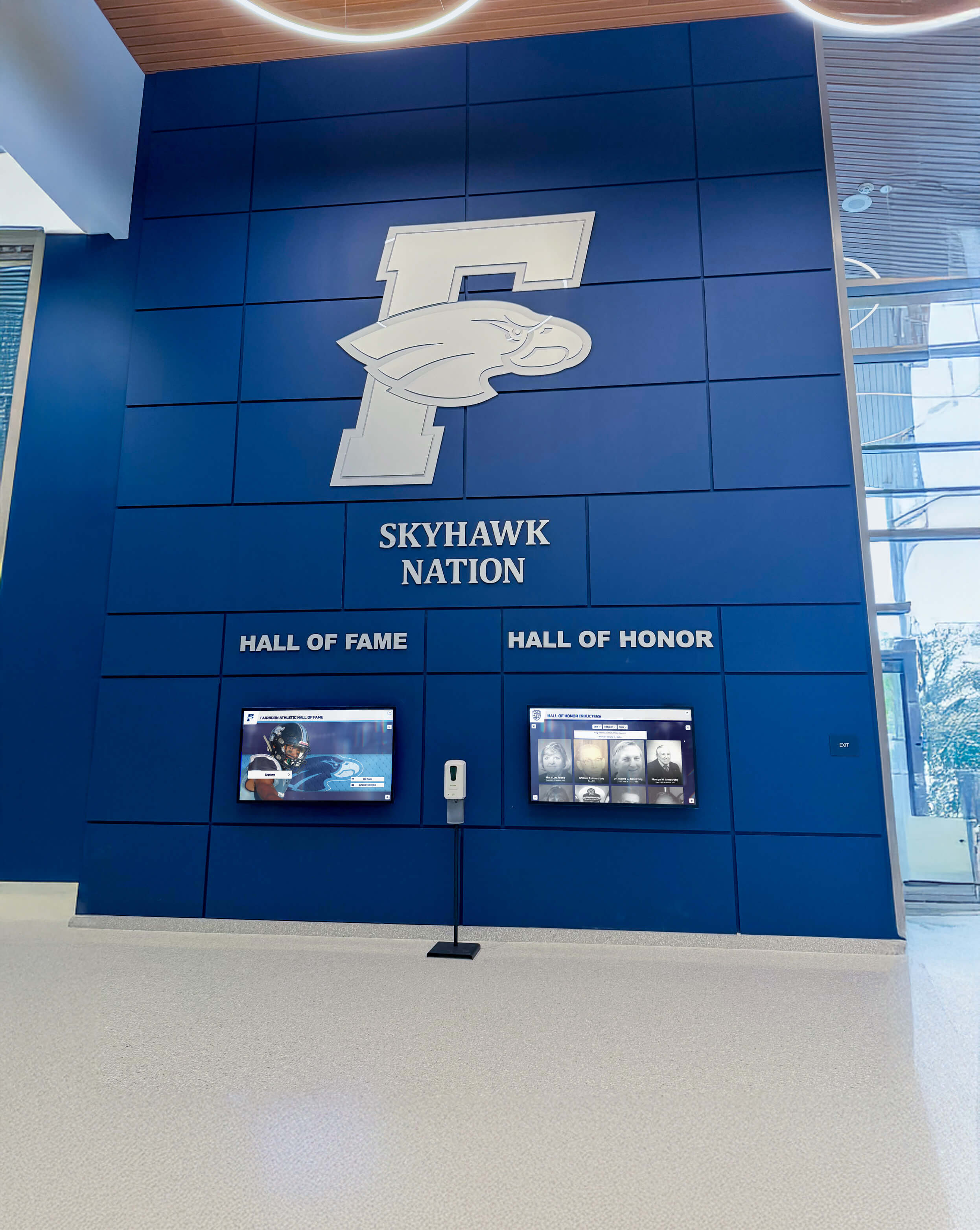
Comprehensive lobby displays integrate welcome content with recognition features celebrating school achievement and building community pride
Measuring Impact and Optimizing Visitor Experience
Technology implementations should deliver measurable value beyond subjective impressions. Schools maximizing return on lobby touchscreen investments establish metrics tracking effectiveness and systematically gather feedback informing continuous improvement.
Tracking Engagement and Usage Patterns
Data-Driven Understanding of Visitor Interaction
Modern touchscreen systems provide analytics revealing how visitors actually engage with content—information that guides content optimization and validates technology investment to stakeholders.
Valuable Engagement Metrics
Usage Statistics
- Total interactions per day/week/month tracking overall engagement
- Session duration indicating content depth and interest
- Content section views revealing visitor priorities
- Peak usage times informing optimal content scheduling
Navigation Patterns
- Most-viewed content identifying visitor priorities
- Navigation pathways showing content discovery patterns
- Search queries revealing information needs
- Wayfinding requests indicating navigation challenges
Demographic Insights (where privacy-appropriate)
- Visitor types using interaction prompts or voluntary identification
- Time-of-day patterns correlating with scheduled visitors vs. walk-ins
- Language selection indicating community diversity needs
- Accessibility feature usage guiding accommodation improvements
This data transforms subjective opinions about display value into objective evidence demonstrating actual visitor engagement—powerful information for justifying expansion, securing funding, or defending technology budgets during resource allocation discussions.
Gathering Visitor Feedback
Direct Input on Welcome Experience
Beyond behavioral analytics, direct visitor feedback provides qualitative insights explaining why people engage with content, what information proves most valuable, and what improvements would enhance their experience.
Feedback Collection Methods
On-Screen Surveys
- Brief post-interaction questions (1-3 questions maximum)
- Rating scales assessing helpfulness and ease of use
- Open text feedback for suggestions and concerns
- Optional contact information for follow-up
Formal Visitor Surveys
- Enrollment inquiry families providing feedback on tour experience
- Event attendees assessing wayfinding and information availability
- Parent organization input on content priorities
- Alumni visitor reactions to heritage and tradition content
Observational Assessment
- Staff monitoring visitor behavior and interaction patterns
- Identification of confusion points or navigation difficulties
- Recognition of popular content generating extended engagement
- Detection of technical issues affecting user experience
Comparative Analysis
- Before/after comparisons measuring impact of lobby technology installation
- Peer school benchmarking against similar institutions
- Industry standards for public interactive displays
- Best practice adoption from museum and cultural institutions
Regular feedback collection creates continuous improvement cycles ensuring lobby displays evolve to serve changing visitor needs and incorporate emerging best practices rather than remaining static after initial installation.
Calculating Return on Investment
Demonstrating Value to Decision Makers
Lobby touchscreen installations represent significant financial investment. Demonstrating clear return on investment helps secure initial funding, justifies ongoing content investment, and builds support for expanding technology to additional locations.
ROI Calculation Approaches
Enrollment Impact
- Prospective family feedback correlating lobby impression to enrollment decisions
- Conversion rates from tour to application for pre/post installation comparison
- Competitive differentiation versus peer schools lacking similar technology
- Tuition revenue attributed to enrollment influenced by positive first impressions
Operational Efficiency
- Front office staff time savings from visitor self-service information access
- Reduced printing costs for maps, schedules, and event information
- Streamlined communication replacing bulletin boards and paper posting
- Event management efficiency through dynamic schedule displays
Community Engagement
- Attendance increases at events promoted through lobby displays
- Volunteer recruitment via parent organization information
- Alumni engagement through heritage content and connection opportunities
- Donor recognition integration attracting philanthropic support
Brand Value
- Institutional reputation enhancement through technology leadership
- Social media sharing as visitors photograph and post impressive displays
- Media coverage featuring innovative school technology implementations
- Community pride in forward-thinking educational institutions
While some benefits resist precise quantification, establishing frameworks attempting to measure impact demonstrates accountability and evidence-based decision making—approaches that resonate with board members, administrators, and community stakeholders evaluating technology investments.
Extending Welcome Experiences Throughout Campus
Lobby touchscreens represent entry points to comprehensive digital recognition and communication ecosystems extending throughout school facilities. Schools maximizing technology value integrate lobby welcome displays with broader facility-wide systems creating consistent, engaging environments campus-wide.
Creating Connected Recognition Experiences
Integrated Displays Across Multiple Locations
The most sophisticated implementations extend beyond isolated lobby displays to create connected recognition experiences in athletic facilities, performing arts centers, academic wings, and outdoor spaces—each location showcasing content relevant to that specific environment while maintaining consistent design and navigation.
Multi-Location Strategies
Athletic Facilities
- Team recognition and championship celebrations
- Record boards and statistical achievements
- Game schedules and upcoming events
- All-state athlete displays honoring top performers
Performing Arts Spaces
- Production highlights and performance calendars
- Student performer recognition
- Arts program history and achievements
- Upcoming show information and ticketing
Academic Buildings
- Department-specific achievements and student work
- Academic competition results and honor roll recognition
- College acceptance and scholarship celebrations
- STEM competition achievements and innovation showcases
Commons and Gathering Spaces
- Student government information and election results
- Club and organization directories
- Community service project highlights
- School tradition and spirit content
This distributed approach creates multiple touchpoints where students, staff, and visitors encounter recognition and information relevant to their location and interests—building comprehensive awareness of school excellence across all program areas rather than limited visibility in a single lobby location.
Integrating with Broader Communication Strategies
Touchscreens as Components of Comprehensive Systems
Effective schools treat lobby touchscreens not as standalone technology but as integrated components within broader communication ecosystems that include websites, social media, email communications, printed materials, and traditional signage—each channel reinforcing consistent messaging while serving different audience needs and contexts.
Integration Strategies
Content Coordination
- Consistent messaging across physical displays and digital channels
- Welcome video content repurposed for website and social media
- Achievement recognition synchronized across lobby displays and newsletters
- Event promotion aligned across touchscreens, websites, and email
Cross-Channel Navigation
- QR codes on touchscreens linking to detailed website content
- Social media feeds displayed on lobby screens
- Mobile app integration allowing content exploration on personal devices
- Email subscription options for visitors wanting ongoing connection
Unified Content Management
- Centralized content creation serving multiple distribution channels
- Template systems ensuring brand consistency across formats
- Workflow integration reducing duplicate content development
- Analytics connecting engagement across channels
This integrated approach maximizes content investment value—creating once and distributing across multiple channels—while ensuring consistent institutional messaging regardless of how visitors encounter your school’s communications.
Best Practices from Leading School Implementations
Schools achieving exceptional results with lobby touchscreen welcome videos share common practices that emerge across diverse institutional contexts, student populations, and geographic locations—proven approaches that new implementers can adapt to their specific circumstances.
Starting with Clear Goals and Success Metrics
Purpose-Driven Implementation Planning
The most successful schools begin with clear articulation of what they hope to accomplish with lobby displays and how they’ll measure success—preventing technology-for-technology’s-sake installations that fail to deliver meaningful value.
Effective Goal-Setting Examples
- Increase prospective family tour-to-application conversion by 15%
- Reduce front office staff time spent providing directional information by 25%
- Achieve 90% visitor awareness rating for upcoming major school events
- Generate positive social media mentions featuring lobby displays monthly
- Create measurable increase in alumni engagement and giving participation
Clear goals focus implementation decisions on outcomes rather than features—ensuring hardware selections, content strategies, and placement decisions all align with defined success criteria rather than pursuing impressive technology disconnected from institutional priorities.
Involving Students in Content Creation
Authentic Voice Through Student Participation
Schools with particularly engaging welcome content typically involve students in video production, content creation, and ongoing updates—generating authentic perspective while providing valuable learning experiences in media production, communication, and storytelling.
Student Involvement Approaches
Media Production Classes
- Welcome video creation as curriculum-integrated project
- Ongoing content updates as semester-long assignments
- Technical skill development in video editing and graphic design
- Portfolio development for college applications and career preparation
Student Ambassadors
- Featured student perspectives in welcome content
- Student-led campus tours incorporated into video segments
- Student testimonials about their authentic experiences
- Student voice in content decisions ensuring relevance to their generation
Student Government
- Content suggestions reflecting student body priorities
- Student event promotion and activity highlights
- School spirit initiatives showcased through lobby displays
- Student feedback on effectiveness and engagement
Student involvement creates authenticity that professionally produced content often lacks—current students speaking to prospective students carries credibility that adult-created messaging cannot match, while student perspectives ensure content reflects actual school culture rather than aspirational messaging disconnected from student experience.
Planning for Long-Term Sustainability
Creating Lasting Value Beyond Initial Installation
Technology projects often launch with enthusiasm that fades as initial excitement wanes and update responsibilities compete with daily operational demands. Sustainable implementations build long-term support structures ensuring continued effectiveness years after installation.
Sustainability Strategies
Staffing and Responsibilities
- Formal position responsibilities including display management
- Cross-training ensuring continuity when personnel change
- Student roles providing sustainable content pipeline
- Vendor support agreements providing technical assistance
Budget Allocations
- Recurring budget line items for content development
- Equipment replacement reserves for eventual hardware updates
- Professional development supporting staff skill maintenance
- Contingency funding for unexpected repairs or upgrades
Policy and Procedures
- Documented content update workflows and schedules
- Approval processes balancing content currency with quality control
- Technical support procedures for troubleshooting issues
- Accessibility compliance verification processes
Governance Structures
- Advisory committees providing stakeholder input on content priorities
- Regular review cycles assessing effectiveness and gathering improvement ideas
- Technology planning alignment ensuring display integration with broader systems
- Board reporting demonstrating ongoing value and ROI
These infrastructure elements prevent lobby displays from becoming abandoned technology that staff walk past without noticing—maintaining relevance and impact that justifies initial investment and builds support for expansion.
Making the Case for Lobby Touchscreen Investment
Despite clear benefits, some schools face resistance to lobby touchscreen investments due to budget constraints, competing priorities, or skepticism about technology value. Successfully securing approval and funding requires compelling cases addressing specific stakeholder concerns.
Building Support Among Decision Makers
Presenting Persuasive Implementation Proposals
Successful advocacy for lobby touchscreen projects addresses both emotional and rational decision criteria—demonstrating how displays serve institutional mission while providing concrete evidence of return on investment and competitive necessity.
Persuasive Proposal Elements
Mission Alignment
- Connection to institutional values and strategic priorities
- Support for enrollment, retention, and community engagement goals
- Enhancement of student recognition and achievement celebration
- Advancement of technology integration and innovation commitments
Competitive Context
- Peer school technology adoption creating competitive disadvantage
- Prospective family expectations shaped by technology ubiquity
- Community perception of institutional investment and forward-thinking
- Recruiting advantage when competing for students and families
Financial Justification
- ROI calculations demonstrating measurable returns
- Operational efficiency gains reducing ongoing costs
- Enrollment impact justifying investment through tuition revenue
- Grant and donor funding opportunities specific to technology
Risk Mitigation
- Phased implementation limiting initial financial exposure
- Vendor partnerships providing technical support and expertise
- Scalable solutions growing with demonstrated success
- Alternative funding approaches reducing general fund impact
Tailoring arguments to specific decision maker priorities—enrollment growth for administrators, student experience for board members, operational efficiency for business managers—increases persuasiveness by connecting technology to what each stakeholder group values most.
Exploring Funding Opportunities
Creative Approaches to Financing Lobby Technology
Schools need not fund lobby touchscreen installations entirely from operating budgets. Multiple funding sources can support welcome display projects when approached strategically.
Potential Funding Sources
Capital Campaign Integration
- Technology components within broader facility improvement campaigns
- Donor recognition opportunities through named displays and content features
- Alumni giving focused on visible, impactful improvements
- Corporate partnerships supporting technology adoption
Grant Opportunities
- Technology grants from government education agencies
- Foundation support for innovation and visitor experience
- Equipment grants from technology companies
- Community development grants supporting institutional infrastructure
Booster and Foundation Support
- Athletic booster clubs funding displays in gym lobbies or athletic facilities
- Arts foundations supporting performing arts center installations
- Academic booster organizations supporting recognition of scholarly achievement
- Parent organizations funding improvements benefiting school community
Vendor Partnership Models
- Equipment financing spreading costs across multi-year periods
- Leasing arrangements reducing upfront capital requirements
- Partnership agreements where vendors provide equipment in exchange for exposure
- Educational discounts reducing purchase prices for qualifying institutions
Budget Reallocation
- Elimination of redundant printing and signage costs
- Reduction in traditional trophy case and plaque expenses
- Consolidation of multiple small communication expenditures
- Efficiency savings from operational improvements
Approaching funding creatively expands the universe of possible resources beyond annual operating budgets—making ambitious implementations achievable even in resource-constrained environments.
Future Directions in School Welcome Technology
Lobby touchscreen technology continues evolving rapidly. Schools planning implementations benefit from understanding emerging trends that may influence long-term value and expansion possibilities.
Artificial Intelligence and Personalization
Adaptive Content Responding to Individual Visitors
Emerging AI technologies enable personalized welcome experiences that adapt content based on visitor identification, preferences, or interaction patterns—creating individualized experiences rather than one-size-fits-all presentations.
AI-Enhanced Capabilities
- Facial recognition identifying returning visitors and adapting welcome messages
- Natural language interfaces allowing voice-based questions and navigation
- Recommendation engines suggesting content based on interaction patterns
- Predictive content highlighting information relevant to visitor timing and context
Enhanced Interactivity and Immersion
Beyond Traditional Touchscreen Interfaces
Future lobby displays may incorporate augmented reality overlays, gesture controls, holographic projections, and other emerging interface technologies creating increasingly immersive and engaging welcome experiences.
Emerging Interface Technologies
- AR experiences overlaying digital content on physical spaces through mobile devices
- Gesture control enabling touchless interaction (particularly valuable post-pandemic)
- Voice interaction supporting accessibility and hands-free navigation
- Haptic feedback creating tactile engagement beyond visual interfaces
Integration with Broader Smart Campus Systems
Connected Infrastructure Creating Seamless Experiences
As schools adopt comprehensive smart campus technologies—from automated building systems to integrated learning management platforms—lobby displays increasingly integrate with these broader ecosystems, providing centralized access points to diverse connected systems.
Smart Campus Integration
- Real-time facility information showing available spaces and current usage
- Calendar integration displaying personalized schedules for identified visitors
- Learning management system connections showcasing student work and achievements
- Safety system integration providing emergency information and protocols
While some emerging technologies remain experimental or cost-prohibitive for most schools, understanding future directions helps institutions make current decisions that remain flexible and expandable as technology evolves and costs decrease.
Conclusion: Transforming First Impressions into Lasting Connections
School lobbies represent threshold spaces where external communities encounter internal cultures—critical transition zones that shape perceptions, communicate values, and set expectations for everything that follows. Traditional static signage and paper bulletin boards no longer capture the dynamic, vibrant nature of contemporary educational environments or meet the technology expectations of digitally-native families evaluating enrollment options.
Interactive lobby touchscreens displaying thoughtfully designed school welcome videos transform anonymous entrance spaces into powerful storytelling environments that greet visitors with warmth, provide genuine utility through wayfinding and information access, showcase authentic student life and achievement, and communicate institutional pride through engaging multimedia content that creates lasting positive impressions.
The most successful implementations begin with clear goals aligned with institutional mission, involve students in content creation ensuring authentic voice, establish sustainable update workflows maintaining content currency, measure engagement demonstrating ongoing value, and integrate lobby displays within broader communication ecosystems serving diverse stakeholder needs across multiple channels and touchpoints.
Whether your school serves 200 students or 2,000, operates in urban or rural settings, prioritizes academic excellence or comprehensive student development, lobby touchscreen technology offers scalable solutions that can be tailored to your specific context, budget, and community culture—creating welcoming first impressions that strengthen school pride while serving the practical needs of diverse visitors navigating your campus.
Ready to transform your school’s lobby into a welcoming, engaging environment that showcases your community’s achievements and pride? Explore interactive touchscreen solutions designed specifically for schools that combine welcome videos, achievement recognition, wayfinding support, and donor acknowledgment in unified systems that create lasting first impressions while celebrating your institution’s unique story.































