



Intent: demonstrate | A comprehensive video guide demonstrating how digital trophy cases and interactive touchscreen displays replace expensive championship banners in school gymnasiums, featuring production specifications, shot sequences, and scene-by-scene walkthroughs that show athletic directors cost-effective banner alternatives.
Expensive gym banners have long been the default recognition method for school athletic programs—custom-printed championship banners costing $200-600 each, quickly filling ceiling space until gyms become visual clutters of faded fabric hanging from rafters. Athletic directors face mounting pressure as more teams win championships, more athletes deserve recognition, and physical space runs out while budgets can’t support endless banner purchases and installation costs.
Digital trophy cases and touchscreen recognition displays provide compelling video-demonstrable alternatives that eliminate recurring banner costs while expanding recognition capacity infinitely. This production guide shows how to create persuasive video walkthroughs demonstrating banner replacement benefits through professional filming techniques, comprehensive feature demonstrations, cost comparison visualizations, and testimonial integration that convinces athletic directors, principals, and boosters that digital displays deliver superior value compared to traditional banner programs.
Traditional banner programs create predictable frustrations: athletic directors must choose which championships warrant banners when space fills up, older banners fade and fray requiring expensive replacements, installation requires renting lifts and paying labor costs, and unsuccessful programs receive no recognition because only championship banners get approved. Video demonstrations showing digital alternatives solving these exact problems resonate powerfully with decision-makers experiencing banner fatigue and budget constraints.

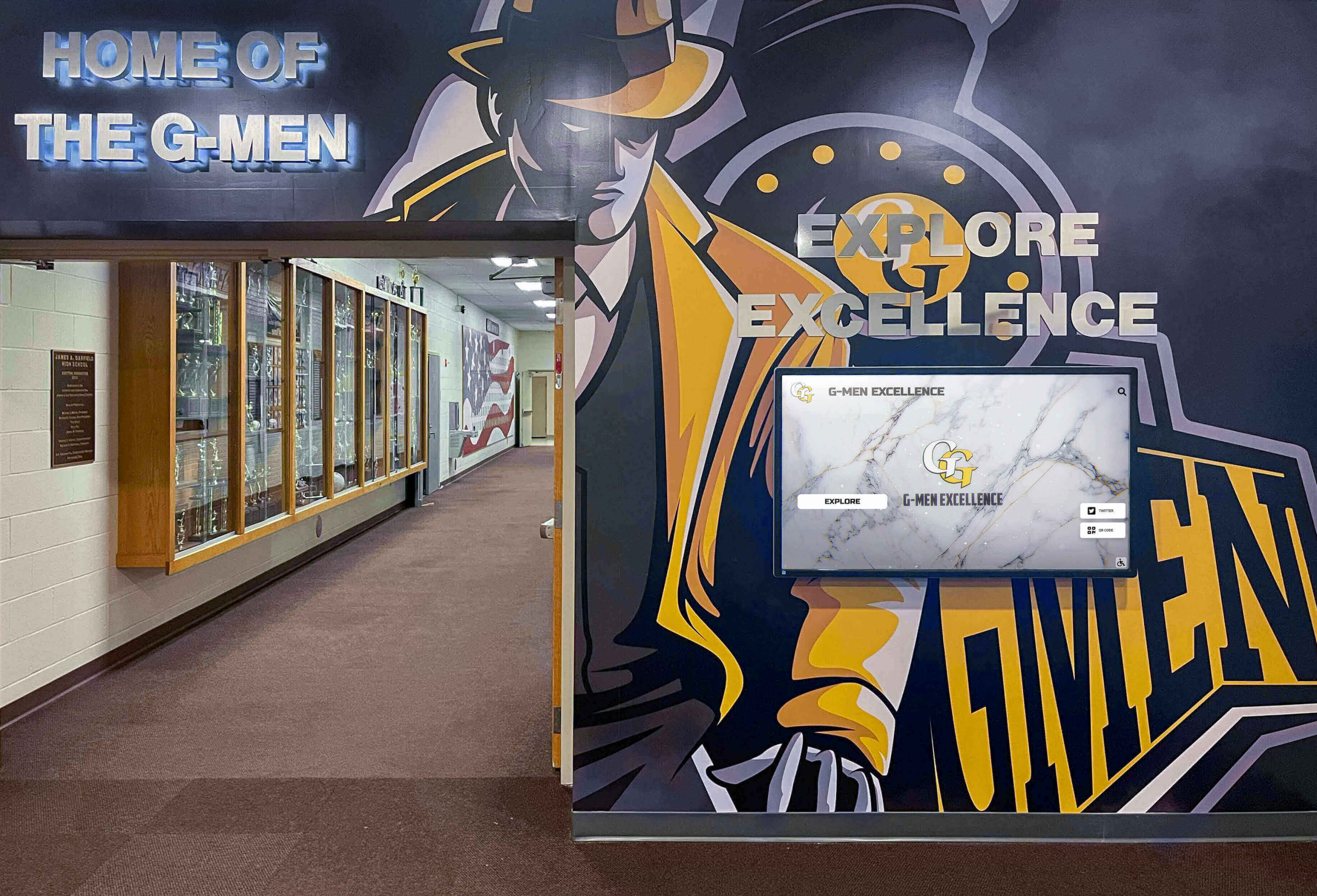
Modern athletic facilities integrate digital displays with traditional trophy cases creating comprehensive recognition environments that complement rather than replace cherished traditions
Video Production Overview: Banner Replacement Demonstration Structure
Effective banner replacement videos follow logical progression showing current banner limitations, introducing digital alternatives, demonstrating comprehensive features, and presenting compelling cost comparisons that justify investment decisions.
Video Specifications and Technical Format
| Specification | Details |
|---|---|
| Video Length | 8-12 minutes comprehensive demonstration |
| Aspect Ratio | 16:9 (1920x1080 HD minimum; 4K preferred for facility projection) |
| Target Platform | YouTube, school board presentations, booster club meetings, athletic director conferences |
| Accessibility | Full closed captions, audio description track, downloadable transcript |
| Streaming Format | Adaptive bitrate MP4, short social clips (60-90 seconds) for Instagram/Facebook |
| Production Timeline | 4-6 days including facility filming, editing, graphics, and distribution preparation |
Scene-by-Scene Video Structure
This demonstration follows natural decision-maker journey from recognizing banner problems through understanding digital solutions:
- Current Banner Problem Documentation (45-60 seconds) - Wide shots showing overcrowded gym ceilings
- Cost Analysis Presentation (90-120 seconds) - Graphics comparing 10-year banner costs versus digital investment
- Digital Display Introduction (60-90 seconds) - Approach and first impression of touchscreen alternative
- Unlimited Recognition Capacity Demo (90-120 seconds) - Browsing hundreds of athletes across all sports
- Championship Banner Digital Recreation (90-120 seconds) - Showing how banners translate to dynamic displays
- Photo and Video Integration (90-120 seconds) - Exploring multimedia content impossible with fabric banners
- Content Management Demonstration (60-90 seconds) - Behind-scenes look at easy updates without physical installation
- Athletic Director Testimonial (45-60 seconds) - Real administrator explaining decision rationale and satisfaction
- Cost Savings Calculation (60-90 seconds) - ROI breakdown showing break-even timeline and long-term savings
Each scene builds comprehensive understanding while maintaining viewer engagement through varied shots, compelling graphics, conversational narration, and emotional testimonials demonstrating both practical benefits and community impact.
Learn about comprehensive athletic recognition approaches in digital hall of fame complete guides covering broader implementation strategies beyond banner replacement alone.
Scene 1: Current Banner Problem Documentation (00:00-01:00)
Visual Elements: Establishing wide shots of gymnasium showing ceiling completely filled with championship banners from multiple decades, close-ups revealing faded colors and frayed edges, pan across rafters demonstrating overcrowding and poor visibility.
Narration Script:
“Walk into most high school gymnasiums and look up—you’ll see decades of athletic achievement hanging from the rafters. Championship banners celebrating conference titles, state tournament appearances, and individual athlete accomplishments. These fabric banners represent proud traditions and hard-fought victories that communities celebrate for generations.
But look closer and you’ll notice problems that athletic directors face every championship season: banners so faded you can barely read team names, frayed edges from years hanging in climate-controlled facilities, rafters so crowded that newer banners hang at awkward angles fighting for visible space, and inevitable questions about which teams warrant banner recognition when ceiling space runs out.
Each banner costs $200-600 depending on size and customization. Installation requires renting aerial lifts at $300-500 per session and paying installation labor. Over a decade, active athletic programs spend $15,000-40,000 just on championship banner purchases and installation—recurring expenses that never stop as long as teams keep winning.”
On-Screen Action:
- Slow pan across gymnasium ceiling showing banner density
- Zoom to faded banner with barely legible text
- Close-up of frayed banner edges and weather damage
- Wide shot showing awkward banner placement due to space constraints
- Text overlay: “Championship Banners: $200-600 Each | Installation: $300-500 Per Session | Lifespan: 8-12 Years Before Replacement”
Production Notes: Film during daytime with natural light showing true banner condition. Avoid defensive tone—honor tradition while acknowledging practical limitations. Include brief interview clip with facilities director explaining installation challenges and costs. Capture emotion by filming proud parent pointing out their child’s banner, then showing disappointment when asked about athletes not recognized due to space/budget constraints.
Discover recognition equity considerations in high school athletics equity checklists addressing comprehensive program visibility challenges.
Scene 2: Cost Analysis Presentation (01:00-02:30)
Visual Elements: Professional motion graphics presenting 10-year cost comparison between traditional banner programs and digital display investment, animated charts showing cumulative expenses, timeline visualization demonstrating break-even points.
Narration Script:
“Let’s examine the true cost of banner programs over realistic timeframes. An active athletic program with 15-20 varsity sports typically purchases 5-8 new championship banners annually as teams achieve conference championships, regional titles, and state tournament qualifications.
At average banner cost of $400 and three installation sessions per year at $400 each, annual banner program expenses total $3,200-4,400. Over ten years, that’s $32,000-44,000 in banner purchases and installation—not including replacement costs when banners fade or deteriorate requiring updates to maintain professional appearance.
Digital trophy case displays present different investment structure: upfront hardware costs of $6,000-10,000 for commercial-grade touchscreen installation plus annual software subscription of $800-1,500 covering unlimited content updates, cloud hosting, and technical support. Ten-year total cost: $14,000-25,000 including all hardware, software, and maintenance.
The financial comparison reveals 35-50% cost savings over ten years while delivering unlimited recognition capacity serving all athletes across all programs rather than only championship winners. Digital displays pay for themselves through eliminated recurring banner expenses within 3-5 years, then provide ongoing savings while expanding recognition far beyond what banner budgets could ever accomplish.”
On-Screen Action:
- Animated bar chart comparing year-by-year costs
- Running total ticker showing cumulative 10-year expenses
- Side-by-side cost breakdown with line items detailed
- Break-even timeline graph with shaded savings region
- Text overlays: “Banner Program: $32K-44K Over 10 Years | Digital Display: $14K-25K Over 10 Years | Savings: 35-50% Plus Unlimited Capacity”
Production Notes: Professional motion graphics using school colors creating polished board presentation aesthetic. Conservative cost estimates erring on side of understating savings rather than overselling. Include footnote citations for average costs (source pricing from common banner vendors, installation service rates). Voice professional financial analyst tone without sales pressure—let numbers speak for themselves.

Digital displays integrate seamlessly with existing athletic facility aesthetics including murals, school colors, and traditional recognition elements
Scene 3: Digital Display Introduction (02:30-04:00)
Visual Elements: Smooth approach to interactive touchscreen display positioned prominently in athletic facility entrance or gymnasium lobby, showing dynamic welcome screen featuring school colors, mascot, and rotating championship highlights.
Narration Script:
“Meet the modern alternative to ceiling banners: interactive digital trophy cases that combine unlimited recognition capacity with engaging multimedia storytelling impossible with fabric hanging from rafters.
This commercial-grade touchscreen display serves as central athletic recognition hub accessible to students, alumni, opponents, and community visitors every time they enter your facility. The welcome screen immediately presents your athletic identity—school colors, mascot pride, and featured championship highlights rotating automatically to ensure every program receives visibility.
Unlike static banners readable only when someone looks up and can decipher faded text from 30 feet away, this interactive display invites exploration. Prospective athletes touring facilities see comprehensive program documentation. Current students discover teammates’ accomplishments and historical context connecting them to school legacy. Alumni visiting years later can explore their own achievements and see how programs evolved since their graduation. Community members attending games understand program depth and tradition impossible to convey through banners alone.
The display runs continuously on low power, updates instantly via cloud connection requiring no physical access, and never fades, frays, or requires replacement. This is athletic recognition designed for the next fifty years rather than the next championship season.”
On-Screen Action:
- Camera approaches display from visitor entrance perspective
- Hand enters frame touching screen, waking from attract mode
- Welcome screen demonstrates dynamic content rotation
- Camera circles display showing integration with facility
- Brief comparison shot showing traditional banner in background
- Text overlays: “24/7 Recognition Access | Cloud-Based Updates | Commercial-Grade Reliability | No Fading or Fraying”
Production Notes: Natural approach mimicking actual visitor experience entering facility. Show intuitive interaction requiring no instruction—important for demonstrating accessibility. Capture authentic reactions from students discovering display for first time. Lighting balanced between screen clarity and ambient facility environment. Brief cutaway showing ceiling banners in background maintaining respect for tradition while introducing innovation.
Explore facility integration strategies in athletic facility digital displays covering comprehensive placement and design approaches.
Scene 4: Unlimited Recognition Capacity Demo (04:00-05:30)
Visual Elements: Detailed demonstration of browsing athlete directory showing hundreds of profiles across all sports and eras, filtering by sport and year, exploring individual athlete achievements with photos and statistics impossible to include on banners.
Narration Script:
“Traditional banner programs force difficult choices: which championships warrant recognition, which athletes deserve individual celebration, which sports receive equal visibility. Budget and physical space impose harsh limitations creating recognition inequity across programs.
Digital displays eliminate these constraints entirely through unlimited content capacity. Watch as we browse the complete athlete directory—over 800 individual profiles spanning current students back through decades of alumni. Every varsity athlete across all programs receives recognition regardless of championship status, ensuring equitable visibility for football and cross country, basketball and swimming, volleyball and track.
Filter by sport revealing complete team rosters across seasons. Select any athlete to explore detailed profiles impossible with banners: comprehensive statistics, photo galleries showing career progression, achievement timelines tracking improvement from freshman through senior seasons, college commitment information, and post-graduation updates alumni submit years later maintaining lifelong connection.
This recognition depth honors achievement appropriately rather than reducing careers to single banner lines listing names. A conference championship banner might list 25 team members’ names in small text barely readable from floor level. This digital approach gives each athlete comprehensive profile space celebrating their unique contributions and personal journey—recognition befitting years of dedication and hard work.”
On-Screen Action:
- Navigate from welcome screen to athlete directory
- Scroll through alphabetical listing showing volume of content
- Apply sport filter demonstrating organization
- Select athlete profile revealing detailed information
- Swipe through photo gallery showing multiple images
- Demonstrate statistics display and achievement timeline
- Return to directory, select athlete from different sport/era
- Text overlays: “800+ Athlete Profiles | All Sports Recognized Equally | Comprehensive Career Documentation | Photo Galleries and Statistics”
Production Notes: Feature actual school content with proper permissions from families. Demonstrate content variety—some detailed profiles with extensive photos, others more basic reflecting participation patterns. Show navigation fluidity through smooth touch interactions. Include brief testimonial from athlete parent expressing appreciation for recognition that banner programs couldn’t provide. Capture emotional response when parent discovers child’s comprehensive profile versus just name on team banner.
Learn about equitable recognition approaches in college intramural sports digital recognition covering inclusive visibility strategies.
Scene 5: Championship Banner Digital Recreation (05:30-07:00)
Visual Elements: Demonstration of “Championship History” section recreating banner information in enhanced digital format with photos, game highlights, roster details, and historical context traditional banners cannot provide.
Narration Script:
“Digital displays don’t eliminate championship celebration—they enhance it beyond what fabric banners can accomplish while preserving tradition and emotional connection communities cherish.
The Championship History section recreates every banner currently hanging in your gym plus decades of achievements never memorialized due to space constraints. Tap any championship revealing comprehensive documentation: complete team roster with individual photos, season statistics and records, tournament bracket progression, game highlights and memorable moments, historical context explaining significance, and ‘where are they now’ updates from team members decades later.
Compare this depth to traditional banner showing team name, year, and small-text roster barely readable from floor level. Digital format honors achievements appropriately through storytelling that brings championships to life rather than reducing them to decorative fabric.
Best of all, these digital championship displays never fade, never fray, and update automatically as teams add new accomplishments each season. No installation costs, no space constraints, no difficult decisions about which banners get removed when rafters fill—just permanent, accessible recognition celebrating every achievement your programs accomplish.”
On-Screen Action:
- Navigate to Championship History section
- Grid view showing all championships organized by sport and year
- Select specific championship revealing detailed content
- Browse team roster with individual athlete photos
- View statistics and season records
- Watch brief video highlight (15-20 seconds)
- Read historical context and memorable moments
- Split-screen comparison showing traditional banner versus digital recreation
- Text overlays: “Every Championship Documented | Complete Rosters with Photos | Video Highlights | Historical Context | Never Fades or Requires Replacement”
Production Notes: Film actual championship content showing both historical and recent achievements. Capture authentic emotion when alumni view their championship documentation—powerful testimonial moment. Include brief quote from coach explaining how digital format tells complete story that banners cannot. Professional video editing for highlight clips showing polished presentation. Split-screen comparison should maintain respect for traditional banners while demonstrating enhanced digital capabilities.

Coordinated facility design combines traditional murals and school branding with modern digital displays creating cohesive recognition environments
Scene 6: Photo and Video Integration (07:00-08:30)
Visual Elements: Exploration of comprehensive photo galleries and video content showcasing game action, celebration moments, behind-scenes content, and alumni updates that fabric banners cannot possibly display.
Narration Script:
“Beyond eliminating recurring banner costs and expanding recognition capacity, digital displays enable storytelling through multimedia content creating emotional connections impossible with fabric hanging from rafters.
Photo galleries preserve seasons comprehensively—not just official team portraits but game action shots, celebration moments, practice dedication, team bonding, and championship victories captured from multiple angles. Parents contribute their own photos from stands, alumni submit historical images from decades ago, and programs systematically archive visual history ensuring nothing gets lost as years pass.
Video content brings recognition to life: championship game highlights, individual athlete spotlight features, coach interviews explaining season significance, and alumni video messages recorded years later reflecting on how programs shaped their lives. These authentic multimedia elements create recognition depth that appropriately honors years of dedication rather than reducing achievements to text on banners.
The emotional impact is profound. Watch this parent’s reaction discovering their daughter’s softball championship video highlight showing her walk-off home run—moment preserved permanently in facility recognition rather than existing only as faded banner with her name listed among teammates. This is recognition befitting achievement, creating memories that strengthen program culture and community pride far beyond what traditional approaches accomplish.”
On-Screen Action:
- Navigate to photo gallery section
- Scroll through game action photography
- Pinch-to-zoom gesture showing image detail
- Switch to championship celebration photos
- Select video content opening player
- Watch 30-45 second athlete highlight video
- Show alumni video message feature
- Capture authentic parent emotional reaction to video content
- Text overlays: “Unlimited Photo Storage | Video Highlights | Alumni Contributions | Comprehensive Season Documentation”
Production Notes: Feature authentic content showing emotional moments—championship victories, senior day celebrations, team unity. Video quality should be broadcast standard demonstrating professional presentation. Parent reaction must be genuine—film actual discovery moment rather than staged testimonial. Include accessibility features in video player (captions, audio description options) demonstrating inclusive design. Brief interview with athletic director explaining how multimedia recognition strengthens recruiting and program culture.
Discover multimedia recognition strategies in digital storytelling for athletic programs with comprehensive content development frameworks.
Scene 7: Content Management Demonstration (08:30-09:30)
Visual Elements: Behind-scenes demonstration of cloud-based content management system showing how athletic directors or staff members add championships, update athlete profiles, and upload photos without technical expertise or physical facility access.
Narration Script:
“Traditional banner programs require ordering from vendors, waiting weeks for production, scheduling installation crews, renting equipment, and coordinating facility access—process consuming significant time and money for every championship addition.
Digital trophy case management eliminates this operational burden through intuitive cloud-based software requiring only web browser and internet connection. Athletic directors or delegated staff members log in from any device to add championships, update athlete profiles, upload photos, publish video content, and schedule featured rotations—all without technical expertise or physical facility access.
Adding championship is simple: select sport and year, enter team name and achievement details, upload roster data and photos, publish. Content appears on display within minutes automatically via cloud connection. No vendor orders, no installation scheduling, no equipment rental, no facility coordination—just immediate recognition reflecting timely celebration rather than waiting weeks for banner production.
Updating athlete information is equally straightforward. When college commitments are finalized, when alumni submit life updates, when new photos become available—make changes instantly from office computer or even smartphone. Real-time updates keep recognition current rather than perpetually outdated waiting for next banner replacement cycle.
This administrative efficiency represents significant soft cost savings beyond direct banner expenses—time that athletic directors reclaim to focus on students, programs, and competitions rather than managing recognition logistics.”
On-Screen Action:
- Screen recording of login to content management system
- Navigate admin dashboard showing intuitive interface
- Demonstrate adding new championship with form fields
- Upload team photo using drag-and-drop interface
- Preview content before publishing showing WYSIWYG functionality
- Publish championship, switch to physical display showing update
- Quick demonstration of editing athlete profile
- Show mobile-responsive admin interface on smartphone
- Text overlays: “Browser-Based Management | No Technical Expertise Required | Instant Updates | Remote Access from Any Device”
Production Notes: Balance technical demonstration with accessible presentation avoiding excessive jargon. Show actual athletic staff member performing updates demonstrating realistic ease of use—not developer or technical specialist. Time-lapse showing championship addition from start to finish completing in under 5 minutes. Include testimonial from administrator explaining time savings and reduced frustration compared to banner ordering and installation processes. Mobile demonstration important for showing flexibility and convenience.
Scene 8: Athletic Director Testimonial (09:30-10:15)
Visual Elements: Sit-down interview with athletic director in their office with championship memorabilia visible in background, intercut with b-roll showing them interacting with digital display and visiting with students exploring content.
Narration Script (Athletic Director speaking):
“We’d reached ceiling capacity for banners—literally. Every championship season I’d get requests from coaches asking when their banners would be installed, and I had to explain we didn’t have space without removing older banners. That created tension and disappointment that no athletic director wants to deliver after teams work so hard to win championships.
The digital trophy case solved both the space problem and the budget problem while actually expanding recognition beyond just championship teams. Now every athlete across every program receives profile recognition whether they won conference titles or not. That equity matters—participation and dedication deserve celebration, not only championships.
Parents love it. They come to games early just to explore the display and show relatives their child’s profile. Alumni visiting facilities discover their own achievements from decades ago still honored and accessible. Prospective athletes touring campus see comprehensive program documentation that communicates culture and tradition better than any recruiting pitch could.
From pure financial perspective, we’ll save roughly $2,500 annually compared to our previous banner program while recognizing ten times as many athletes with infinitely better content. The system paid for itself in four years, and now we’re essentially getting unlimited recognition capacity permanently at fraction of what banner programs cost.
But honestly, the cost savings aren’t what matters most. It’s seeing students discover teammates’ accomplishments, alumni reconnecting with their legacy, and families feeling genuinely honored rather than just having their child’s name listed in small text on banner nobody can read from floor level. That emotional impact and community connection is what makes this worthwhile.”
On-Screen Action:
- Professional interview setup with proper lighting and audio
- Athletic director speaking directly to camera
- B-roll intercut showing them demonstrating display to visitor
- Shots of students exploring content independently
- Parent and child viewing profile together
- Athletic director pointing out specific championship content
- Wide shot showing display integrated into facility
- Text overlays: “Athletic Director, [School Name] | Implemented Digital Trophy Case [Year]”
Production Notes: Authentic testimonial without scripted talking points—natural conversational responses to interview questions. Questions asked off-camera allowing seamless editing. Professional lighting and audio quality ensuring broadcast-ready output. B-roll shot separately showing genuine interactions not staged demonstrations. Include brief quote graphics pulling key phrases for social media excerpt clips. Athletic director should represent authentic peer voice for other athletic directors considering similar transitions—credible authority figure rather than sales representative.
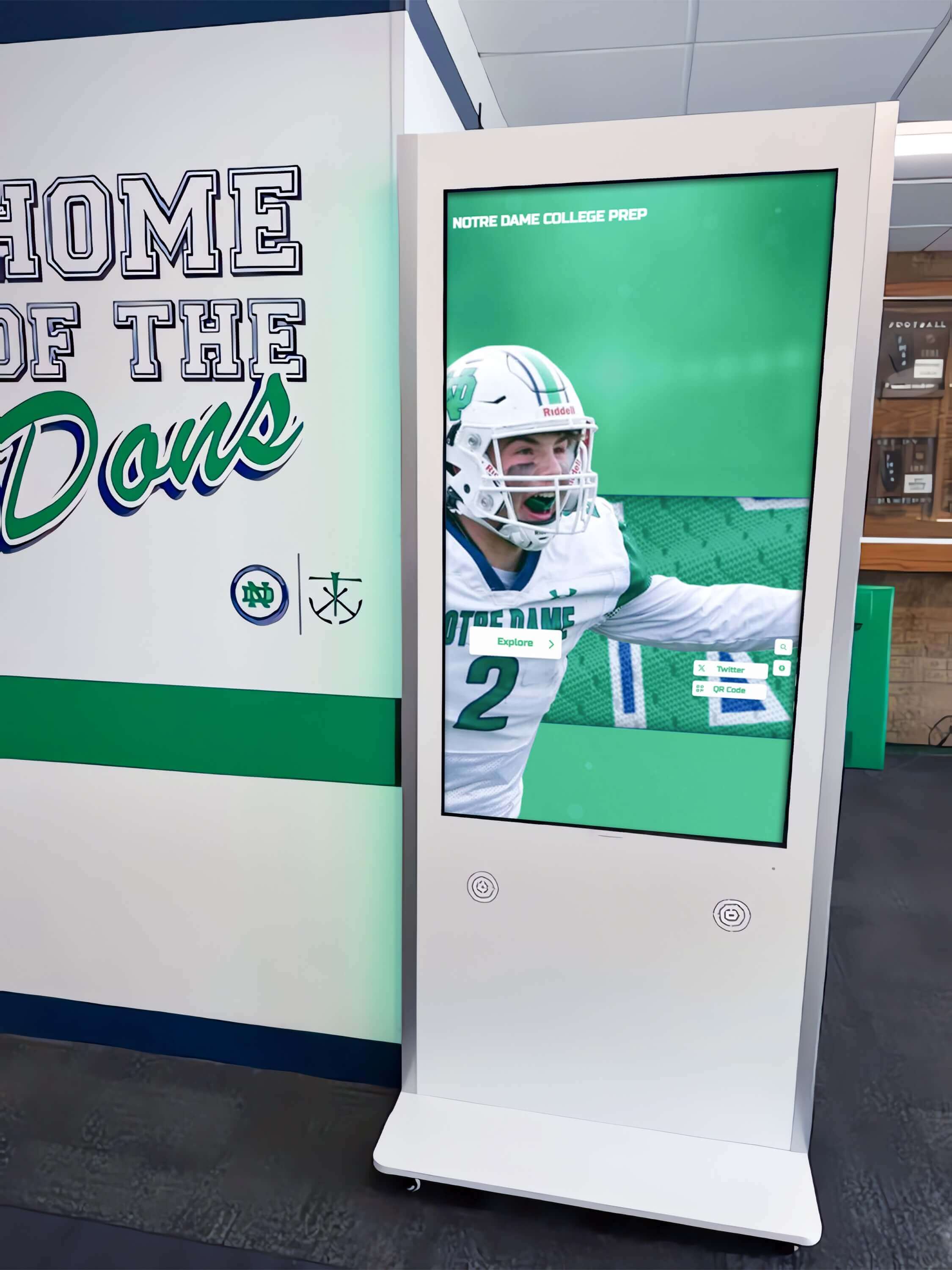
Freestanding touchscreen kiosks create dedicated recognition destinations in high-traffic areas where students, parents, and visitors naturally gather
Scene 9: Cost Savings Calculation and Call-to-Action (10:15-11:30)
Visual Elements: Professional motion graphics presenting customizable cost calculator showing viewer’s potential savings based on their program size, final call-to-action directing to video demo booking or contact information.
Narration Script:
“Let’s calculate potential savings for your athletic program. Consider your typical banner purchases: how many championships does your school celebrate annually requiring new banners? What’s your average banner cost including customization? How much do you pay for installation equipment and labor?
Most athletic programs with 15-20 varsity sports purchase 5-8 banners annually at $300-500 each, plus 2-3 installation sessions at $350-450 per session. That totals $2,800-5,200 annually—$28,000-52,000 over ten years just maintaining traditional banner programs with their inherent space limitations and equity challenges.
Digital trophy case investment: $6,000-10,000 initial installation for commercial-grade touchscreen system plus $800-1,500 annual software subscription providing unlimited content capacity, cloud management, technical support, and ongoing feature enhancements. Ten-year total: $14,000-25,000 delivering comprehensive recognition serving every athlete across every program.
The financial case is compelling: 35-60% cost savings over realistic timeframes while dramatically expanding recognition capacity and eliminating space constraints, installation logistics, and ongoing maintenance headaches.
Beyond pure economics, consider recognition quality improvements: unlimited athlete profiles replacing limited banner space, multimedia storytelling honoring achievements appropriately, equitable visibility across all programs rather than only championship winners, permanent preservation never fading or requiring replacement, and instant updates celebrating accomplishments immediately rather than waiting weeks for banner production.
Ready to explore how digital trophy cases can transform your athletic recognition while reducing costs and administrative burden? Schedule a personalized video demonstration where we’ll walk through your specific situation, calculate customized ROI projections, and show how digital displays integrate with your existing facility and recognition traditions.”
On-Screen Action:
- Interactive calculator graphic showing customizable inputs
- Animated numbers calculating 10-year comparison
- Highlight reel montage showing key features from earlier scenes
- Final ROI summary with savings percentage highlighted
- Call-to-action screen with contact information and QR code
- Text overlays: “Calculate Your Savings | Schedule Video Demo | [Contact URL] | Scan QR Code for Instant Consultation”
Production Notes: Professional motion graphics with customizable template allowing reuse with different school parameters. Conservative calculations avoiding overselling savings. Clear call-to-action with multiple contact methods (URL, QR code, phone number, email). Closing montage using best moments from earlier scenes reinforcing key value propositions. Upbeat background music building to resolution. End screen remaining on screen 8-10 seconds allowing viewers to capture contact information. Include abbreviated version (60-90 seconds) extracting key highlights for social media promotion and email campaigns.
Production Equipment and Technical Specifications
Professional banner replacement demonstration videos require appropriate equipment creating polished presentations that command attention in school board meetings, booster club presentations, and athletic director conferences.
Camera Equipment and Settings
Primary Camera: Professional video camera or high-end mirrorless system (Sony A7 series, Canon R series, Panasonic Lumix) capable of 4K recording at 60fps enabling smooth slow-motion b-roll and future-proof archival quality.
Lens Selection: 24-70mm f/2.8 zoom lens provides versatility for wide facility establishing shots, medium demonstration shots, and close-ups showing touchscreen details. Prime lenses (35mm f/1.4, 50mm f/1.2) offer superior low-light performance for gymnasium environments with challenging mixed lighting.
Stabilization: Gimbal stabilizer (DJI Ronin, Zhiyun Crane) enables smooth movement approaching displays and walking through facilities. Slider for controlled linear movements creating professional production value. Heavy-duty tripod for static interview setups and extended demonstration sequences.
Lighting Approach for Facility and Display Filming
School gymnasiums present lighting challenges—high ceilings with overhead fluorescents, natural light from windows, and bright touchscreen displays requiring careful exposure balancing.
Key Lighting: Portable LED panel lights (Aputure Amaran, Godox SL-series) with controllable color temperature (3200K-5600K) matching gymnasium ambient conditions. Soft diffusion creating flattering light on interview subjects and display demonstrations.
Display Screen Exposure: Balance screen brightness with ambient facility lighting preventing blown-out displays or underexposed surroundings. Polarizing filter reduces screen glare from overhead gymnasium lights. Manual exposure control exposing properly for environment, then adjust display brightness if screen appears overexposed.
Interview Lighting: Three-point lighting setup for athletic director testimonial creating professional broadcast appearance. Key light at 45-degree angle, fill light opposite side, rim light separating subject from background. Color temperature matched to facility ambient preventing color cast.
Discover comprehensive filming strategies in creating video content for digital halls of fame covering production approaches and best practices.
Audio Recording for Clear Narration and Testimonials
Professional audio quality ensures viewers understand every cost comparison and value proposition—critical for persuasive demonstration videos.
Narration Recording: Professional USB condenser microphone (Blue Yeti, Rode NT-USB, Shure MV7) in quiet environment recording voice-over separately from location filming. Acoustic treatment (foam panels, reflection filters) eliminating room echo ensuring broadcast-quality narration clarity.
Interview Audio: Wireless lavalier microphones (Rode Wireless GO II, Sennheiser EW series) capturing athletic director testimonial with pristine audio quality. Backup recorder for redundancy preventing lost interviews due to equipment failure.
Location Audio: Shotgun microphone (Rode NTG series) on boom pole capturing facility ambiance and demonstration audio without picking up excessive gymnasium reverberation.
Audio Processing: Normalize levels to -3dB preventing distortion. Apply noise reduction removing background HVAC or equipment hum. Gentle compression for consistent volume. EQ enhancing voice clarity—cut frequencies below 80Hz removing rumble, boost presence frequencies around 3-5kHz enhancing intelligibility.
Graphics and Animation Production
Professional motion graphics elevate demonstration videos from basic product walkthroughs to compelling business presentations commanding decision-maker attention.
Cost Comparison Graphics: Professional animation software (Adobe After Effects, Apple Motion) creating polished charts, graphs, and data visualizations. School colors and branding maintaining consistent aesthetic. Conservative design avoiding flashy animations that undermine financial credibility.
Text Overlays and Lower Thirds: Clean typography reinforcing key points without cluttering screen. Consistent styling throughout video. Lower thirds identifying interview subjects and locations with professional broadcast appearance.
Transition Effects: Smooth transitions between scenes maintaining professional pacing. Avoid excessive effects that distract from content. Simple cuts, crossfades, and subtle motion maintaining viewer focus on demonstrations and value propositions.
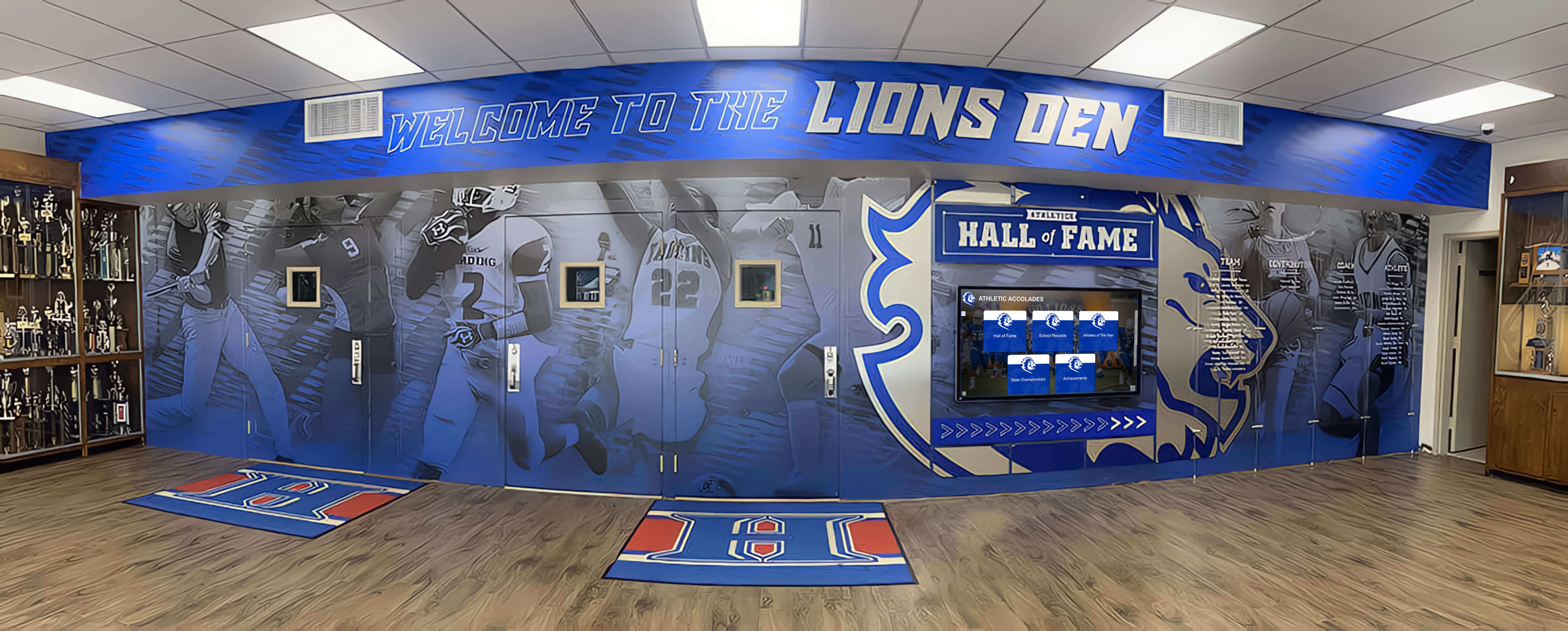
Comprehensive recognition environments blend traditional elements like murals and trophy cases with modern digital capabilities creating spaces that honor both heritage and innovation
Distribution Strategy and Marketing Applications
Completed banner replacement demonstration videos serve multiple strategic purposes maximizing production investment through diverse distribution across athletic director outreach, school board presentations, and vendor sales channels.
Primary Distribution Channels
Athletic Director Conferences: Featured presentation at state and national athletic director association conferences demonstrating innovative solutions to universal banner challenges. USB drives and QR codes providing instant video access for attendees interested in exploring further.
School Board Presentations: High-quality video format ideal for board meetings where athletic directors present capital investment proposals requiring approval. Professional production quality strengthens proposals demonstrating thorough research and strategic planning.
Booster Club Meetings: Persuasive content for parent organizations considering fundraising support for digital displays. Cost comparison graphics particularly compelling for volunteer groups managing limited budgets and seeking maximum recognition impact.
Email Campaign Integration: Video links in targeted campaigns to athletic directors at schools with aging facilities or growing athletic programs likely experiencing banner capacity challenges. Personalized outreach referencing specific school situations that digital displays would address.
YouTube Channel: Upload to vendor channel with comprehensive SEO optimization. Title: “Replacing Expensive Gym Banners: Digital Trophy Case ROI Analysis | [Vendor Name].” Description: 300+ word summary explaining cost savings, feature benefits, and implementation process. Tags covering banner alternatives, athletic recognition, championship displays, digital trophy case.
Video SEO and Organic Discovery
Optimize video content for search engine discovery maximizing organic reach beyond paid promotion or existing sales relationships.
Keyword-Rich Metadata: Front-load title with primary keywords (“Replacing Expensive Gym Banners”) while maintaining natural readability. Include secondary keywords in description (digital trophy case, championship banner alternatives, athletic recognition cost savings). Comprehensive tagging covering all feature aspects and use cases.
Timestamp Chapters: Add YouTube chapters enabling viewers to navigate directly to sections of interest: 0:00 Banner Problem Overview, 1:00 Cost Analysis, 2:30 Digital Display Introduction, etc. Improves user experience while providing additional keyword-rich metadata for search engines.
Thumbnail Optimization: Custom-designed thumbnail showing side-by-side banner versus digital display comparison with overlaid text highlighting key benefit (“Save 35-60% While Expanding Recognition Capacity”). A/B test thumbnails maximizing click-through rates. Ensure thumbnail remains readable at small sizes on mobile devices.
Supporting Blog Content: Publish accompanying blog post embedding video alongside written content explaining features in detail, providing implementation guidance, sharing cost calculators, and including call-to-action buttons. Blog post provides SEO-rich text content while video delivers engaging visual demonstration—combination maximizing search visibility and conversion.
Explore content marketing strategies in school athletic recognition program guides covering comprehensive promotion approaches.
Sales Enablement and Lead Generation
Strategic video placement throughout sales process maximizes conversion from awareness to proposal requests.
Awareness Stage: 90-second video excerpt on social media introducing banner problem and digital solution at high level. Focus on emotional benefits—recognition equity, community pride, athletic tradition preservation. Drive traffic to full video on landing page.
Consideration Stage: Full-length demonstration video on dedicated landing page with clear calls-to-action: “Request Custom Cost Analysis,” “Schedule Live Demo Consultation,” “Download Athletic Recognition Planning Guide PDF.” Capture lead information before providing additional resources.
Decision Stage: Customized video presentations for specific schools incorporating their actual banner inventory, facility photos, and personalized ROI calculations demonstrating tailored solutions addressing unique situations. This customization dramatically increases conversion rates by eliminating “one-size-fits-all” concerns.
Post-Sale Stage: Customer success stories and facility tours showing implemented digital displays in action. Real athletic directors explaining decision rationale and satisfaction. These authentic testimonials become powerful sales tools for future prospects considering similar implementations.
Measuring Video Performance and Conversion Impact
Systematic assessment reveals which video elements drive engagement and conversion while identifying opportunities for enhancement in future productions.
Engagement Metrics Analysis
View Counts and Traffic Sources: Track total video views segmented by traffic source (website embedding, YouTube organic search, email campaigns, conference presentations, social media referrals) revealing which distribution channels drive engagement. Monitor view velocity identifying if interest peaks around budget planning seasons or athletic director conference schedules.
Completion Rates: Percentage of viewers watching entire video versus dropping off early indicates content quality and pacing effectiveness. Analyze drop-off points using YouTube Analytics identifying scenes requiring tightening or content needing clarification. Target 45%+ completion rate for 10-12 minute demonstrations—strong performance indicating compelling content maintaining attention.
Chapter Engagement: Analyze which sections receive most replays or direct navigation revealing topics of greatest interest. High engagement on cost comparison suggests financial justification is primary decision factor. Heavy replay on testimonial section indicates credibility and peer validation matter significantly. Use insights informing which features to emphasize in sales conversations and marketing materials.
Interaction Rates: Click-through on embedded calls-to-action, links in descriptions, conversion actions (form submissions, consultation bookings, pricing requests) measuring how effectively video drives desired actions beyond passive viewing.
Lead Generation and Sales Impact
Qualified Lead Volume: Quantity and quality of inquiries generated through video landing pages, email campaigns featuring video, and organic YouTube discovery. Track conversion rates from video viewer to qualified lead to actual implementation proposal. Survey leads asking whether video influenced decision to reach out and explore further.
Sales Cycle Velocity: Monitor whether prospects viewing demonstration videos close faster or require fewer touchpoints before making decisions compared to those not exposed to video content. Track correlation between video view duration and ultimate conversion—do prospects watching complete videos close at higher rates than those with partial viewing?
Implementation Success: Survey schools that purchased after viewing demonstration video about whether final experience matched expectations set by video content. High satisfaction indicates accurate representation while mismatches suggest adjustments needed to align video promises with actual delivery.
ROI Attribution: Calculate revenue attributed to video marketing efforts compared to production and distribution costs. Track lifetime value of customers acquired through video content versus other channels. Assess whether video-educated customers require less onboarding support and achieve faster time-to-value.
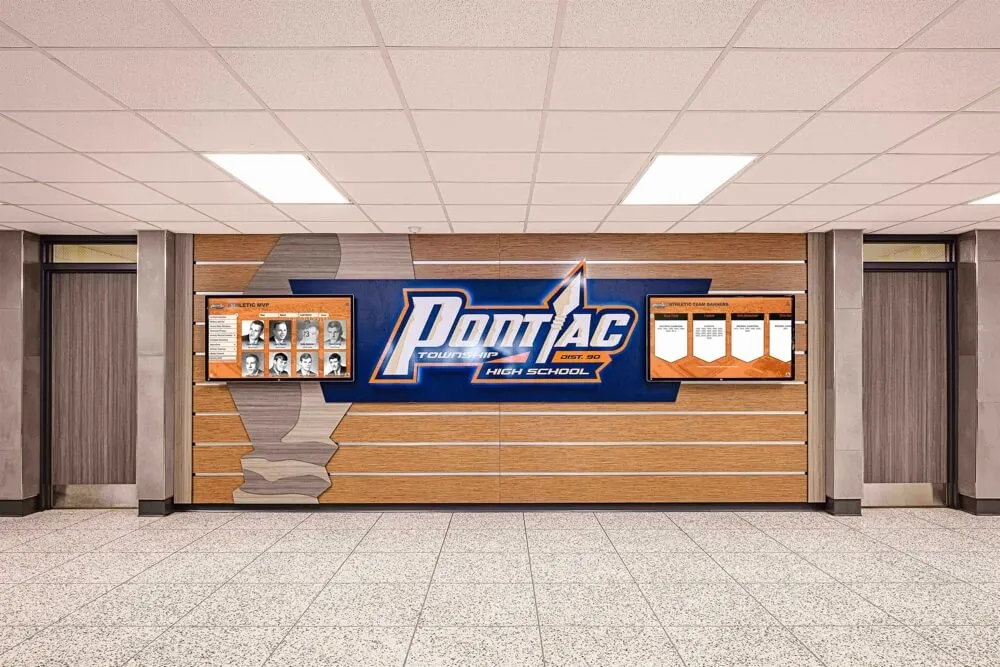
Modern athletic recognition systems coordinate digital displays with traditional honor walls creating comprehensive environments celebrating achievement across multiple formats
Advanced Video Applications and Content Variations
Emerging video formats and technologies create new opportunities for demonstrating banner replacement benefits through innovative presentation approaches.
Interactive Video Experiences
Clickable Hotspots: Interactive video platforms (HapYak, Wirewax, Interactr) enabling viewers to click elements within video accessing additional information. Click cost comparison chart to open detailed calculator. Click testimonial to view extended interview. Click display demonstration to explore feature documentation. Transforms passive viewing into active exploration increasing engagement and information retention.
Choose-Your-Own-Path Videos: Branching video allowing viewers to select which topics interest them most. Athletic directors focused on budget can follow cost analysis path. Those concerned about implementation complexity can explore setup and management path. Feature-focused viewers can dive deep into recognition capabilities. Personalized viewing experiences increase relevance and satisfaction.
Augmented Reality Preview Tools
AR Display Visualization: Mobile app enabling athletic directors to preview digital display placement in their actual facilities using smartphone camera and augmented reality. Point camera at gym wall or lobby space, see virtual display rendered in realistic scale and position, walk around viewing from multiple angles understanding spatial requirements. “Try-before-you-buy” technology reduces purchasing anxiety and accelerates decision-making.
Virtual Facility Tours: 360-degree video tours of implemented installations enabling remote exploration of actual school facilities featuring digital displays. Prospective customers navigate through facilities at their own pace, examine display positioning and integration, view authentic usage by students and visitors, all without traveling for site visits. Particularly valuable for decision committees including multiple stakeholders unable to coordinate simultaneous travel.
Artificial Intelligence Personalization
Dynamic Video Customization: AI-driven video generation creating personalized demonstrations for specific schools showing their actual banner inventory, estimated costs based on their program size, and ROI projections tailored to their budget parameters. Automated customization delivers personalized experience at scale without manual editing for each prospect.
Chatbot Integration: AI chatbot alongside video player answering viewer questions in real-time, directing to specific video chapters relevant to their interests, collecting qualification information conversationally, and scheduling follow-up consultations without requiring human sales intervention. Improves user experience while capturing valuable lead data.
Explore emerging technologies in future trends in digital recognition examining next-generation capabilities and applications.
Conclusion: Video Walkthroughs Transform Banner Replacement Decisions
School athletic directors face mounting pressure as championship banners consume ceiling space, budgets limit recognition capacity, and equity concerns demand visibility for all programs beyond only championship winners. Traditional fabric banners represent significant recurring costs while imposing harsh physical limitations forcing difficult prioritization decisions that create frustration across athletic departments.
Book a Live Digital Trophy Case Demo
Experience banner replacement solutions firsthand through personalized video consultation demonstrating exactly how digital displays can eliminate your banner program costs while expanding recognition capacity across all athletic programs. Get customized ROI analysis for your specific situation.
Schedule Your Video Demo TodayProfessional video demonstrations bridge communication gaps by providing tangible visual proof showing exactly what digital trophy cases deliver, how they integrate into existing facilities, what administrative efficiency improvements they create, and most importantly, what cost savings they generate over realistic timeframes. From establishing shots documenting banner problems through detailed demonstrations showing comprehensive features to compelling testimonials from peer athletic directors explaining their satisfaction, strategic video content transforms abstract possibilities into concrete understanding driving confident decision-making by administrators evaluating whether digital displays deliver sufficient value to justify investment.
When athletic directors watch well-produced demonstration videos showing realistic cost comparisons, authentic facility integrations, and measurable ROI timelines, they gain confidence that digital solutions will enhance rather than diminish their athletic traditions—enabling informed decisions about whether banner alternatives align with their recognition goals, budget constraints, and community values. The video format provides persuasive proof impossible through written proposals or static images alone, while creating reusable content serving multiple purposes across marketing, sales enablement, and customer education.
Ready to explore how digital trophy cases can replace expensive banner programs while expanding recognition capacity and reducing long-term costs? Solutions like Rocket Alumni Solutions provide comprehensive touchscreen platforms designed specifically for athletic recognition, combining intuitive interfaces welcoming all users, unlimited content capacity serving every athlete across every program, cloud-based management enabling instant updates without installation costs, and professional support ensuring successful implementation from planning through long-term operation.
Discover broader athletic recognition approaches in division I athletics digital recognition systems and basketball hall of fame recognition guides demonstrating comprehensive implementation strategies beyond banner replacement alone.
Learn about permanent installation options in interactive touchscreen software guides and digital hall of fame training that serve ongoing recognition while demonstrating capabilities for athletic facilities evaluating technology investments across multiple use cases.































