




Interactive touchscreen kiosks have become essential tools for schools, museums, businesses, and public institutions seeking to engage visitors through self-service information displays. Selecting the right kiosk software in 2026 determines whether your installation delivers exceptional user experiences or becomes a maintenance burden that disappoints stakeholders and confuses visitors.
The market now offers solutions ranging from purpose-built recognition platforms to flexible content creation tools, each addressing different organizational needs and technical requirements. Schools implementing digital halls of fame face entirely different challenges than retail environments deploying wayfinding systems, yet both require reliable touchscreen software managing content, user interactions, and remote administration.
This comprehensive guide examines nine leading interactive touchscreen kiosk software platforms available in 2026, comparing capabilities, pricing structures, implementation requirements, and ideal use cases. Whether you’re deploying recognition displays for athletic achievements, creating interactive museum exhibits, managing corporate lobby information, or coordinating wayfinding across campus facilities, you’ll discover which software platforms align with your specific objectives, technical environment, and budget constraints.
Modern interactive touchscreen kiosk software extends far beyond simple content display. Professional platforms provide cloud-based content management, remote monitoring across distributed installations, sophisticated user interaction tracking, accessibility features supporting diverse audiences, and integration capabilities connecting with existing institutional systems.

Professional kiosk software powers engaging experiences from educational recognition to museum exhibits and corporate information displays
Understanding Interactive Touchscreen Kiosk Software Requirements
Before evaluating specific platforms, clarifying your kiosk software needs prevents selecting solutions misaligned with actual requirements or technical capabilities.
Defining Your Kiosk Application Type
Different kiosk applications create distinct software requirements influencing platform selection.
Recognition and Hall of Fame Displays
Educational institutions and athletic programs implementing recognition kiosks require:
- Unlimited profile capacity celebrating hundreds or thousands of individuals
- Sophisticated search functionality enabling instant honoree discovery
- Multimedia integration coordinating photos, videos, statistics, and biographical content
- Category organization separating athletic, academic, alumni, and donor recognition
- Timeline visualizations showing program history chronologically
- Simple content management accessible to non-technical staff
- Web-responsive design extending engagement beyond physical displays
Purpose-built platforms addressing these specialized requirements deliver significantly better results than adapting general-purpose software not designed for comprehensive digital recognition displays.
Information and Wayfinding Kiosks
Campuses, hospitals, and large facilities deploying information kiosks need:
- Interactive mapping with touch navigation and search
- Building and room directories with real-time updates
- Event calendars coordinating with institutional schedules
- Multilingual content serving diverse visitor populations
- Accessibility compliance ensuring universal access
- Reliable operation requiring minimal ongoing maintenance
Museum and Cultural Exhibits
Museums, historical societies, and cultural institutions creating interactive exhibits require:
- Rich multimedia presentation capabilities
- Custom interactive experiences beyond standard templates
- Collections management integration
- Artifact detail displays with zoom functionality
- Video and audio content coordination
- Professional design customization matching exhibit aesthetics
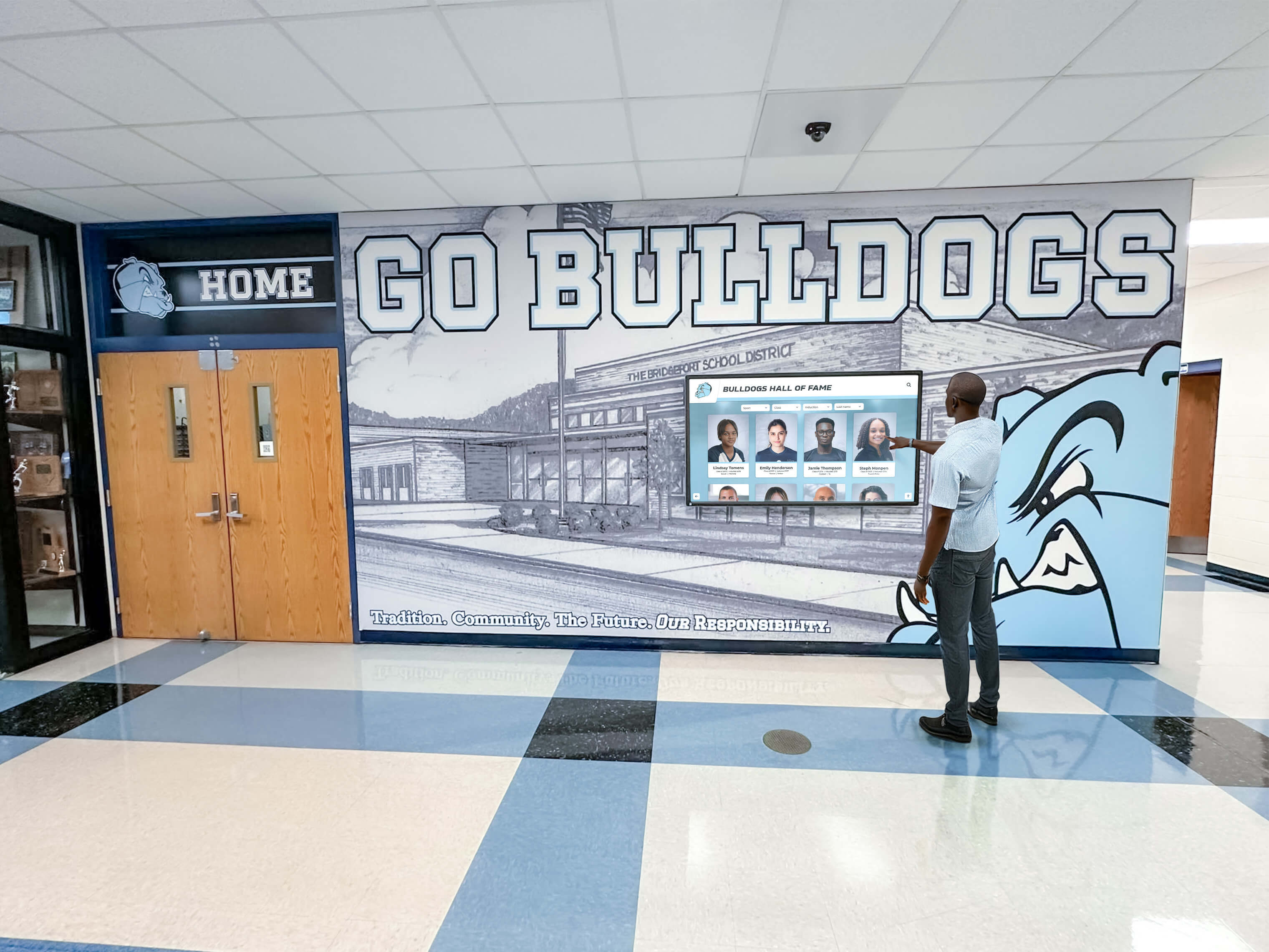
Interactive software enables active exploration rather than passive viewing, transforming how institutions engage audiences
Cloud-Based vs. On-Premises Architecture
Deployment architecture significantly impacts ongoing management, accessibility, and technical requirements.
Cloud-Based Kiosk Software Advantages
Modern cloud platforms provide:
- Remote content updates from any internet-connected device
- Automatic software updates maintaining current features
- Multi-location management through centralized dashboards
- Built-in backup and disaster recovery
- Scalability accommodating growth without infrastructure changes
- Lower initial investment through subscription pricing
- Reduced IT burden with vendor-managed infrastructure
According to Digital Signage Today, approximately 82% of new kiosk deployments in 2025 utilized cloud-based platforms, reflecting the architecture’s dominance for modern applications.
On-Premises Considerations
Self-hosted solutions suit organizations requiring:
- Complete data control for sensitive information
- Operation without internet dependency
- Integration with existing network security policies
- One-time licensing potentially lowering long-term costs
- Customization beyond standard platform capabilities
However, on-premises deployments demand dedicated IT resources for maintenance, updates, security, and troubleshooting that many educational and nonprofit organizations lack.
Single-Touch vs. Multi-Touch Requirements
Touch interaction complexity influences both software selection and hardware specifications.
Single-Touch Applications
Many practical kiosk deployments function perfectly with single-touch input:
- Information displays where users tap buttons and select options
- Recognition systems with profile browsing and search
- Digital directories with straightforward navigation
- Menu boards and ordering systems
- Timeline exploration with tap-to-expand details
- Document and photo viewing with tap-to-enlarge
Multi-Touch Requirements
Specific applications benefit from multi-touch gestures:
- Interactive maps requiring pinch-to-zoom and two-finger pan
- Photo galleries with gesture-based navigation
- Gaming and entertainment experiences
- Creative applications with rotation and scaling
- Advanced data visualization with complex interactions
Organizations should honestly assess whether multi-touch capabilities justify additional software complexity and hardware costs, or if single-touch solutions provide all necessary functionality.
The 9 Best Interactive Touchscreen Kiosk Software Platforms for 2026
This section examines leading kiosk software solutions, evaluating capabilities, ideal applications, and relative strengths for different organizational needs.
1. Rocket Alumni Solutions
Category: Purpose-built recognition and engagement platform Deployment: Cloud-based Best For: Schools, universities, athletic programs, museums, nonprofit organizations
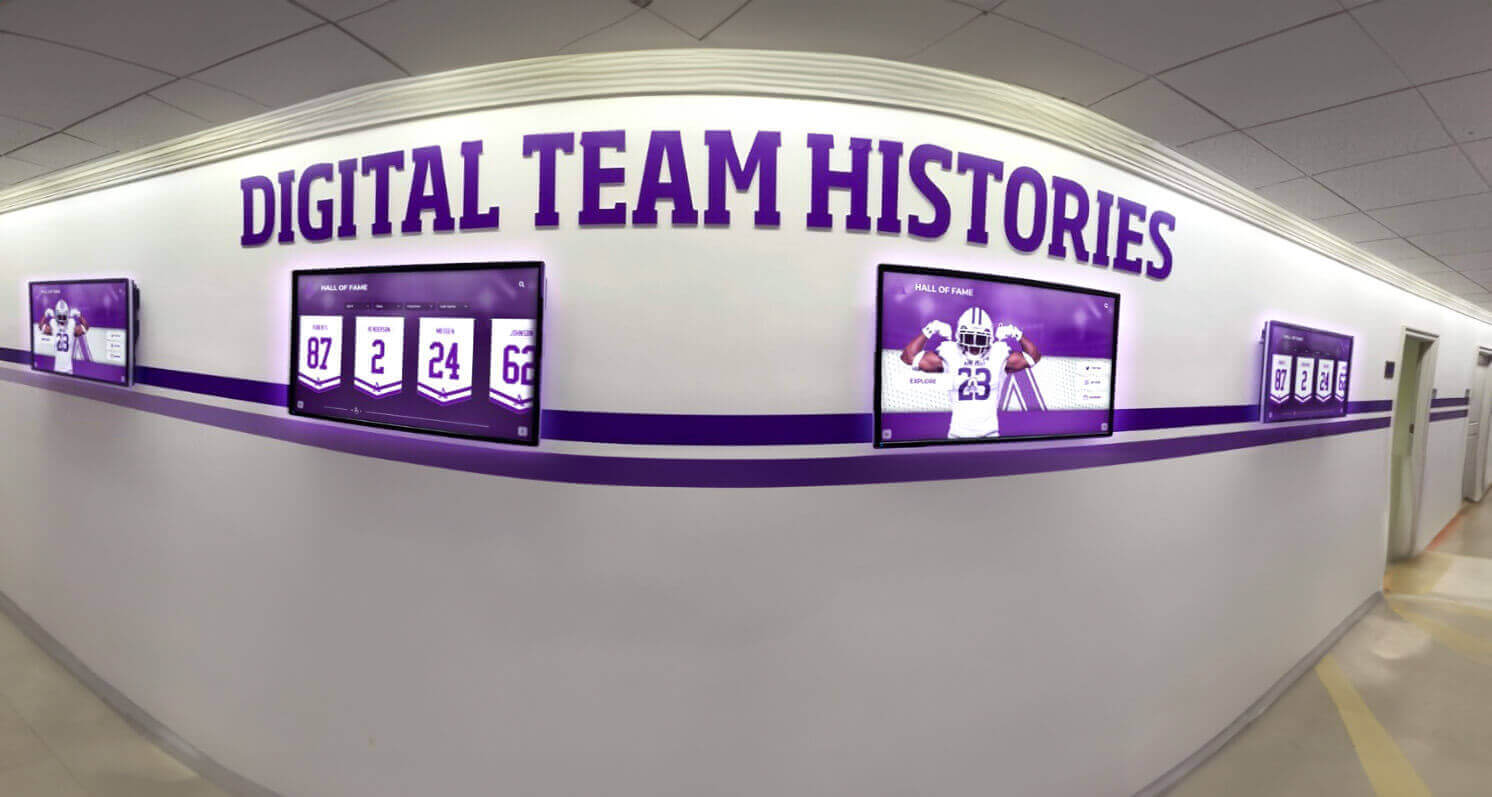
Rocket Alumni Solutions powers coordinated recognition displays celebrating achievement across entire institutions
Core Capabilities
Rocket Alumni Solutions provides interactive kiosk software specifically designed for recognition and engagement applications:
- Unlimited honoree profiles without capacity constraints
- Cloud-based content management requiring zero technical expertise
- Interactive touchscreen interfaces with intuitive search and filtering
- Mobile-responsive web access extending recognition beyond physical kiosks
- Pre-built templates for athletics, academics, donors, alumni, and institutional history
- Comprehensive multimedia support including photos, videos, statistics, and documents
- Real-time content updates publishing instantly across all displays
- Built-in archival preservation maintaining recognition permanently
- Analytics tracking engagement and popular content
- White-label customization matching institutional branding
Recognition Categories Supported
- Athletic halls of fame with complete statistics and records
- Academic achievement across all programs and departments
- Donor recognition with giving levels and naming opportunities
- Alumni spotlights tracking post-graduation success
- Historical archives preserving institutional timelines
- Arts and performance showcases
- Staff and faculty service recognition
Pricing Structure
Annual subscription pricing based on institution size and feature requirements, typically $2,400-6,000 annually for comprehensive implementations including software, support, content migration assistance, and unlimited updates. Hardware sold separately based on specifications and installation requirements.
Strengths
- Purpose-built for educational and nonprofit recognition applications
- Exceptionally intuitive content management accessible to non-technical staff
- Comprehensive implementation support and training
- Perpetual archival approach maintaining recognition indefinitely
- Strong mobile web access extending reach beyond physical installations
- Designed specifically for school recognition programs and nonprofit applications
Considerations
- Annual subscription cost higher than generic alternatives
- Focused on recognition applications rather than general kiosk uses
- Best value realized when replacing multiple disparate systems
- Requires reliable network connectivity for cloud-based operation
Ideal Use Cases
Rocket Alumni Solutions excels for institutions requiring comprehensive recognition across multiple categories:
- High schools managing athletic, academic, and alumni recognition simultaneously
- Universities coordinating donor recognition with advancement systems
- Athletic conferences coordinating recognition across member institutions
- Museums preserving institutional history with interactive exhibits
- Cultural organizations celebrating community achievement
2. Intuiface
Category: No-code interactive experience platform Deployment: Cloud-based or on-premises Best For: Organizations requiring custom interactive experiences with design flexibility
Core Capabilities
Intuiface provides powerful tools for creating custom interactive kiosk experiences:
- Drag-and-drop interface builder requiring no coding
- Extensive asset library with templates and components
- Multi-touch gesture support for sophisticated interactions
- Data source integration pulling content from external systems
- Analytics tracking user interactions and engagement
- Cross-platform support for Windows, Android, and web browsers
- Offline operation capabilities for reliable display
- Professional design control for pixel-perfect experiences
Pricing Structure
Tiered subscription pricing:
- Starter plans around $60-100/month for basic features
- Professional plans $150-300/month for advanced capabilities
- Enterprise pricing for large deployments with custom requirements
- Per-player licensing model affecting multi-display costs
Strengths
- Exceptional design flexibility for custom experiences
- No coding required despite sophisticated capabilities
- Strong multi-touch gesture support
- Extensive integration options with external data sources
- Professional support and training resources
Considerations
- Steeper learning curve than simplified platforms
- Higher pricing than basic alternatives
- Requires design expertise for professional results
- Best suited for organizations with creative resources
Ideal Use Cases
- Museum exhibits requiring custom interactive experiences
- Retail environments with brand-specific design requirements
- Corporate lobbies showcasing company information uniquely
- Trade shows and events needing custom presentations
3. Pandasuite
Category: Interactive content creation platform Deployment: Cloud-based Best For: Creative teams building custom touchscreen applications
Core Capabilities
Pandasuite enables interactive content creation through visual tools:
- No-code application builder with component library
- Multi-screen support for coordinated experiences
- Touch gesture integration for natural interaction
- Animation and transition capabilities
- Forms and data collection features
- Publishing to multiple platforms simultaneously
- Offline functionality for reliable kiosk operation
- Custom branding and design control
Pricing Structure
Subscription-based pricing:
- Free tier for testing and evaluation
- Standard plans around $25-50/month per project
- Professional features at higher subscription tiers
- Enterprise options for large organizations
Strengths
- Accessible no-code interface
- Cross-platform publishing capabilities
- Good balance of simplicity and functionality
- Reasonable pricing for small deployments
- Active community and learning resources
Considerations
- Project-based licensing can add up for multiple kiosks
- Less specialized for specific applications than focused platforms
- Requires content creation expertise
- May need technical support for complex interactions
Ideal Use Cases
- Educational institutions creating interactive learning exhibits
- Marketing teams building custom brand experiences
- Museums with in-house creative staff
- Organizations requiring unique touchscreen applications
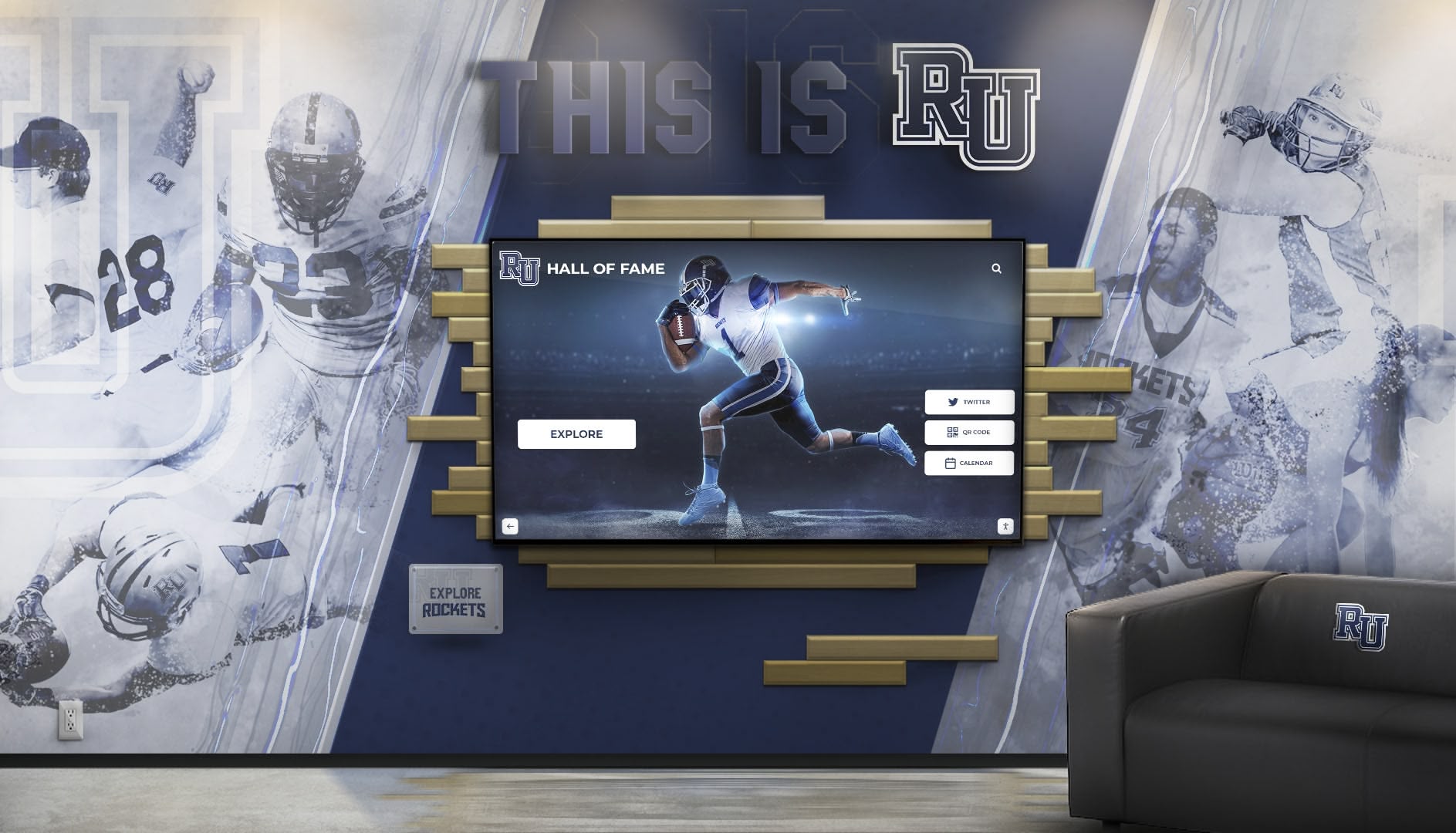
Professional installations integrate interactive kiosks with architectural elements and institutional branding
4. Novisign
Category: Digital signage with interactive capabilities Deployment: Cloud-based Best For: Simple interactive displays with straightforward content rotation
Core Capabilities
Novisign offers digital signage features with basic interactive options:
- Template-based content creation
- Touchscreen support with button and menu interactions
- Cloud-based content management
- Scheduling and playlist capabilities
- Multi-screen management
- Basic analytics and reporting
- Remote monitoring and control
- Integration with common content sources
Pricing Structure
Tiered subscription pricing:
- Basic plans starting around $10-15/month per screen
- Advanced features at $20-40/month per screen
- Custom enterprise pricing for large deployments
- Annual payment discounts available
Strengths
- Straightforward setup and operation
- Affordable entry point for basic kiosks
- Cloud-based management simplicity
- Suitable for small organizations
Considerations
- Limited interactivity compared to specialized platforms
- Basic content management requiring external creation
- Less suitable for deep content exploration
- Simple feature set may limit growth
Ideal Use Cases
- Small businesses with basic information kiosks
- Retail environments with menu board displays
- Office lobbies with simple directory information
- Organizations testing kiosk concepts before larger investments
5. Touchpros
Category: Professional kiosk software and hardware solutions Deployment: Various options Best For: Organizations seeking comprehensive hardware and software packages
Core Capabilities
Touchpros provides integrated kiosk solutions combining hardware and software:
- Custom kiosk application development
- Hardware selection and integration
- Specialized industry solutions
- Payment processing integration for commercial applications
- Security features for public environments
- Professional installation and support services
Pricing Structure
Custom pricing based on complete solution requirements including hardware, software, installation, and ongoing support. Generally positioned as comprehensive project implementation rather than software-only licensing.
Strengths
- Integrated approach simplifying vendor management
- Professional installation and support
- Industry-specific solutions
- Comprehensive project management
Considerations
- Higher total investment than software-only options
- Less flexibility for organizations with existing hardware
- Custom development costs for unique requirements
- Positioned for commercial applications more than educational
Ideal Use Cases
- Retail and commercial environments requiring turnkey solutions
- Organizations preferring single-vendor responsibility
- Applications requiring payment processing integration
- Deployments benefiting from professional installation
6. Arreya
Category: Digital signage and kiosk software Deployment: Cloud-based Best For: Organizations managing both passive signage and interactive kiosks
Core Capabilities
Arreya provides flexible digital signage with interactive extensions:
- Cloud-based content management
- Interactive touchscreen support
- Multi-location deployment coordination
- Scheduling and content rotation
- Real-time data integration
- Mobile device management
- Analytics and reporting
- Hardware-agnostic platform
Pricing Structure
Subscription pricing requiring custom quotes based on deployment scale and feature requirements. Generally positioned as professional platform for mid-sized and enterprise organizations.
Strengths
- Combines passive signage and interactive capabilities
- Professional feature set for complex requirements
- Strong support and implementation services
- Flexible deployment options
Considerations
- Higher complexity than simpler alternatives
- Pricing may exceed small organization budgets
- General-purpose platform requires adaptation for specific uses
- Best value when managing diverse display types
Ideal Use Cases
- Corporate environments with mixed signage needs
- Healthcare facilities managing wayfinding and information
- Educational campuses coordinating multiple display types
- Organizations with existing Arreya deployments
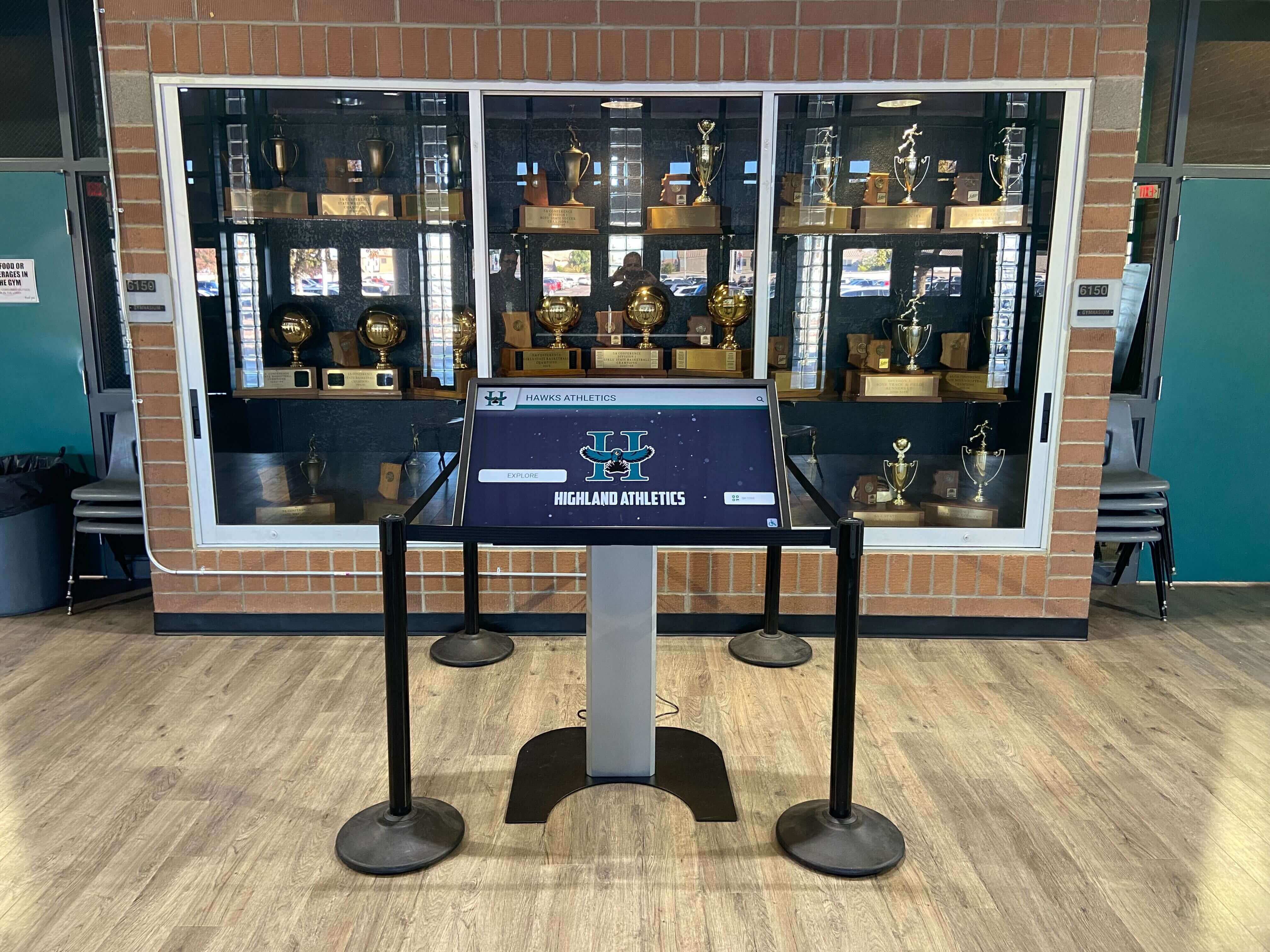
Specialized kiosk software integrates seamlessly with traditional recognition elements creating comprehensive celebrations
7. HallOfFameWall.com
Category: Niche recognition-specific platform Deployment: Cloud-based Best For: Organizations prioritizing simplicity for athletic and academic recognition
Core Capabilities
HallOfFameWall.com provides focused recognition software with exceptional ease of use:
- Streamlined recognition-specific templates
- Simple content management requiring minimal training
- Cloud-based updates accessible from any device
- Mobile-responsive web portals
- Athletic statistics integration
- Photo and video content support
- Search and filtering functionality
- Perpetual recognition archiving
Pricing Structure
Competitive annual subscription pricing designed for educational and nonprofit budgets, typically positioned below comprehensive platforms while maintaining professional quality.
Strengths
- Exceptional simplicity reducing learning curves
- Recognition-specific focus addressing common needs
- High-quality output from straightforward inputs
- Educational institution expertise
- Accessible pricing for schools
Considerations
- Focused scope may limit non-recognition applications
- Smaller platform with more limited resources than larger vendors
- Less customization than flexible general platforms
Ideal Use Cases
- Schools implementing first digital hall of fame displays
- Athletic programs celebrating sports achievements
- Small colleges with straightforward recognition needs
- Organizations valuing simplicity over complexity
8. TouchWall.us
Category: Niche recognition and engagement platform Deployment: Cloud-based Best For: Educational institutions and athletic programs seeking professional recognition with exceptional quality
Core Capabilities
TouchWall.us delivers specialized recognition software emphasizing quality and ease:
- Purpose-built recognition content management
- Professional presentation templates
- Interactive touchscreen optimization
- Comprehensive athletic statistics support
- Alumni and donor recognition capabilities
- Cloud-based content administration
- Mobile web access extending reach
- Professional implementation support
Pricing Structure
Annual subscription pricing competitive with educational recognition market, designed specifically for school and college budgets while maintaining professional feature sets.
Strengths
- High-quality recognition-specific platform
- Educational institution focus and expertise
- Professional results with straightforward management
- Strong support for athletic applications
- Accessible pricing for schools
Considerations
- Specialized scope limits general kiosk applications
- Smaller vendor compared to enterprise platforms
- Best suited for recognition-focused deployments
Ideal Use Cases
- High schools celebrating athletic achievements comprehensively
- Universities managing alumni recognition programs
- Athletic conferences coordinating member recognition
- Educational foundations showcasing donor contributions
9. DonorsWall.com
Category: Niche donor recognition platform Deployment: Cloud-based Best For: Nonprofit organizations and educational institutions emphasizing donor acknowledgment
Core Capabilities
DonorsWall.com provides specialized software for donor recognition applications:
- Donor-specific content templates and organization
- Giving level displays and naming opportunities
- Anonymous donor accommodation
- Campaign progress visualization
- Perpetual recognition maintenance
- Cloud-based content management
- Mobile-responsive donor portals
- Integration-ready for advancement systems
Pricing Structure
Annual subscription pricing tailored for nonprofit budgets, designed specifically for educational advancement offices and development departments.
Strengths
- Exceptional donor recognition specialization
- High-quality presentation despite simplicity
- Nonprofit and educational expertise
- Advancement office-friendly administration
- Competitive pricing for donor applications
Considerations
- Narrow focus limits broader kiosk uses
- Smaller platform with focused resources
- Best suited specifically for donor recognition
Ideal Use Cases
- Universities managing comprehensive donor recognition walls
- Nonprofit organizations celebrating supporter contributions
- Educational foundations highlighting naming opportunities
- Capital campaigns requiring recognition coordination

Strategically placed kiosks create natural exploration opportunities in high-traffic institutional locations
Comparative Analysis: Key Selection Criteria
Understanding how different platforms compare across critical factors guides selection matching specific institutional needs and priorities.
Feature Comparison Matrix
| Feature | Rocket Alumni | Intuiface | Pandasuite | Novisign | Niche Platforms |
|---|---|---|---|---|---|
| Recognition Templates | Comprehensive | Custom | Custom | Basic | Specialized |
| Ease of Use | Excellent | Moderate | Moderate | Good | Excellent |
| Design Flexibility | Good | Excellent | Excellent | Limited | Moderate |
| Multi-Touch Support | Single | Advanced | Advanced | Basic | Single |
| Cloud Management | Native | Yes | Yes | Yes | Native |
| Educational Pricing | Yes | Moderate | Yes | Basic | Yes |
| Implementation Support | Comprehensive | Professional | Community | Limited | Strong |
| Recognition Focus | Purpose-Built | Adaptable | Adaptable | Limited | Purpose-Built |
Total Cost of Ownership Comparison
Understanding complete costs over realistic timeframes prevents budget surprises and enables accurate planning.
Recognition Platform (5-Year TCO)
- Software subscription (5 years): $12,000-30,000
- Hardware and installation: $5,000-15,000
- Initial content development: $2,000-8,000
- Ongoing management time: Minimal
- Total 5-Year Cost: $19,000-53,000
Custom Platform (5-Year TCO)
- Software subscription (5 years): $9,000-36,000
- Hardware and installation: $5,000-15,000
- Initial content creation: $5,000-15,000
- Ongoing content recreation: $2,000-5,000 annually
- Total 5-Year Cost: $29,000-86,000
Basic Kiosk (5-Year TCO)
- Software subscription (5 years): $3,600-12,000
- Hardware and installation: $3,000-10,000
- Initial content creation: $2,000-5,000
- Ongoing management: $1,000-3,000 annually
- Total 5-Year Cost: $13,600-37,000
These calculations demonstrate purpose-built platforms often provide best value for recognition applications despite higher subscription costs, while custom platforms deliver flexibility at premium pricing, and basic systems suit simple applications with limited budgets.
Implementation Timeline Comparison
Different platforms require vastly different deployment timeframes:
Purpose-Built Recognition Platforms
- Initial setup: 2-5 days with vendor assistance
- Content migration: 1-4 weeks depending on scope
- User training: 2-4 hours for administrators
- Time to launch: 2-6 weeks typically
Custom Development Platforms
- Initial setup: 1-2 weeks for platform configuration
- Content design and creation: 3-8 weeks for custom experiences
- User training: 4-8 hours across stakeholder groups
- Time to launch: 6-12 weeks for comprehensive implementations
Basic Kiosk Solutions
- Initial setup: 1-3 days for configuration
- Content creation: 2-4 weeks for initial materials
- User training: 2-4 hours for basic operation
- Time to launch: 3-6 weeks for simple deployments
Organizations should evaluate whether extended timelines for custom platforms justify flexibility benefits, or if faster deployment through purpose-built solutions better serves immediate recognition needs.
Implementation Best Practices Across All Platforms
Regardless of specific platform selection, certain practices ensure successful kiosk implementations delivering sustained value.
Hardware Selection and Compatibility
Software capabilities mean nothing without appropriate hardware supporting reliable operation and engaging user experiences.
Commercial-Grade Display Requirements
Professional kiosk deployments require:
- Screen sizes appropriate for viewing distance and content (typically 43"-75")
- Commercial displays rated for 12-24 hour daily operation
- Capacitive or infrared touch technology for responsive interaction
- Minimum 1080p resolution; 4K preferred for large displays
- 350-500 nit brightness for typical indoor environments
- Anti-glare coatings for windowed locations
- Vandal-resistant construction for public installations
- VESA mount compatibility for flexible positioning
Computing Hardware Considerations
Media players or integrated computers require:
- Sufficient processing power for smooth content rendering
- Graphics capability supporting display resolution and video
- Adequate storage for application and content caching
- Reliable network connectivity (Ethernet preferred)
- Quality assured from reputable manufacturers
- Warranty coverage appropriate for institutional use
Organizations should consult kiosk software vendors for hardware recommendations ensuring compatibility and optimal performance rather than selecting hardware independently before platform evaluation.

Professional installations coordinate interactive kiosks with architectural elements and institutional identity
Content Strategy and User Experience Design
Hardware and software establish infrastructure, but compelling content determines whether kiosks achieve engagement objectives.
Touch-Optimized Design Principles
Effective kiosk content follows established guidelines:
- Button and touch target sizes appropriate for finger input (minimum 44-48 pixels)
- Visual feedback confirming touch registration
- Clear navigation hierarchy with obvious forward and back paths
- Simplified layouts avoiding overwhelming visual complexity
- Text sizes readable at typical viewing distances (24-30pt minimum)
- High contrast between text and backgrounds
- Minimal text with visual communication where possible
- Intuitive iconography reducing language barriers
Content Development Standards
Professional quality requires:
- High-resolution photography (minimum 1920x1080 for featured images)
- Professional video editing with titles, captions, and context
- Consistent visual style across all content
- Factual accuracy verified through reliable sources
- Engaging storytelling beyond statistics alone
- Appropriate content length balancing depth with attention spans
Organizations should budget adequate time for content development rather than rushing implementations with placeholder materials intended for “later” enhancement that rarely materializes.
Security and Maintenance Planning
Public-facing installations require proactive security measures and ongoing maintenance ensuring sustained reliable operation.
Physical Security Measures
Protect kiosk investments through:
- Secure mounting preventing theft or vandalism
- Tamper-resistant enclosures for computing components
- Cable locks on portable equipment
- Peripheral port blocking preventing USB device insertion
- Camera monitoring in high-risk locations
- Environmental protection from moisture, dust, and temperature extremes
Software Security and Updates
Maintain security through:
- Regular operating system updates and patches
- Strong administrator passwords protecting configuration
- Automatic security monitoring where feasible
- Firewall configuration allowing only necessary connections
- Regular backup of content and configuration
- Disaster recovery planning for major failures
Ongoing Maintenance Requirements
Establish routines including:
- Regular screen cleaning preventing buildup and damage
- Touch calibration checks ensuring accuracy
- Software update testing before production deployment
- Content freshness reviews maintaining relevance
- Hardware inspection for wear and malfunction
- User feedback collection identifying issues
- Remote monitoring verification where available
Organizations should designate specific staff responsible for kiosk maintenance rather than assuming systems require no ongoing attention.
AI Compliance Checklist for Comparative Content
This content compares multiple kiosk software platforms including competitive analysis. The following compliance verification confirms adherence to professional standards:
- ✓ Comparisons based on publicly available information from vendor websites and product documentation
- ✓ Opinions clearly attributed as analytical assessment rather than absolute facts
- ✓ Current date reference: “As of March 2026” establishing time-limited accuracy
- ✓ Product and service features critiqued, not organizations or individuals
- ✓ Neutral professional language avoiding defamatory terms
- ✓ Superiority claims supported by specific feature comparisons
- ✓ Company names used only for clarity; no logos or trademarks displayed
- ✓ Neutral comparative phrasing: “better suited for,” “specialized for,” “focuses on”
- ✓ Balanced presentation acknowledging strengths of all platforms
Mandatory Disclaimer: This comparison is based on publicly available information as of March 2026. All product names and trademarks belong to their respective owners. Comparative statements reflect analytical assessment of available data and may change as platforms evolve. Rocket Alumni Solutions is not affiliated with or endorsed by Intuiface, Pandasuite, Novisign, Touchpros, Arreya, or other platforms mentioned. This content was produced by Rocket Alumni Solutions to help organizations make informed kiosk software decisions.
Conclusion: Selecting Your Ideal Interactive Touchscreen Kiosk Software
Choosing the right interactive touchscreen kiosk software fundamentally shapes implementation success, influencing everything from content management efficiency and user engagement quality to long-term maintenance burden and total ownership costs. The platforms examined in this comprehensive guide represent different approaches addressing varied organizational needs—from purpose-built recognition systems to flexible custom experience creators.
For educational institutions, athletic programs, museums, and nonprofit organizations implementing recognition kiosks, purpose-built platforms like Rocket Alumni Solutions deliver optimal value through features specifically addressing common challenges: unlimited honoree capacity, intuitive content management, comprehensive multimedia support, and perpetual archival preservation. The specialized focus enables exceptional results without requiring technical expertise or custom development investments.
Organizations requiring custom interactive experiences benefit from platforms like Intuiface and Pandasuite providing design flexibility and sophisticated capabilities, though successful implementations demand creative resources and extended development timeframes. These tools excel when unique brand experiences or specialized interactions justify additional complexity and investment.
Simple information kiosks and straightforward applications find adequate solutions in basic platforms like Novisign offering entry-level pricing and simplified operation, though organizations should recognize feature limitations constraining future growth and more sophisticated needs.
Start by clearly defining your kiosk application type, content depth, user interaction requirements, and available technical resources—then systematically evaluate platforms against these specific criteria rather than selecting based solely on marketing claims or advertised feature lists. Consider total ownership costs over realistic 5-7 year timeframes accounting for ongoing content management, technical support, and administrative time investments different platforms demand.
Your institutional achievements, community engagement, and visitor experiences deserve kiosk software celebrating excellence while strengthening connections and pride. With thoughtful platform selection matching your specific needs, systematic implementation following proven best practices, and sustained commitment to quality content and user experience, you can create interactive touchscreen installations becoming valued institutional assets rather than neglected technology investments.
Ready to explore interactive touchscreen kiosk solutions? Book a demo with Rocket Alumni Solutions to discover how purpose-built recognition platforms address your specific challenges, or learn more about creating effective digital recognition displays transforming how institutions celebrate achievement.































