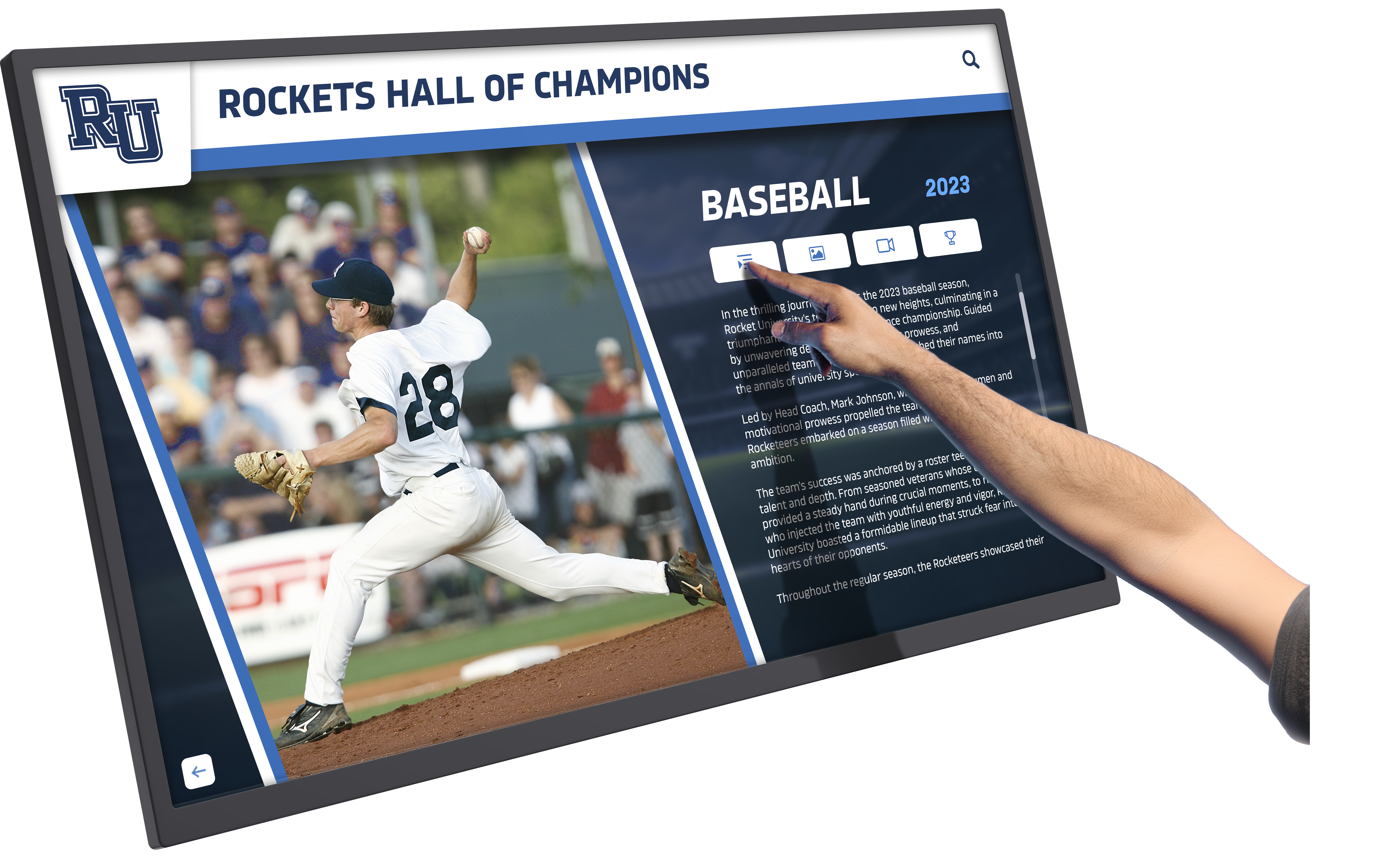




Picture this: A student walks past a sleek touchscreen display in your school’s main hallway, pauses, taps the screen, and suddenly she’s exploring athlete profiles, academic achievements, and donor recognition with intuitive swipes and taps. What was once a static plaque wall gathering dust has become an engaging digital experience that students actually want to interact with. This transformation—from passive recognition to active engagement—represents the fundamental shift that modern interactive display boards bring to educational institutions.
Schools investing in interactive display technology often struggle to visualize exactly how these systems work in practice. Marketing materials show polished screenshots, but questions remain: What does the actual hardware look like installed? How do students interact with it? What appears on screen during typical use? How does content get updated? These practical details determine whether an interactive display board becomes a heavily-used centerpiece or an expensive mistake gathering fingerprints.
This comprehensive visual walkthrough takes you step-by-step through a real interactive display board installation, from the physical hardware mounted on a school wall through typical student interactions and behind-the-scenes content management. Whether you’re considering your first installation or evaluating different solutions, this guided tour provides the concrete details needed to make informed decisions.
Understanding interactive display boards requires moving beyond abstract descriptions to see exactly how modern touchscreen technology integrates into school environments. The most successful installations combine thoughtful physical placement, intuitive interface design, and seamless content management—elements best understood through visual demonstration rather than theoretical explanation.

Modern interactive display boards respond instantly to touch, allowing users to explore recognition content with intuitive gestures
Stop 1: Physical Installation and First Impressions
The journey begins with understanding what visitors actually see when encountering an interactive display board in a school setting.
The Hardware: What You See on the Wall
Physical Presence and Mounting
Modern interactive display boards typically feature commercial-grade touchscreen displays ranging from 43 to 75 inches diagonally, mounted in protective enclosures designed for high-traffic educational environments:
The display itself sits within a robust frame that protects sensitive electronics while providing clean, professional aesthetics matching institutional environments. Commercial touchscreen displays use capacitive touch technology—the same responsive interface found on smartphones and tablets—enabling multi-touch gestures, swipes, and taps that feel natural to users of all ages. Mounting systems secure displays directly to wall studs or use heavy-duty anchors rated for commercial installations, ensuring displays remain safely in place despite accidental bumps in crowded hallways.
Unlike consumer televisions hung in living rooms, these purpose-built interactive displays include tempered anti-glare glass protecting screens from impacts while maintaining excellent visibility even in brightly-lit hallways. Integrated speakers provide audio for video content while cable management systems hide power and network connections, creating clean installations without visible wires.
Strategic Placement Considerations
Installation location dramatically impacts usage and visibility:
High-traffic areas including main lobbies, athletic corridors, and cafeteria entrances maximize exposure to students, staff, and visitors passing through daily. Mounting height places interactive zones at accessible heights for users ranging from elementary students through adults while positioning screens at eye level for optimal visibility. Lighting considerations avoid direct sunlight causing glare while ensuring adequate ambient light for screen visibility. Proximity to power and network infrastructure reduces installation complexity and ongoing maintenance requirements.
The most successful installations integrate interactive display boards into existing recognition environments rather than isolating them in random locations, as explored in comprehensive display board ideas for schools covering both traditional and digital approaches.
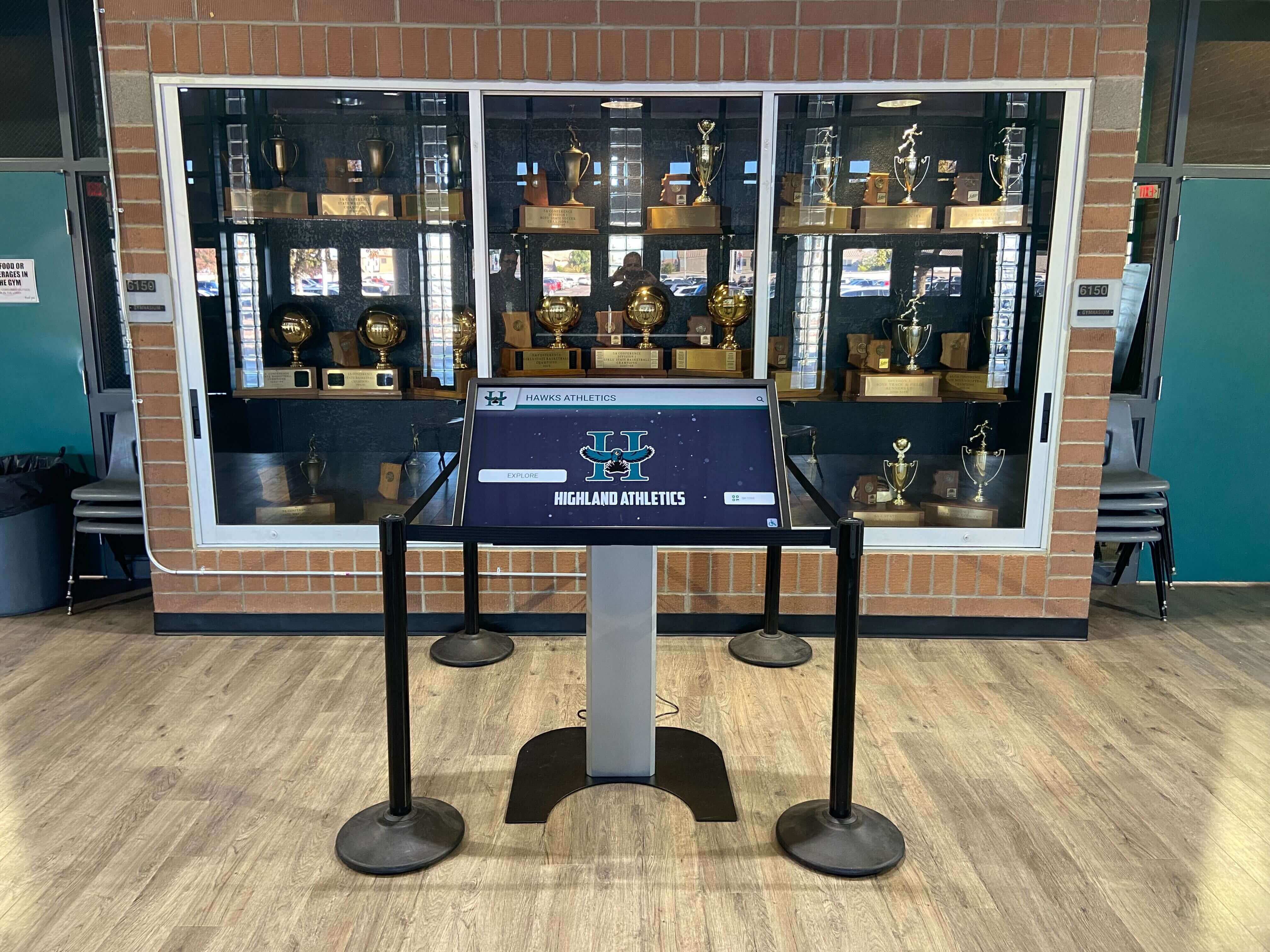
Professional installations integrate seamlessly with existing trophy cases and recognition displays
First Interaction: The Attract Loop
What Appears When Nobody’s Touching
Interactive display boards need compelling attract modes drawing attention in busy hallways:
When idle, the screen cycles through eye-catching content designed to attract interaction rather than displaying static images. Rotating highlight reels showcase featured athletes, scholars, donors, or recent achievements with high-quality photography and motion graphics. Dynamic statistics display real-time or frequently updated information including athletic records, academic milestones, or fundraising progress creating reasons for repeat visits. Branded content reinforces institutional identity through logos, mascots, school colors, and pride messaging. Clear call-to-action prompts invite interaction with messages like “Touch to Explore” or “Tap to Learn More” accompanied by animated visual cues.
This attract mode serves dual purposes: providing value to passersby who don’t stop to interact while enticing those with time to engage deeper. The balance between informative passive viewing and compelling interaction prompts distinguishes effective installations from those that become ignored background noise.
Stop 2: Student Interaction and User Experience
Moving from passive viewing to active engagement reveals how interactive display boards transform static recognition into dynamic experiences.
The Initial Touch: Launching the Interface
From Attract Mode to Active Exploration
The moment someone taps the screen, the interface transitions from passive display to active tool:
Touch responsiveness feels immediate and natural—screens respond within milliseconds just like smartphones, creating familiar interaction patterns requiring no learning curve. The attract loop fades smoothly to reveal the main navigation interface presenting clear options for exploration. Large, touchable tiles or buttons organize content into logical categories including Athletics, Academics, Donors, History, or other institution-specific sections. Visual hierarchy uses size, color, and placement to guide users toward primary content while keeping secondary options accessible.
Well-designed interfaces require no instructions—users intuitively understand how to navigate, explore, and return to previous screens through universally recognized gestures and visual conventions learned from consumer technology experiences.

Intuitive interfaces enable visitors of all ages to explore recognition content without training or assistance
Navigating Content: A Typical User Journey
Following a Student Exploring Athletic Recognition
Let’s follow a student’s actual interaction journey to understand typical usage patterns:
Starting Point: Main Menu The student taps “Athletics” from the main navigation, revealing sport-specific categories arranged with clear icons and labels—Football, Basketball, Soccer, Track & Field, and more. Each category displays current season highlights, recent achievements, or featured athletes attracting attention.
Selecting a Sport: Basketball Tapping Basketball reveals multiple exploration paths: Current Roster, Record Holders, All-Time Greats, Championship History, and Season Highlights. The interface provides freedom to explore based on current interest rather than forcing linear navigation.
Exploring Profiles: Individual Athletes Selecting “All-Time Greats” displays a grid of former athletes with profile photos, names, graduation years, and key statistics visible at a glance. Tapping any individual athlete reveals their complete profile including comprehensive statistics, career highlights, awards and honors, action photography or video clips, and current accomplishments for recent alumni demonstrating life after high school.
This multi-level information architecture accommodates both quick lookups (“Who holds the scoring record?”) and deep exploration sessions where engaged users spend several minutes discovering connections and achievements.
Similar interactive experiences enhance academic recognition programs celebrating scholarly achievement alongside athletic success.
Advanced Interactions: Search and Filtering
Beyond Category Browsing
Sophisticated interactive display boards include search functionality enabling direct access:
Virtual keyboards allow users to search by name, year, sport, achievement, or other criteria depending on database structure and content organization. Filtering options narrow large datasets—viewing only scholarship recipients, championship team members, or specific graduation year classes. Sorting capabilities arrange content alphabetically, chronologically, by achievement level, or through custom ranking algorithms.
These advanced features prove particularly valuable for alumni visitors returning to campus searching for specific names, donor recognition walls with hundreds of contributors, or comprehensive athletic programs with decades of history to explore.
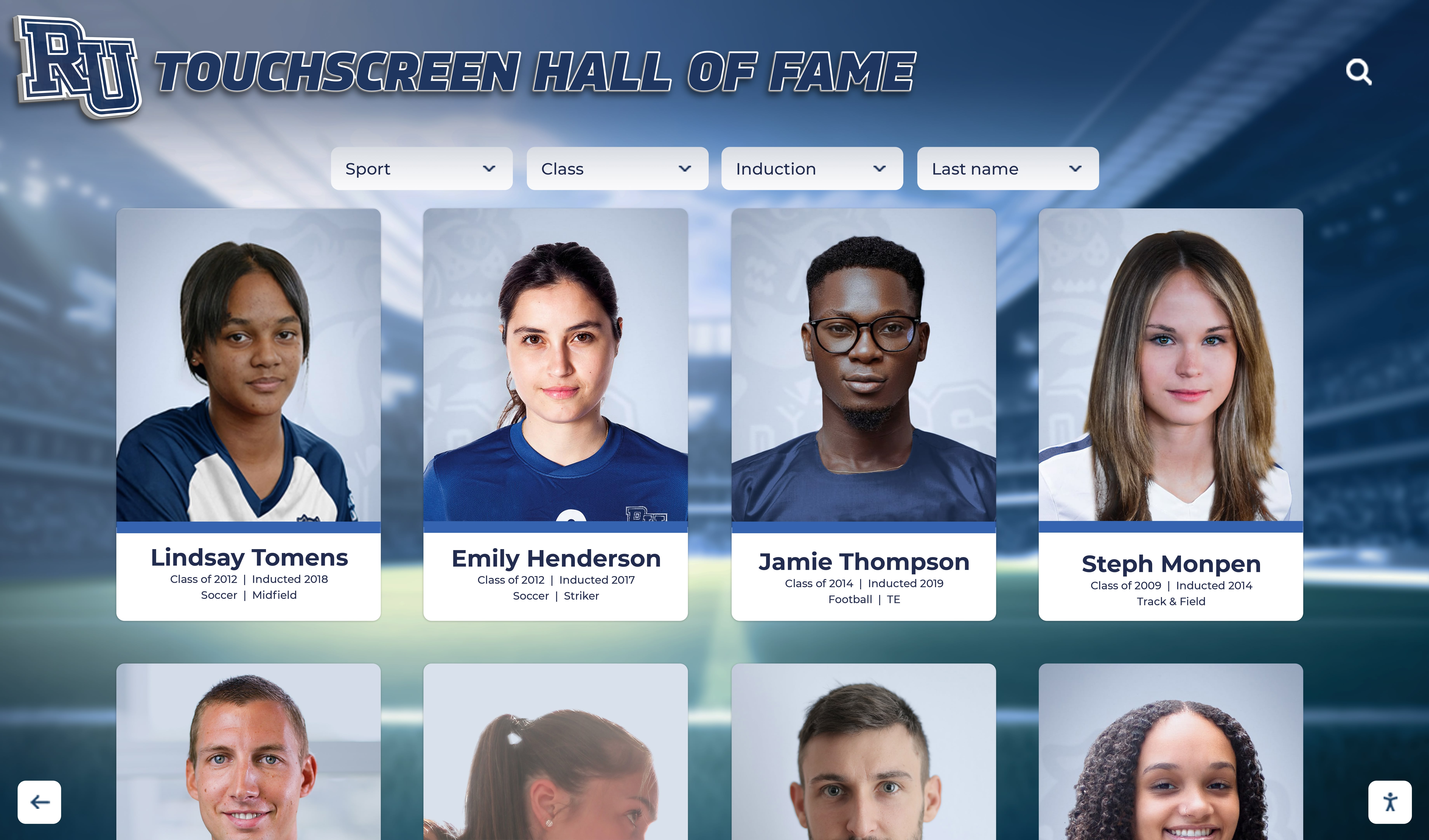
Grid layouts enable efficient browsing of extensive recognition databases with hundreds of profiles
Stop 3: Content Presentation and Multimedia Integration
Understanding what content appears on interactive display boards and how multimedia enhances recognition reveals their advantage over static alternatives.
Profile Pages: Comprehensive Recognition
What Appears for Individual Honorees
Individual profile pages demonstrate how digital recognition exceeds traditional plaques:
Visual Elements High-resolution photography provides primary visual anchors—professional portraits, action shots, candid moments, or historical photographs depending on content type and availability. School branding elements including logos, colors, and design motifs create cohesive visual identity across all profiles. Background imagery might include relevant locations like athletic fields, campus buildings, or contextual scenes.
Textual Information Comprehensive biographical details impossible to fit on physical plaques: full names with proper pronunciation, graduation or honor year, specific achievements, awards, and recognition, statistical information and records, quotes or testimonials when available, and connection to current programs or institutional history.
Multimedia Enhancements Video integration transforms recognition from static to dynamic: highlight reels showcase athletic performance, interview clips capture personal stories and reflections, acceptance speeches preserve significant moments, and historical footage brings past eras to life.
Audio narration can supplement visual content for accessibility while adding personal dimension to recognition. Interactive timelines connect individual achievements to broader institutional history.
Dynamic Content: Real-Time Updates
Living Recognition vs. Static Displays
Interactive display boards serve as always-current information sources:
Athletic statistics update automatically as seasons progress—current leaders, recent records, live tournament brackets, and updated standings appear without manual intervention. End-of-year awards for students get added immediately following ceremonies rather than waiting for annual plaque orders. Fundraising thermometers reflect real-time donation totals encouraging continued giving. Event calendars, announcements, and timely messaging keep content relevant beyond permanent recognition.
This currency maintains engagement—users return repeatedly because content changes rather than memorizing static displays they’ve seen countless times.
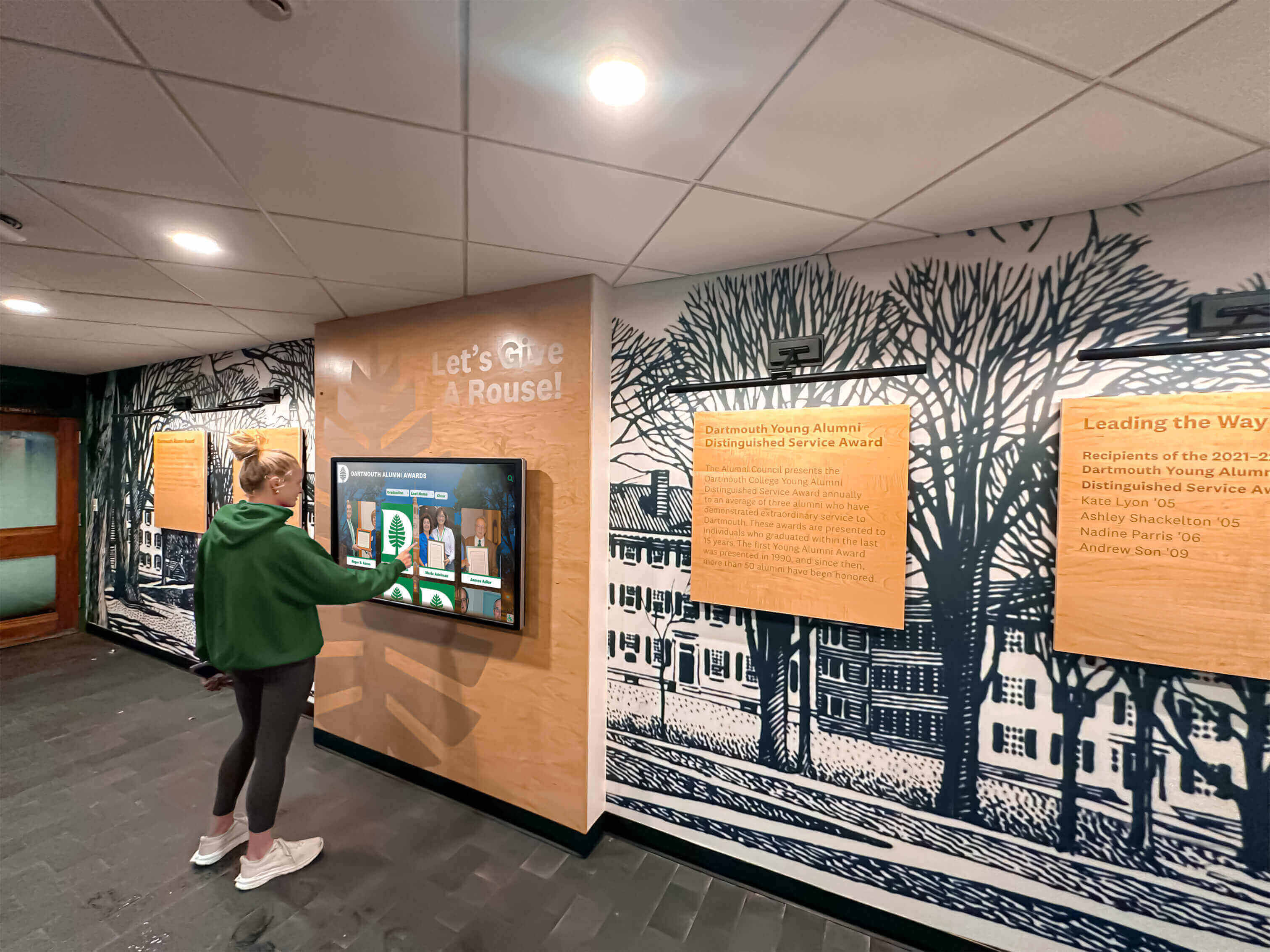
Strategic hallway placement enables casual exploration during passing periods and free time
Stop 4: Behind the Scenes—Content Management
The most critical aspect of interactive display boards happens off-screen: how content gets created, organized, and updated.
The Content Management System
Where Content Lives and Gets Updated
Professional interactive display boards separate content from presentation through cloud-based content management systems (CMS):
Remote Access and Management Authorized staff access the CMS through standard web browsers from any location—no need to physically touch displays or install special software. This remote capability proves invaluable during evenings, weekends, or when managing multiple displays across campus or district locations.
Content Organization The CMS structures content through logical hierarchies matching on-screen navigation: departments or categories (Athletics, Academics, Donors), sub-categories (individual sports, subject areas, giving levels), and individual entries (person profiles, team records, donor recognition).
Database architecture enables powerful relationships: an individual athlete appears automatically in multiple relevant sections—their sport’s all-time roster, record-holder lists, specific achievement categories, and graduation year groups—all maintained from a single profile entry rather than duplicating information across multiple locations.
Update Workflows Content updates follow structured processes ensuring quality and accuracy:
Staff create or modify content entries through web forms including all relevant fields—biographical information, achievements, statistics, and media uploads. Preview functions show exactly how content appears on displays before publishing. Approval workflows can require review by department heads, communications staff, or administrators before content goes live. Scheduled publishing enables preparing content in advance to appear automatically on specific dates—perfect for ceremony timing, seasonal updates, or announcement scheduling.
Updates appear on displays within seconds or minutes depending on sync frequency, ensuring recognition remains current. Comprehensive guides to software products for athletic administrators explore broader technology ecosystems supporting these content management needs.
Media Management and Organization
Handling Photos, Videos, and Graphics
Compelling interactive displays require extensive media libraries:
Photography Standards Professional-quality images create positive impressions: minimum resolution requirements ensure sharp display on large screens, consistent lighting and composition standards maintain visual coherence, appropriate file formats balance quality with loading performance, and organized naming conventions and metadata enable efficient retrieval from large libraries.
Video Integration Video content adds dynamic dimension: highlight compilations showcase athletic or academic performances, interviews capture personal stories and reflections, historical footage preserves institutional heritage, and ceremony recordings document significant recognition moments.
Processing pipelines optimize video for digital display delivery—transcoding to appropriate formats, compression balancing quality with file size, caption creation ensuring accessibility compliance, and hosting infrastructure supporting smooth streaming.
Graphic Design Assets Supporting graphics reinforce branding: logo variations and mascot artwork, background patterns and textures matching institutional identity, icons and interface elements maintaining consistent visual language, and custom layouts accommodating different content types.

Freestanding kiosk installations provide flexibility for locations without suitable wall mounting options
Accessibility and Inclusive Design
Ensuring Universal Access
Professional interactive display boards prioritize accessibility:
Physical Accessibility Mounting heights accommodate wheelchair users and individuals of varying heights. Touch zones position interactive elements within comfortable reach ranges. Clear floor space provides maneuvering room for mobility devices.
Digital Accessibility High contrast ratios ensure readability for users with visual impairments. Text sizing options allow enlargement for easier reading. Screen reader compatibility enables audio navigation for blind users. Caption availability accompanies all video content. Simple, clear language reduces barriers for diverse literacy levels.
Organizations committed to inclusive recognition should review WCAG-accessible digital displays ensuring all community members can engage with recognition content.
Stop 5: Integration with Broader Recognition Ecosystems
Interactive display boards work best when integrated with complementary recognition approaches rather than existing in isolation.
Physical and Digital Harmony
Combining Traditional and Interactive Recognition
The most effective recognition programs blend approaches:
Complementary Placement Interactive displays often enhance existing trophy cases, award displays, and recognition walls rather than replacing them entirely. Traditional elements provide physical artifacts and historical continuity while interactive displays add depth, context, and dynamic content impossible through physical objects alone.
Physical championship trophies displayed in cases gain enhanced meaning through adjacent interactive displays providing championship game highlights, team rosters, season statistics, and historical context. Traditional donor plaques acknowledging major gifts connect to interactive displays sharing donor stories, campaign progress, and organizational impact enabled by philanthropy.
Unified Visual Identity Cohesive design languages across physical and digital recognition create professional, intentional environments. Color palettes, typography, logo usage, and graphic treatments establish visual consistency whether viewing physical plaques or digital screens.
This integration approach recognizes that different recognition formats serve different purposes—physical trophies provide tangible proof and ceremonial significance while interactive displays offer comprehensive information, regular updates, and engaging exploration impossible through static formats. Schools exploring this balance should review traditional vs. digital trophy cases examining when each approach works best.
Multi-Display Coordination
Managing Multiple Interactive Displays
Growing recognition programs often expand to multiple displays:
Coordinated Content Strategies Main lobby displays serve different functions than athletic corridor installations or academic building placements. Content strategies align display purposes with locations—main entrances showcase institutional highlights for visitors, department-specific locations feature detailed recognition relevant to those areas, and high-traffic student zones emphasize current, frequently-changing content maintaining repeat engagement.
Centralized Management Cloud-based content management systems efficiently handle multiple displays: single content updates appear across all relevant displays automatically, different displays pull different subsets from unified databases based on local relevance, and scheduled content rotations keep displays fresh without individual programming.
Consistent User Experience Interface consistency across displays creates familiar experiences—users encountering interactive displays in different campus locations find similar navigation patterns, visual designs, and interaction models reducing learning curves and increasing engagement.
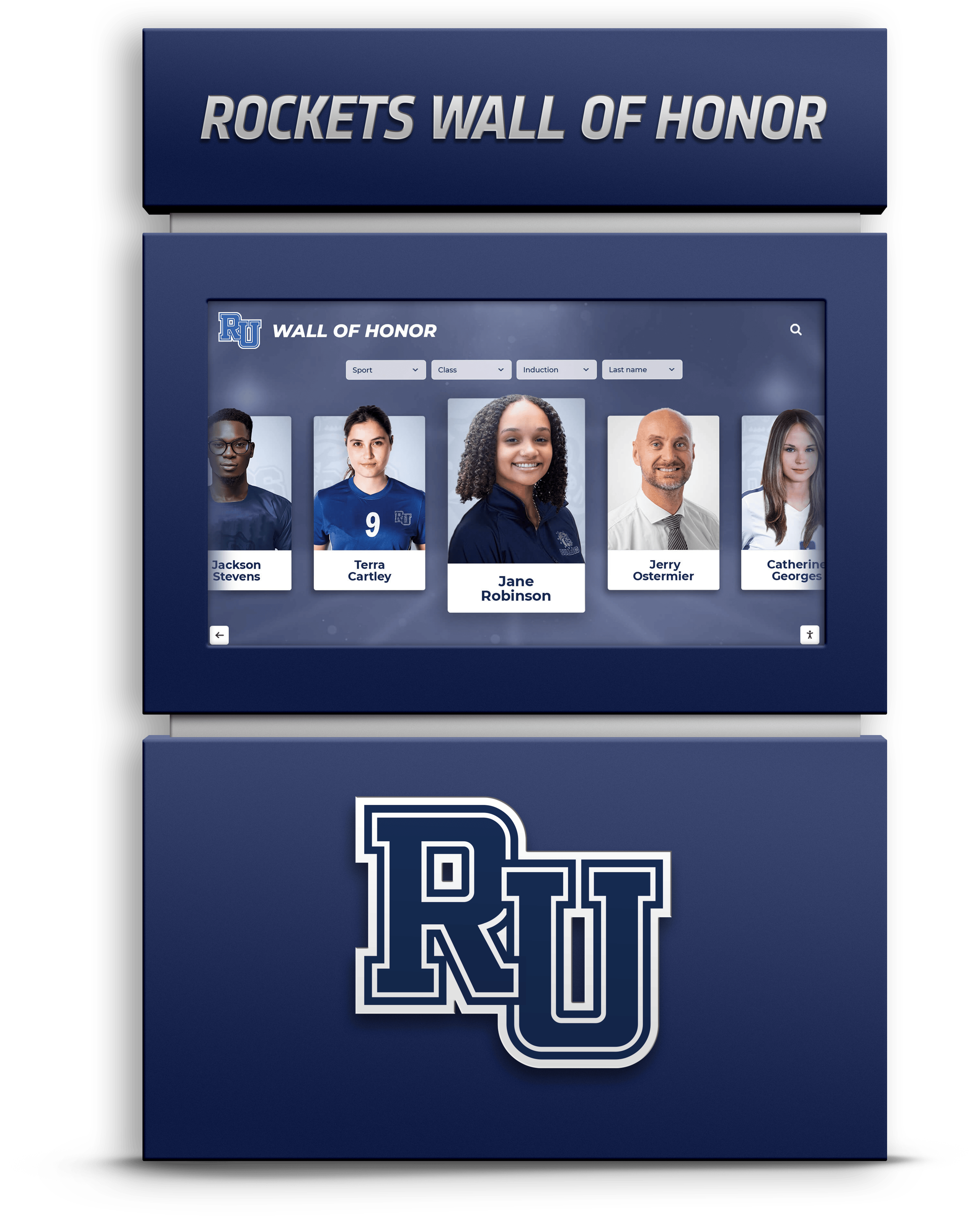
Large-format displays accommodate extensive recognition databases while maintaining clean, organized presentation
Stop 6: Use Cases Beyond Recognition
While recognition represents the primary application, interactive display boards serve broader institutional purposes.
Wayfinding and Campus Information
Helping Visitors Navigate
Interactive displays function as digital directories:
Building maps help visitors locate specific rooms, departments, or facilities without asking for directions. Staff directories enable finding contact information for administrators, teachers, or department personnel. Event calendars inform about upcoming activities, performances, competitions, or ceremonies. Emergency information provides assembly points, safety procedures, and critical contacts.
This multi-purpose functionality increases return on investment by serving daily operational needs alongside celebratory recognition.
Storytelling and Historical Archives
Preserving Institutional Heritage
Interactive displays excel at sharing institutional stories:
Timeline interfaces guide users through institutional history decade by decade, highlighting significant milestones, transformative moments, and evolving traditions. Photo galleries preserve visual heritage—campus evolution, historical events, and community memories. Oral history interviews capture first-person accounts from alumni, retiring faculty, or community members sharing experiences and perspectives.
Organizations building comprehensive historical resources should explore digital history archive approaches extending beyond physical displays.
Fundraising and Development Support
Engaging Donors Through Digital Recognition
Interactive displays serve advancement objectives:
Donor walls move beyond static name lists to share compelling donor stories, gift impact narratives, and campaign progress. Modern donor wall ideas increasingly incorporate digital components enabling dynamic recognition impossible through traditional plaques.
Giving level visualizations showcase different recognition tiers encouraging increased contributions. Impact stories demonstrate how donations translate to tangible outcomes—scholarships funded, programs created, facilities improved. Tribute options enable memorial and honorary gifts with meaningful recognition preserving legacies.
Community Engagement and Social Connection
Building Bridges Between Past and Present
Interactive displays facilitate connections:
Alumni visiting campus discover former classmates, teachers, and achievements triggering memories and conversations. Current students explore achievements of those who came before, recognizing that their own accomplishments may someday appear on these same displays. Families discover relatives honored across different eras, connecting personal heritage to institutional history.
Social sharing features enable photographing or emailing content, extending recognition beyond physical display locations to social media and personal communications amplifying visibility and pride.
Stop 7: Choosing the Right Interactive Display Solution
Understanding what to look for when evaluating interactive display board options ensures successful implementations.
Critical Features and Capabilities
What Separates Professional Solutions from Consumer Technology
Not all touchscreen displays offer equivalent capabilities:
Hardware Durability Commercial-grade components withstand high-traffic institutional environments far better than consumer electronics. Look for displays rated for 16-24 hour daily operation rather than residential 4-8 hour assumptions. Tempered glass and reinforced enclosures protect against accidental impacts. Industrial-grade touch sensors maintain responsiveness despite constant use.
Content Management Sophistication Professional solutions separate content from display hardware through cloud-based management systems. This architecture enables remote updates, multi-display coordination, scheduled content rotation, and role-based access controls. Consumer-grade alternatives often require physical access to displays for updates or use inflexible proprietary systems limiting customization.
Support and Maintenance Enterprise solutions include ongoing technical support, software updates, security patches, and proactive monitoring. Consumer products typically offer minimal support after purchase with no long-term update commitments.
Implementation Considerations
Planning for Success
Successful interactive display implementations require systematic planning:
Needs Assessment Clarify objectives before selecting technology: What content needs display? Who are primary users? What actions should displays enable? How frequently will content change? These answers guide appropriate solution selection.
Content Readiness Gather content before installation: Collect photographs, compile statistics and achievements, verify biographical information accuracy, and organize data into logical structures. Nothing frustrates administrators more than expensive displays sitting empty because required content doesn’t exist yet.
Training and Adoption Plan for staff training on content management systems and establish clear processes for submitting updates, reviewing accuracy, and maintaining quality standards. Identify content champions responsible for keeping displays current rather than assuming maintenance happens automatically.
Organizations implementing comprehensive recognition systems should review guides to touchscreen kiosk solutions for schools covering technical specifications and deployment best practices.
The Evolution of School Recognition
Interactive display boards represent significant evolution in how schools celebrate achievement, honor contributors, and preserve heritage. Moving from static plaques requiring annual ordering, engraving, and physical mounting to dynamic digital systems that update instantly, accommodate multimedia content, and enable engaging exploration changes both the economics and effectiveness of recognition programs.
The visual walkthrough presented here demonstrates that successful interactive display implementations combine thoughtful hardware selection, strategic placement, intuitive interface design, comprehensive content management, and integration with broader recognition ecosystems. Schools considering these investments should evaluate solutions based on long-term capability rather than initial cost, understanding that professional platforms supporting sustained engagement deliver far greater value than consumer-grade alternatives requiring replacement within years.
As educational institutions increasingly recognize that physical environments influence culture, engagement, and community pride, interactive display boards provide powerful tools for transforming recognition from periodic ceremonies and forgotten plaques into ongoing, visible celebrations that inspire current students while honoring those who came before.
Ready to see how an interactive display board would work in your school? Rocket Alumni Solutions specializes in turnkey touchscreen recognition systems designed specifically for educational institutions. Our platform combines commercial-grade hardware, intuitive content management, and comprehensive support enabling schools to create engaging recognition experiences without technical complexity. Explore interactive display solutions and schedule your personalized demo to see exactly how modern recognition technology can transform your school’s approach to celebrating achievement.































