



Traditional flip-through class composite displays have served schools for generations, preserving the faces and names of graduating seniors in physical photo albums or wall-mounted frames. These displays allow visitors to browse through decades of school history, discovering class photos organized year by year. Yet this traditional format faces limitations: physical composites deteriorate over time, occupy increasing wall space as decades accumulate, remain inaccessible to remote alumni, and lack the search capabilities that modern users expect.
Interactive digital class composite displays solve these challenges while preserving the core purpose of traditional composites. These touchscreen systems enable visitors to browse class photos by year, search for specific individuals, explore detailed student information, and engage with multimedia content that brings graduation history to life. Whether installed in school lobbies, alumni centers, or reunion venues, digital composites provide the familiar year-by-year browsing experience people expect while adding capabilities impossible with traditional physical formats.
This comprehensive guide explores how schools can implement interactive digital class composite displays that honor tradition while providing the accessibility, searchability, and engagement that modern communities expect from recognition systems.
Digital class composite displays don’t replace the nostalgic experience of browsing through graduation photos. Instead, they improve this experience by making every graduating class equally accessible, enabling instant search for specific individuals, preserving photos that would otherwise deteriorate, and extending access to alumni who can no longer visit campus physically.

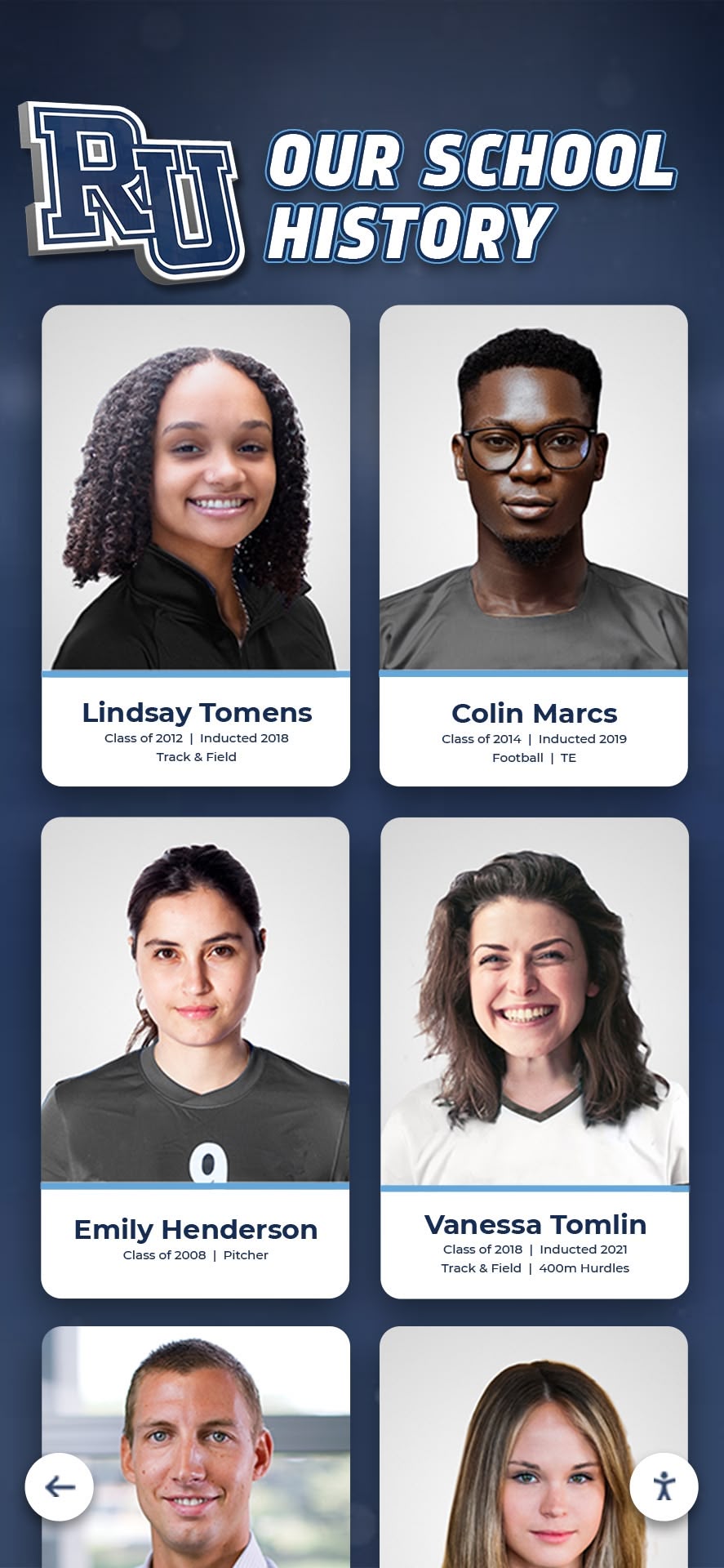
Modern digital class composites preserve individual student recognition while enabling intuitive year-by-year browsing
Understanding Digital Class Composite Displays
Before implementing interactive class composite systems, understanding how they function and what distinguishes quality solutions from basic photo galleries helps schools make informed decisions matching their recognition goals and community needs.
What Is a Digital Class Composite Display?
A digital class composite display is an interactive touchscreen system that organizes graduating class photos chronologically, enabling visitors to browse by year, search for specific students, and access detailed information about each graduating class and individual senior. These systems replicate the familiar flip-through experience of traditional composites while adding search, multimedia, and remote access capabilities.
Core System Components
Complete digital class composite systems integrate several elements:
- Commercial-grade touchscreen displays: Professional interactive screens designed for continuous operation in school lobbies and common areas
- Cloud-based content management platform: Web-based software enabling remote updates from any device without requiring on-site access
- Chronological navigation interface: Year-by-year browsing that mirrors the traditional composite experience familiar to generations of alumni
- Individual student profiles: Detailed pages for each senior containing photos, activities, achievements, and post-graduation information
- Search functionality: Name-based lookup enabling instant discovery without manual year-by-year browsing
- Web-based access portals: Mobile-responsive websites extending composite access to alumni unable to visit campus
- Media storage infrastructure: Cloud hosting for thousands of student photos across decades of graduating classes
This integrated approach transforms simple photo galleries into comprehensive historical archives preserving institutional memory while making it accessible to current and future generations.
How Digital Composites Differ from Traditional Yearbooks
While yearbooks document complete school years with activities, events, and candid photos throughout the year, class composites focus specifically on graduating seniors, creating permanent records of each class organized chronologically rather than by individual student interests or activities captured in yearbook format.
Traditional Composite Characteristics
Physical class composites typically display:
- Formal senior portraits arranged in organized grids
- Limited biographical information beyond names and graduation years
- Class officers and leadership positions
- School and class identification
- Professional framing for permanent display
Digital Composite Improvements
Interactive digital composites maintain this focus on graduating seniors while adding:
- Expandable biographical profiles beyond what fits on physical plaques
- Search capabilities enabling instant discovery
- Multimedia elements including video messages and ceremony footage
- Post-graduation information tracking career paths and achievements
- Related content connections linking classmates and contemporaries
- Accessibility for remote alumni through web-based access
These improvements preserve composite traditions while solving limitations that frustrate users of traditional physical-only formats.
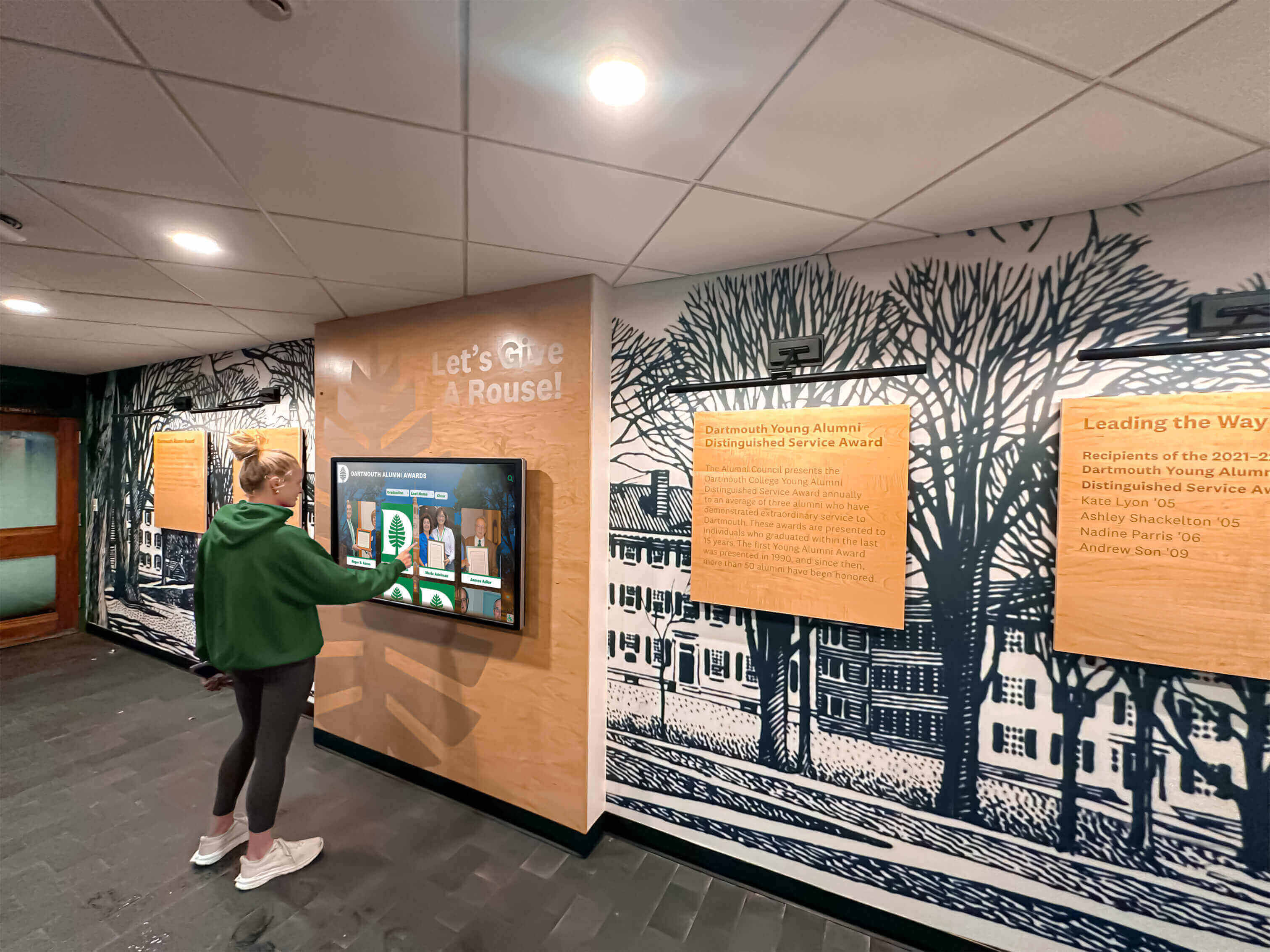
Intuitive touchscreen interfaces enable natural exploration of graduation history without technical expertise
Why Schools Are Implementing Digital Class Composites
Understanding the benefits driving digital composite adoption helps schools evaluate whether this investment matches their goals for preserving graduation traditions and engaging alumni communities.
Unlimited Space for Growing Archives
Physical composite displays face inevitable space constraints as graduating classes accumulate year after year. Digital systems eliminate this fundamental limitation entirely.
Overcoming Physical Capacity Limits
Traditional composites consume wall space that eventually becomes scarce:
- Standard composite frame size: 24" × 36" (2 square feet per class)
- 50 years of composites: 100+ square feet of wall space required
- Older composites often relegated to storage or removed entirely
- Prime hallway locations reserved for recent classes only
- Historical composites from early decades may never receive visibility
Digital platforms provide unlimited capacity enabling schools to showcase every graduating class from founding to present without space constraints forcing difficult decisions about which years receive visibility.
Equal Recognition Across All Eras
When schools run out of physical display space, they inevitably prioritize recent graduating classes, relegating historical composites to storage. This creates invisible graduating classes whose members contributed equally to institutional history but lack recognition simply because their graduation years occurred decades ago.
Digital systems restore equal recognition opportunity by making the Class of 1965 as accessible as the Class of 2025, honoring all graduates regardless of when they attended school.
Schools implementing comprehensive digital archives often discover class composite presentation approaches that coordinate physical and digital recognition for maximum impact.
Remote Accessibility for Dispersed Alumni
Geographic distance prevents many alumni from viewing their class composites after graduation. Digital systems extend access far beyond school walls to reach graduates worldwide.
Global Web Access
Cloud-based platforms enable alumni to:
- View their graduating class composites from anywhere with internet connectivity
- Share class photos with family members who never visited campus
- Explore multiple graduating classes during reunion planning
- Access composites on mobile devices during travel
- Maintain connections to school history regardless of distance
This extended accessibility particularly benefits older alumni with mobility limitations, graduates living internationally, and family members interested in understanding relatives’ educational experiences.
Increased Engagement Through Accessibility
Schools implementing web-accessible composites consistently report increased alumni engagement including higher reunion attendance rates, stronger response to fundraising appeals, more frequent website visits and digital interaction, and greater participation in mentorship programs connecting alumni with current students.
These engagement improvements typically justify composite display investments through increased alumni giving alone, even before considering other benefits like current student inspiration or prospective family recruitment.
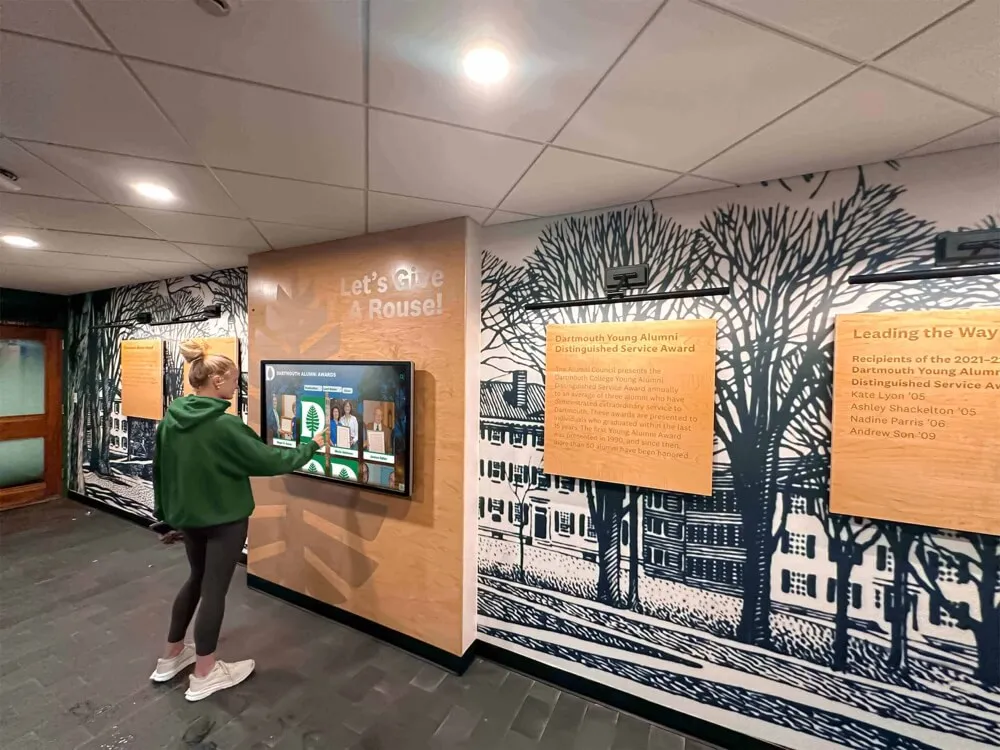
Web-based access enables alumni worldwide to explore graduation history and maintain school connections
Powerful Search and Discovery Features
Traditional physical composites require manual browsing through potentially dozens of years to locate specific individuals. Digital systems enable instant discovery through robust search capabilities.
Name-Based Search
Visitors can enter names and immediately find matching students across all graduating classes without knowing graduation years or browsing chronologically. This instant discovery proves particularly valuable during:
- Reunion planning when classmates search for each other
- Alumni visits when graduates seek specific friends or relatives
- Family research when children or grandchildren explore ancestors
- Historical research when community members investigate institutional connections
Filter-Based Discovery
Beyond name search, digital composites enable filtering by:
- Graduation year or decade ranges
- Class officer positions and leadership roles
- Activities, sports, and organization participation
- Post-graduation colleges attended or career paths
- Special designations or achievements
These filters support both targeted searches and exploratory browsing, enabling users to discover unexpected connections and interesting patterns within institutional history.
For comprehensive approaches to organizing historical content, schools can explore digital archives for schools that coordinate composite displays with broader institutional documentation.
Rich Multimedia Enhancement
Physical composites display static photographs with limited text information. Digital platforms enable comprehensive storytelling through multiple media types.
Video Integration
Engaging digital composites incorporate:
- Graduation ceremony footage from specific years
- Senior video messages recorded during final year
- Reunion videos showing classmates reconnecting decades later
- Historical school footage providing context for specific eras
- Interview recordings with notable alumni from specific classes
These video elements create emotional connections impossible with still photographs alone, bringing composite browsing to life while honoring graduates more comprehensively.
Expandable Biographical Content
While physical composites show faces with perhaps names and graduation years, digital profiles can include:
- Student activities and achievements during school years
- Class officer positions and leadership roles
- Athletic participation and performance statistics
- Arts involvement including theater, music, and visual arts
- Academic honors and scholarship recognition
- Post-graduation college attendance and degrees earned
- Career information and professional accomplishments
- Family connections when multiple generations attended
- Reunion participation and continued school engagement
This expanded information transforms simple photo directories into rich biographical resources documenting not just who graduated but what students accomplished and how education prepared them for life after graduation.

Individual profile cards enable detailed exploration of each student's story and achievements
Planning Your Digital Class Composite Implementation
Successful digital composite implementation requires systematic planning addressing content, technology, and community considerations to ensure displays honor graduation traditions while meeting modern expectations.
Phase 1: Content Assessment and Gathering
Inventory Existing Composite Materials
Begin by documenting what composite materials currently exist:
- Physical composites displayed in school buildings
- Stored composites in administrative areas or basements
- Digital files from photography companies for recent years
- Yearbook archives containing senior sections
- Alumni association historical collections
- Newspaper archives with graduation coverage
This inventory establishes what content requires digitization versus what already exists in digital formats, clarifying project scope and timeline requirements.
Prioritize Digitization Approach
Rather than attempting to digitize complete institutional history immediately, strategic approaches begin with:
- Recent composites (last 10-15 years) where digital files may already exist and current families show greatest interest
- Milestone years including founding classes, major anniversaries, and historically significant graduating classes
- Systematic historical expansion working backward through earlier decades in manageable phases
Phased digitization makes projects manageable within budget constraints while delivering value quickly rather than delaying implementation until complete historical archives are prepared.
Professional Scanning Services
For schools with extensive physical composite collections, professional digitization services provide efficient, high-quality conversion:
- Large-format scanning capable of handling composite sizes (often 24" × 36" or larger)
- Color correction ensuring accurate reproduction
- Format standardization creating consistent digital files
- Metadata capture organizing composites systematically
Professional services typically range from $15-35 per composite depending on size and complexity, but deliver superior results compared to consumer-grade equipment or smartphone photography used in-house.
For systematic approaches to historical preservation, schools should explore digitizing old yearbooks that can coordinate with composite digitization projects.
Phase 2: Technology Platform Selection
Choosing appropriate digital composite platforms significantly impacts user experience, administrative efficiency, and long-term satisfaction.
Recognition-Specific vs. Generic Signage
Purpose-built recognition platforms like Rocket Alumni Solutions offer significant advantages over generic digital signage systems adapted for composite display:
Essential Platform Capabilities
- Chronological organization with year-by-year browsing
- Individual student profile management
- Robust name-based search across all graduating classes
- Mobile-responsive web access extending beyond physical displays
- Intuitive content management requiring no technical expertise
- Unlimited photo storage supporting extensive archives
- Privacy controls appropriate for student information
- Analytics revealing engagement patterns
- Integration capabilities with student information systems when desired
Avoiding Platform Mistakes
Schools sometimes select inappropriate platforms creating frustration:
- Generic photo galleries lacking composite-specific organization
- Basic slideshow systems without interactive browsing capability
- Custom development requiring ongoing technical resources
- Consumer-grade technology inappropriate for institutional longevity
- Platforms without mobile web access limiting alumni reach
- Systems requiring frequent manual content recreation
Choosing education-specific platforms from established vendors prevents these problems while ensuring support teams understand unique institutional needs and privacy requirements.

Professional kiosk installations create dedicated composite browsing destinations in high-traffic areas
Phase 3: Hardware Considerations
Display hardware significantly impacts user experience and long-term satisfaction with composite systems.
Critical Hardware Specifications
Display Requirements
- Size: 43-55 inches for smaller spaces; 65-75 inches for large lobbies ensuring visibility
- Touch technology: Capacitive or infrared multi-touch providing responsive interaction
- Resolution: Minimum 1080p; 4K preferred for larger displays ensuring photo clarity
- Commercial grade: Displays rated for 16-24 hour daily operation unlike consumer televisions
- Brightness: 350-500 nits for typical indoor environments
- Durability: Tempered glass and vandal-resistant construction for public environments
Installation Considerations
- Secure mounting meeting safety standards
- Appropriate viewing heights for standing interaction
- ADA-compliant accessibility meeting universal design requirements
- Anti-glare positioning minimizing window reflections
- Professional cable management maintaining clean appearance
- Electrical work meeting local codes
- Network configuration ensuring reliable connectivity
Schools should budget $3,000-8,000 per display unit for commercial-grade hardware and $800-2,500 for professional installation depending on size, features, and facility conditions.
Freestanding Kiosks vs. Wall-Mounted Displays
Freestanding kiosk enclosures offer flexibility for spaces where wall mounting proves impractical:
- Portable installations that can relocate for special events
- Integrated security features protecting equipment
- Cable management built into enclosure design
- Professional appearance enhancing school aesthetics
Wall-mounted displays work well for dedicated recognition spaces with available wall surfaces and permanent installation intentions.
Phase 4: Strategic Location Selection
Display placement dramatically affects composite visibility and engagement outcomes.
Optimal Placement Locations
- Main entrance lobbies: Ensuring all visitors encounter composites immediately upon arrival
- Alumni welcome areas: Creating dedicated spaces for graduate connection and nostalgia
- Reunion venues: Supporting class gatherings with accessible composite browsing
- Administrative corridors: Reaching parents and community visitors during meetings
- Library or media centers: Encouraging extended exploration in spaces with natural dwell time
Creating Composite Destinations
Most effective implementations transform areas into recognition destinations through:
- Comfortable seating encouraging extended browsing
- Coordinated graphics and murals reinforcing school identity
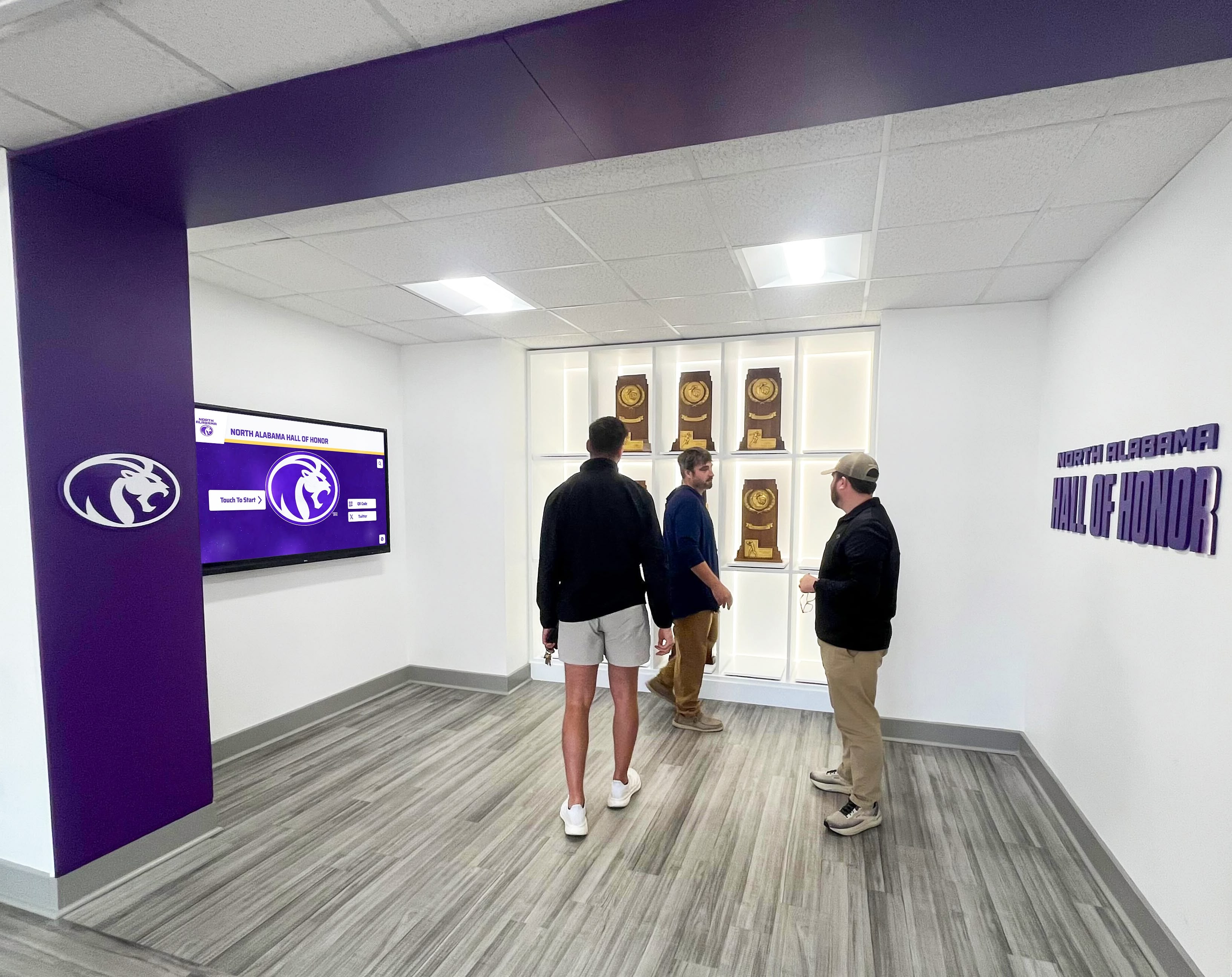
- Integration with traditional trophy cases and achievement displays
- Appropriate lighting highlighting composite areas
- Clear wayfinding directing visitors to composite locations
These integrated approaches signal institutional commitment to preserving graduation traditions while encouraging engagement that strengthens alumni connections.
For schools creating comprehensive recognition environments, exploring interactive display technology for school lobbies provides frameworks for coordinating composite displays with other institutional recognition.
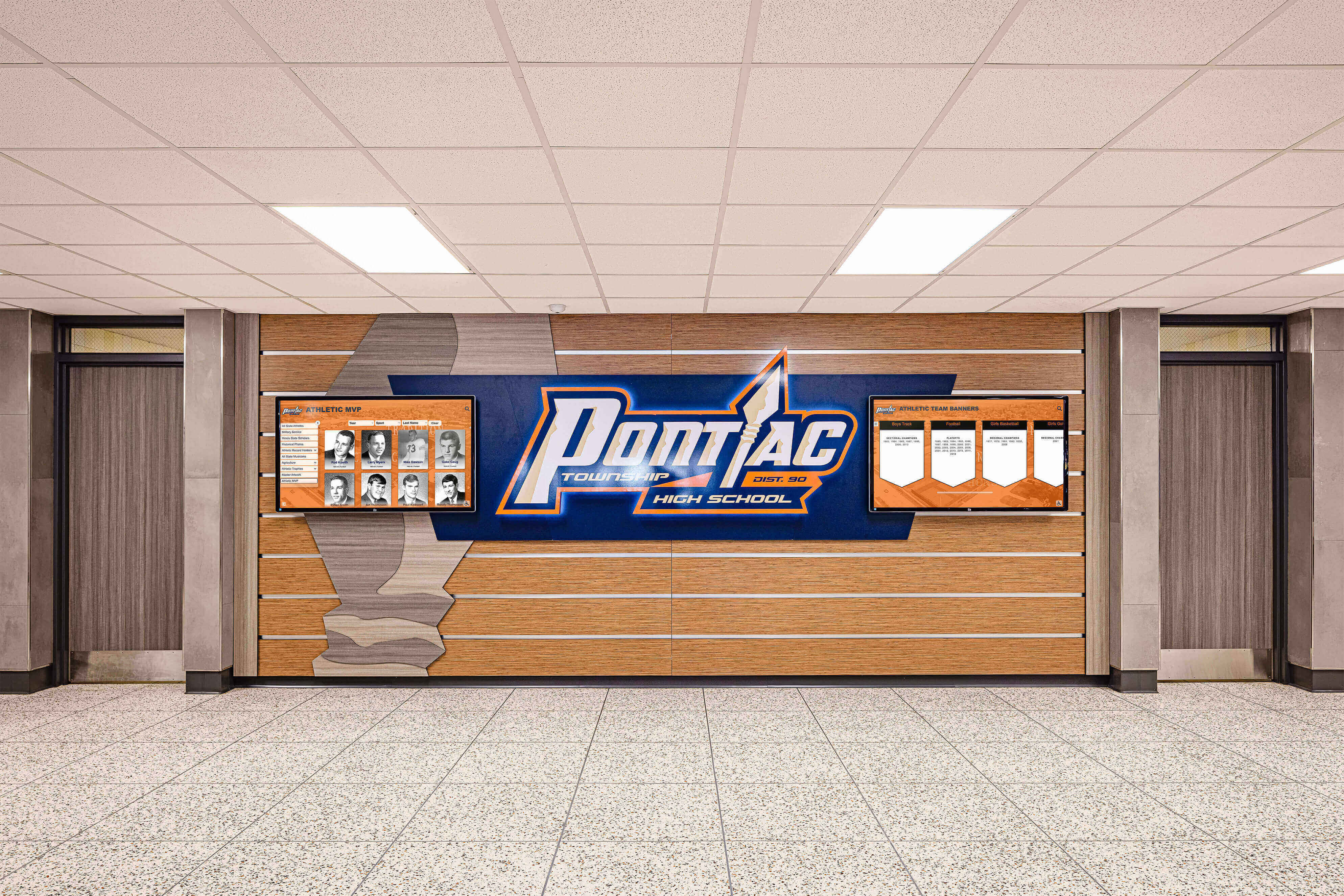
Coordinated recognition spaces integrate class composites with other achievement displays creating comprehensive environments
Creating Compelling Digital Composite Content
Technology provides infrastructure, but engaging content determines whether digital class composites achieve intended goals for preserving graduation traditions and connecting alumni generations.
Individual Student Profile Development
Each graduating senior deserves comprehensive recognition honoring their contributions to school community and documenting their journey.
Essential Profile Elements
Basic student profiles should include:
- Formal senior portrait photograph
- Full name with preferred nicknames when appropriate
- Graduation year prominently displayed
- Class officer positions if held
- Major activities, sports, and organization participation
- Academic honors and special recognitions
- Post-graduation college attendance when known
- Brief biographical information appropriate for public display
Enhanced Profile Content
More comprehensive profiles add value through:
- Multiple photographs from various school years and activities
- Senior quotes or personal reflections
- Video messages recorded during senior year
- Reunion photos showing graduates in later years
- Career information and professional accomplishments
- Family connections when multiple generations attended
- Notable achievements after graduation
- Current location and contact preferences
This expanded content transforms basic directories into rich biographical resources honoring complete student experiences rather than just graduation moment documentation.
Privacy and Consent Considerations
Some students and families may prefer privacy regarding personal information for various legitimate reasons. Effective systems should:
- Allow students or families to request exclusion from public-facing displays
- Provide options limiting visibility of certain biographical information
- Ensure appropriate permissions are obtained before publication
- Include clear privacy policies developed with school administration
Clear privacy procedures prevent problems while respecting individual preferences and maintaining compliance with educational privacy regulations.
Class-Level Content and Context
Beyond individual profiles, class-level content provides context about specific graduating years.
Class Overview Pages
Each graduating class should include:
- Class size and demographic information
- Class officers and leadership team
- Class motto, colors, or other identifying information
- Graduation ceremony date and location
- Major school events or achievements during senior year
- Historical context about the era (local, national, or world events)
- Reunion information and attendance records
Multimedia Class Content
Rich class pages incorporate:
- Graduation ceremony video footage
- Senior class photos showing complete graduating groups
- Award presentations and special recognitions
- Performance footage from senior year productions or events
- Athletic championship coverage from that year’s teams
- Historical photographs showing school facilities during that era
This contextual content transforms individual student profiles into comprehensive graduating class documentation preserving institutional memory far more completely than simple name-and-face directories.
For institutions creating comprehensive historical documentation, exploring developing college history timelines provides frameworks that can incorporate class composite information within broader institutional narratives.
Organizing Content for Year-by-Year Browsing
Intuitive chronological organization enables the familiar flip-through experience that makes composites accessible to users of all ages and technical comfort levels.
Chronological Navigation Design
Effective year-by-year browsing includes:
- Decade-based organization (1960s, 1970s, etc.) providing high-level navigation
- Individual year selection within decades
- Timeline visualizations showing institutional growth over eras
- Featured class rotation highlighting historically significant years
- Jump-to-year functionality enabling quick navigation to specific dates
Supplementary Navigation Paths
While chronological browsing remains primary, additional paths support different user goals:
- Name search enabling instant discovery without knowing graduation years
- Alphabetical directory across all graduating classes
- Filter by activities, sports, or organizations
- Related content connections linking classmates and contemporaries
- Random discovery featuring unexpected profiles
This multi-faceted organization ensures all visitors can explore composites matching their interests whether browsing nostalgically through their own graduation era or searching specifically for individual classmates.

Intuitive interfaces enable both chronological browsing and instant name-based search across decades
Maintaining Digital Composites Long-Term
Digital systems require ongoing attention ensuring they remain current, accurate, and engaging as new classes graduate and institutional history continues evolving.
Annual Update Processes
New Graduating Class Integration
Establish systematic workflows for adding recent graduating classes:
- Coordinate with photography companies to obtain digital senior portrait files
- Collect student information from school records and senior surveys
- Prepare biographical content including activities and achievements
- Upload photos and information to composite platform
- Review and verify accuracy before publication
- Announce new composite availability to community
- Coordinate timing with graduation ceremonies or alumni events
Regular update schedules ensure systems remain current rather than becoming outdated archives that current students ignore because recent classes are missing.
Historical Archive Expansion
Continue systematic digitization of older composites not included in initial implementation:
- Designate historical research as ongoing project for specific staff members
- Engage alumni volunteers in gathering and verifying historical information
- Partner with historical societies or libraries holding relevant archives
- Assign student organizations composite research as service learning projects
These ongoing processes gradually build comprehensive archives spanning complete institutional histories without requiring massive upfront investments that may prove prohibitive.
Content Quality and Accuracy
Verification and Correction
Digital systems make fixing errors dramatically easier than with physical composites. Establish processes for:
- Correcting misspelled names discovered by alumni
- Adding missing individuals omitted from original composites
- Updating biographical information as alumni achieve new accomplishments
- Responding to community requests for changes or clarifications
- Regular quality reviews ensuring consistent standards
This ongoing quality improvement ensures composites remain accurate and valuable resources rather than flawed historical records perpetuating errors indefinitely.
Community Contribution Opportunities
Engage alumni in improving composite content through:
- Update submission forms enabling alumni to share post-graduation information
- Photo contribution campaigns gathering additional images from personal collections
- Memory collection initiatives documenting class stories and experiences
- Reunion coordination enabling bulk updates for specific graduating classes
- Volunteer opportunities for alumni interested in historical research
Community involvement improves content quality while strengthening alumni engagement and investment in institutional recognition traditions.
For schools exploring comprehensive approaches to maintaining historical content, learning about best school history software provides frameworks for sustainable long-term management.
Promoting Composite Engagement
Regular Feature Content
Keep composites top-of-mind through consistent promotion:
- Featured graduating class highlights on school websites and newsletters
- Social media posts showcasing specific years or individual alumni
- Email campaigns announcing milestone reunion years
- Blog content exploring institutional history through composite archives
- Event promotion incorporating composite exploration opportunities
Consistent visibility drives ongoing engagement rather than initial excitement that fades as novelty wears off.
Reunion Integration
Coordinate composite displays with reunion planning:
- Featured class content highlighting upcoming reunion years
- Temporary display installations at reunion venues
- Web-based access enabling remote classmate browsing during planning
- Custom composite URLs shareable in reunion invitations
- Photo collection campaigns gathering reunion photos for archive updates
These reunion connections demonstrate composite value while strengthening alumni relationships with schools and each other.
Composite displays create natural gathering points during reunions where alumni reconnect around shared memories
Special Considerations and Best Practices
Educational institutions face unique factors requiring thoughtful consideration when implementing composite display systems.
Balancing Tradition with Innovation
Many alumni hold strong emotional attachments to traditional composite formats. Successful implementations honor these feelings while demonstrating enhanced value.
Hybrid Approaches
Consider combining selective physical composites with comprehensive digital systems:
- Maintain traditional composites for most recent 5-10 years in prime hallway locations
- Display milestone composites (25th, 50th anniversary classes) in places of honor
- Use QR codes on physical composites linking to expanded digital versions
- Create dedicated composite rooms featuring both traditional and digital displays
These hybrid approaches honor tradition while solving space and accessibility limitations through digital enhancement.
Communication and Education
Help community understand digital composite value through:
- Demonstration events showing system capabilities during reunions or homecoming
- Tutorial videos explaining how to browse and search composites
- Success stories from early adopters who discovered value
- Transparent communication about preserving rather than replacing traditions
Thoughtful communication prevents resistance while building excitement about enhanced capabilities.
Photography Company Coordination
Many schools contract with professional photography companies for senior portraits and composite creation.
Vendor Collaboration
Coordinate digital implementation with photography vendors ensuring:
- Access to high-resolution digital files suitable for displays
- Clarification of licensing and usage rights for digital reproduction
- Coordination of composite formats supporting both traditional and digital needs
- Timeline alignment between photography delivery and display updates
- Discussion of integrated workflows reducing duplicate effort
Early coordination with photography vendors prevents implementation delays or licensing disputes that could derail projects.
For schools managing relationships with multiple recognition vendors, exploring digital donor recognition approaches provides frameworks applicable to composite coordination.
Historical Research and Documentation
Older composites may contain errors, missing information, or context requiring research to clarify.
Research Best Practices
- Verify names and spelling through multiple sources when possible
- Document uncertainty or gaps in historical records rather than guessing
- Engage older alumni in identifying individuals in historical photos
- Cross-reference yearbooks, newspapers, and other primary sources
- Preserve original physical composites even after digitization
This research commitment ensures digital archives provide accurate, valuable historical documentation rather than simply reproducing errors from physical composites without verification.
Cost Considerations and Funding Strategies
Understanding complete costs enables realistic budgeting and informed decision-making about appropriate implementation approaches.
Initial Investment Components
Digitization Costs
- Professional scanning services: $15-35 per composite
- In-house scanning equipment: $500-2,000 for capable scanner
- Historical research and organization: Variable based on project scope (20-100+ hours of staff time)
Technology Costs for Physical Displays
- Commercial touchscreen display (55"-75"): $3,000-$12,000
- Professional installation and mounting: $500-$2,000
- Software platform licensing: $1,500-$5,000 initial setup
- Annual software subscription: $500-$2,000 depending on features and capacity
Web-Only Implementation
- Software platform setup: $1,000-$3,000
- Annual hosting and licensing: $300-$1,500
- Content development and upload: Variable based on class quantity
Total Investment Ranges
- Basic web-only implementation: $2,000-$5,000 initial + $300-$1,500 annual
- Standard single-display system: $8,000-$20,000 initial + $500-$2,000 annual
- Premium multiple-display installation: $20,000-$40,000 initial + $1,000-$3,000 annual
Funding Approaches
Schools fund composite display projects through:
- Alumni fundraising campaigns specifically for historical preservation
- Capital campaign integration within larger institutional initiatives
- Parent organization investments in school culture and tradition
- Memorial giving opportunities honoring deceased community members
- Phased implementation spreading costs across multiple budget cycles
- Technology refresh budget reallocations replacing outdated equipment
Many schools find that prominent alumni, particularly older graduates nostalgic about school history, willingly fund composite digitization when presented as legacy investments benefiting future generations.

Professional installations demonstrate institutional commitment to preserving graduation traditions for current and future generations
Measuring Success and Demonstrating Value
Systematic assessment demonstrates composite value while identifying improvement opportunities ensuring displays achieve intended objectives.
Quantitative Engagement Metrics
Modern recognition platforms provide concrete usage data impossible with traditional displays:
Display Interaction Analytics
- Touchscreen interaction frequency showing daily usage patterns
- Average session duration revealing engagement depth
- Most-viewed graduating classes identifying visitor interests
- Search query analysis showing how users discover content
- Peak usage times informing content scheduling decisions
Web Platform Analytics
- Unique visitor counts showing online composite reach
- Geographic distribution revealing how far recognition extends
- Device types indicating mobile versus desktop access
- Social sharing frequency demonstrating organic promotion
- Return visitor rates indicating sustained engagement
These metrics reveal whether digital composites generate intended engagement or require strategy adjustments improving effectiveness.
Qualitative Impact Assessment
Regular feedback provides insights beyond quantitative metrics:
- Alumni surveys assessing connection and accessibility improvements
- Family responses to enhanced visibility into school history
- Visitor reactions during campus tours and community events
- Staff observations about interaction patterns
- Community perception surveys measuring pride and connection
Long-term changes provide evidence of cultural impact including increased community awareness of graduation traditions, enhanced institutional pride and positive identity, strengthened alumni connections to current programs, and more inclusive recognition culture celebrating complete institutional history.
For comprehensive approaches to measuring recognition impact, schools can explore frameworks in academic recognition programs that apply to composite display evaluation.
Future Trends in Digital Class Composites
Understanding emerging developments helps schools plan investments remaining relevant and valuable long-term.
Artificial Intelligence Integration
AI capabilities will enhance personalization and content development:
- Automated name recognition through optical character recognition on historical composites
- Facial recognition linking individual portraits across multiple school years (with appropriate privacy controls)
- Intelligent search understanding natural language queries
- Automated content generation from basic biographical data
- Pattern recognition identifying related content connections
Enhanced Accessibility Features
Universal design improvements will ensure inclusive recognition:
- Multi-language support reaching diverse communities
- Voice control enabling hands-free interaction
- Advanced screen reader compatibility
- Adjustable interfaces accommodating different abilities
- Closed captioning for video content
Augmented Reality Applications
Immersive technologies will expand composite experiences:
- AR overlays on physical composites providing expanded information through smartphone cameras
- Virtual reunion spaces enabling remote alumni interaction around shared composite browsing
- 3D graduation ceremony recreations from historical footage
- Interactive timeline explorations placing graduating classes in historical context
These innovations will continue expanding what’s possible with class composite technology while maintaining focus on honoring graduation traditions and strengthening alumni connections.
Conclusion: Preserving Graduation Traditions Through Digital Innovation
Interactive digital class composite displays honor cherished traditions while solving the limitations that constrain traditional physical formats. These touchscreen systems enable the familiar year-by-year browsing experience that alumni expect while adding search capabilities, multimedia enhancement, remote accessibility, and unlimited capacity that physical composites simply cannot provide.
When schools implement digital class composites thoughtfully—with comprehensive historical content, intuitive navigation, quality photographs, and sustained management—they create powerful tools for preserving institutional memory, strengthening alumni engagement, and inspiring current students through visible connections to generations of graduates who came before.
Solutions like Rocket Alumni Solutions provide purpose-built platforms designed specifically for educational institutions rather than generic photo galleries or digital signage systems adapted for composite display. These specialized platforms understand unique needs including year-by-year organization, privacy requirements, chronological browsing patterns, and integration with school systems and processes.
The strategies and considerations explored in this comprehensive guide provide frameworks for implementing digital class composites that deliver lasting value for your institution and community. From unlimited recognition capacity and remote web access to powerful search and rich multimedia storytelling, these platforms transform traditional composites into dynamic celebrations woven throughout institutional culture.
Whether you begin with web-only platforms making composites accessible to distant alumni, single touchscreen displays in main lobbies, or comprehensive multi-location installations coordinated with other recognition systems, digital class composites honor graduation traditions while making them accessible and engaging for current and future generations.
Every graduating class contributed to your institutional legacy and deserves recognition that remains accessible regardless of how many decades pass. Digital class composites ensure that promise becomes reality, preserving faces, names, and stories for generations to come while inspiring current students through visible connections to complete institutional history.
Ready to transform how your school preserves and celebrates graduating classes? Explore digital recognition solutions that honor tradition while providing capabilities modern communities expect from institutional recognition systems.































