




Touchscreen software decisions fundamentally shape user experience, system reliability, and long-term maintenance for interactive displays deployed in schools, businesses, museums, and public environments. When planning digital kiosks, recognition displays, or interactive information systems, organizations face a critical architectural choice: web-based software running through browsers, or native applications built specifically for operating systems and touchscreen hardware.
This decision impacts far more than technical implementation details. Web-based and native touchscreen software differ dramatically in performance characteristics, development costs, offline capabilities, multitouch support, security features, update processes, and scalability across different hardware platforms. Organizations making uninformed choices frequently encounter frustrating limitations—discovering their web-based solution lacks critical gesture support, or finding their native application requires expensive custom development for each platform.
This comprehensive guide examines both approaches in detail, exploring technical architecture, real-world advantages and disadvantages, cost implications, ideal use cases, and practical implementation considerations. Whether you’re deploying a single information kiosk or managing dozens of interactive recognition displays across multiple locations, you’ll discover which touchscreen software approach aligns with your specific requirements, technical capabilities, budget constraints, and long-term strategic objectives.
Touchscreen software serves diverse applications—from school recognition systems celebrating athletic and academic achievement to museum interactive exhibits, retail point-of-sale interfaces, wayfinding directories, corporate lobby displays, and public information kiosks. Each requires reliable touch input handling, intuitive user interfaces, content management capabilities, and often security features preventing unauthorized access to underlying systems.

Modern touchscreen software powers engaging interactive experiences for recognition displays, information kiosks, and public installations
Understanding Touchscreen Software Architectures
Before evaluating specific advantages and disadvantages, understanding fundamental architectural differences between web-based and native touchscreen software helps organizations make informed decisions aligned with technical requirements and deployment contexts.
What Is Web-Based Touchscreen Software?
Web-based touchscreen software runs inside web browsers using standard internet technologies including HTML5, CSS, and JavaScript. Rather than installing dedicated applications on devices, organizations point browser software to URLs hosting web-based content designed for touch interaction.
Core Technical Characteristics
Web-based touchscreen applications share fundamental architecture:
- Browser dependency: Requires modern web browser (Chrome, Firefox, Safari, Edge) interpreting and rendering content
- Remote content hosting: Web pages and application logic reside on web servers rather than local devices
- Internet connectivity: Typically requires network connection for content delivery and functionality
- Cross-platform compatibility: Same codebase works across different operating systems and devices
- Touch event handling: Browsers translate touch inputs into JavaScript events applications respond to
- Progressive Web App (PWA) capabilities: Modern web apps can cache content locally and function offline when designed appropriately
- Responsive design: Single interface adapts layout and interaction for different screen sizes and orientations
This architecture delivers significant advantages for certain deployment scenarios while imposing limitations affecting others. Organizations implementing digital hall of fame displays often leverage web-based approaches for content flexibility and remote management capabilities.
Browser-Based Kiosk Implementations
Organizations deploying web-based touchscreen software typically use specialized kiosk browsers or lock standard browsers into kiosk modes:
- Full-screen display hiding browser chrome, address bars, and navigation elements
- Disabled keyboard shortcuts preventing exit or system access
- Automatic launch on device startup
- Session timeout and automatic reset preventing prolonged single-user occupation
- URL restriction limiting navigation to approved content only
- Remote management capabilities for distributed deployments
These kiosk features transform general-purpose browsers into dedicated touchscreen terminals appropriate for public environments.
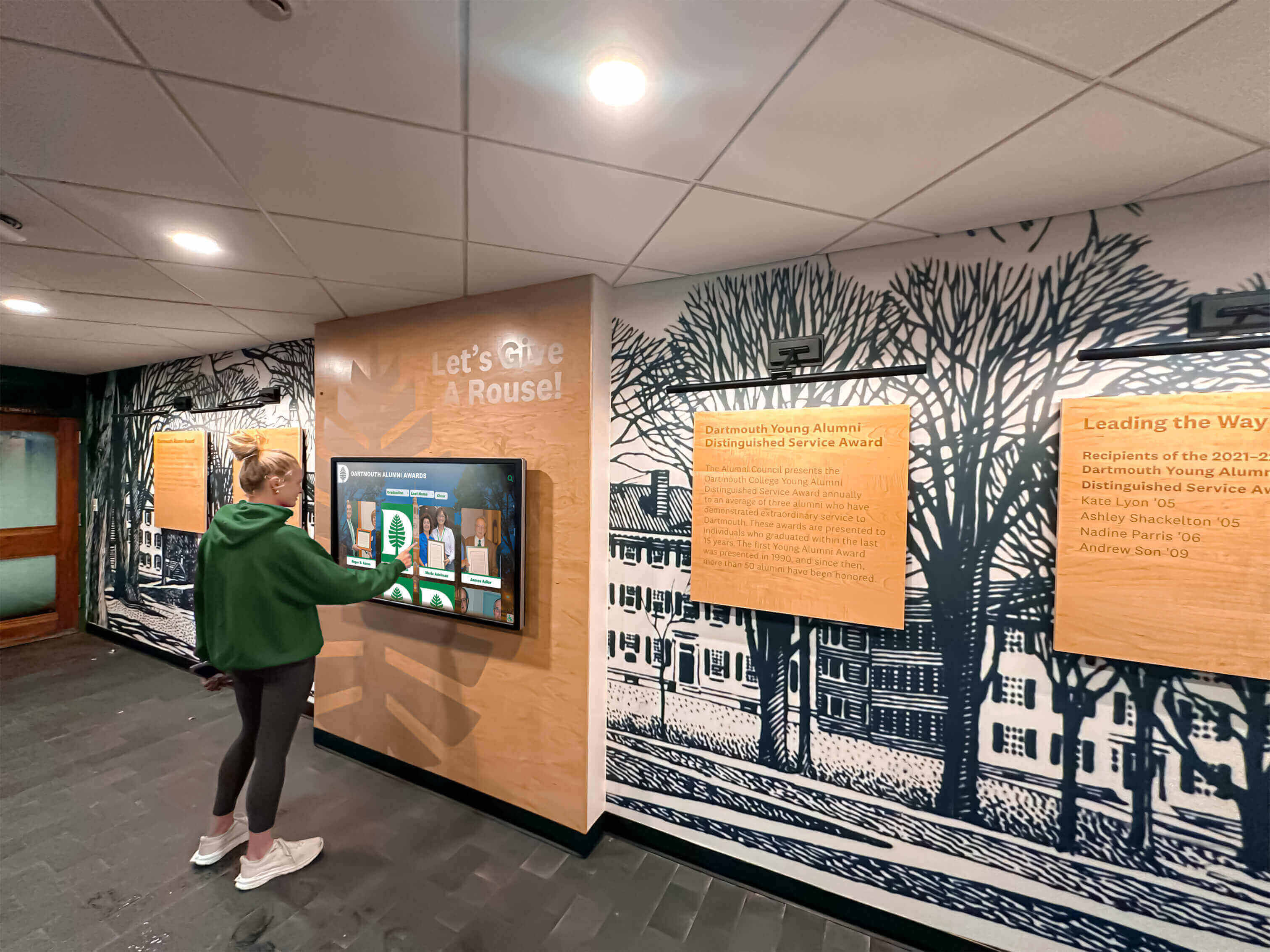
Web-based touchscreen interfaces enable intuitive exploration of institutional history, achievements, and community content
What Is Native Touchscreen Software?
Native touchscreen software consists of applications built specifically for particular operating systems using platform-specific programming languages, development frameworks, and system APIs. These applications install directly on devices and run without browser intermediaries.
Core Technical Characteristics
Native touchscreen applications operate fundamentally differently from web-based alternatives:
- Direct system integration: Applications communicate directly with operating system APIs and hardware
- Platform-specific development: Separate codebases required for Windows, macOS, Android, iOS, and Linux
- Installation required: Applications must be installed, configured, and launched on each device
- Offline operation: Full functionality available without internet connectivity
- Hardware optimization: Direct access to touchscreen drivers, multitouch capabilities, and device features
- Performance efficiency: No browser overhead consuming system resources
- Native UI elements: Applications use operating system interface components and design patterns
- Local data storage: Content and application data reside on devices rather than remote servers
This architecture provides performance and capability advantages for demanding applications while requiring greater development investment and more complex deployment processes.
Common Native Development Approaches
Organizations create native touchscreen software through various technical paths:
- Platform-specific SDKs: Using Windows .NET, macOS Swift/SwiftUI, Android Kotlin/Java, or iOS Swift
- Cross-platform frameworks: Tools like Electron, Qt, or Flutter enabling single codebase deployments across multiple platforms with near-native performance
- Specialized touchscreen frameworks: Purpose-built development environments optimized for large-format multitouch displays
- Custom development: Fully bespoke applications addressing unique organizational requirements
Each approach involves different tradeoffs between development complexity, performance optimization, and cross-platform portability.
Web-Based Touchscreen Software: Advantages and Strengths
Web-based touchscreen solutions deliver compelling benefits making them ideal choices for many organizational applications and deployment scenarios.
Cross-Platform Compatibility and Device Independence
Web-based software’s most significant advantage stems from platform independence enabling unprecedented deployment flexibility.
Universal Compatibility
Single web-based touchscreen applications work seamlessly across:
- Windows PCs running any modern browser
- macOS devices including Mac mini, iMac, or MacBook
- Android tablets and large-format displays
- iOS iPads deployed as kiosks
- Linux systems supporting standard browsers
- Chrome OS devices in educational environments
- Smart displays with integrated browsers
This universal compatibility eliminates platform lock-in and enables organizations to select hardware based on cost, preference, and availability rather than software constraints. Schools implementing digital recognition displays across mixed technology infrastructures particularly value this flexibility.
Future-Proof Hardware Decisions
Platform independence provides valuable strategic flexibility:
- Hardware upgrades don’t require software redevelopment or migration
- Organizations can change device platforms without content recreation
- New devices integrate immediately without compatibility concerns
- Vendor changes don’t strand investments in platform-specific software
- Testing and development occur once rather than separately per platform
These advantages reduce long-term total cost of ownership and eliminate technical debt associated with platform-specific implementations.
Simplified Development and Lower Initial Costs
Web development requires fewer specialized skills and delivers faster time-to-market compared to native application development.
Accessible Development Skills
Web developers substantially outnumber native application specialists:
- Larger talent pool for hiring and contracting
- Lower hourly rates for web versus native developers
- Existing staff may already possess necessary skills
- Abundant learning resources and community support
- Faster skill acquisition for organizations building internal capabilities

Web-based platforms enable remote content updates keeping recognition displays current without physical device access
Streamlined Development Process
Web-based development typically proceeds faster:
- Single codebase serves all platforms simultaneously
- Standard development tools and frameworks
- Rapid prototyping and iterative refinement
- Immediate deployment without app store approval processes
- Simplified testing across different devices
- No platform-specific certification or compliance requirements
Organizations implementing touchscreen projects on tight timelines or limited budgets find web-based approaches significantly more accessible than native development.
Remote Updates and Content Management
Cloud-based content management represents web-based software’s most operationally valuable advantage for many organizations.
Instant Content Updates
Web-based touchscreen systems enable immediate content changes:
- Update content from any internet-connected device
- Changes propagate instantly to all displays
- No physical access required to deployed kiosks
- Multiple staff members can contribute content remotely
- Scheduled content changes activate automatically
- Emergency updates published immediately when circumstances require
Schools using solutions like Rocket Alumni Solutions leverage this capability to maintain current recognition content—adding championship victories within hours, correcting errors immediately when discovered, and rotating featured content regularly without on-site visits.
Centralized Multi-Location Management
Organizations with distributed displays benefit enormously:
- Single interface manages dozens or hundreds of kiosks
- Consistent content across multiple locations
- Location-specific customization when appropriate
- Usage analytics aggregated across all installations
- Troubleshooting and support performed remotely
- Firmware and software updates deployed centrally
This centralized management dramatically reduces administrative burden compared to individually managing independent native installations.
Explore remote management capabilities in interactive announcements feed systems demonstrating cloud-based content distribution.

Cloud-managed web-based systems maintain consistent professional presentation across multiple installation locations
Progressive Web App (PWA) Capabilities
Modern Progressive Web App technologies bridge gaps between traditional web applications and native software.
Offline Functionality
PWAs can cache content locally enabling offline operation:
- Service workers store content on devices
- Applications function during network interruptions
- Content updates when connectivity restores
- Graceful degradation rather than complete failure
- Critical functionality available regardless of network status
This offline capability addresses web software’s historical connectivity dependency limitation.
Enhanced User Experience
PWAs provide native-like experiences through web technologies:
- Install to home screens like native applications
- Full-screen operation without browser chrome
- Fast loading through aggressive caching
- Push notifications when appropriate
- Background synchronization updating content automatically
These capabilities narrow gaps between web and native applications while maintaining web development’s inherent advantages.
Native Touchscreen Software: Advantages and Strengths
Native applications deliver performance, capabilities, and reliability benefits making them essential for certain touchscreen deployments despite higher development costs.
Superior Performance and Responsiveness
Native software operates more efficiently than browser-based alternatives, particularly for demanding applications.
Optimized System Integration
Direct operating system access enables performance impossible through browsers:
- No browser overhead consuming memory and processing resources
- Direct hardware acceleration for graphics and animations
- Optimized touch event processing with minimal latency
- Efficient memory management appropriate for continuous operation
- Hardware-specific optimizations maximizing performance
- Reduced power consumption extending device lifespan
For large-format multitouch displays supporting simultaneous multi-user interaction, these performance advantages prove critical. Native applications designed for interactive museum exhibits leverage direct hardware access for smooth, responsive experiences impossible through browser technologies.
Smooth Multitouch Gestures
Native touchscreen software provides superior gesture support:
- Complex multitouch interactions (pinch, zoom, rotate, multi-finger gestures)
- Custom gesture recognition for application-specific interactions
- Low-latency response matching user expectations from mobile devices
- Simultaneous multi-user support on large displays
- Precise touch tracking across entire display surfaces
Organizations requiring sophisticated touch interactions—interactive data visualizations, map interfaces, creative applications—typically need native software delivering reliable gesture support.
Advanced Hardware Integration
Native applications access device capabilities unavailable to web-based software through browser security restrictions.
Comprehensive Device Access
Native software integrates with hardware features:
- Camera and microphone access for augmented reality or video capture
- Bluetooth connectivity for peripheral devices
- USB peripherals including card readers, printers, or specialized hardware
- Biometric authentication through fingerprint or facial recognition
- Specialized sensors (accelerometers, gyroscopes, proximity detectors)
- Hardware encryption for secure data handling
- Direct touchscreen calibration and configuration
These integrations enable applications impossible with web technologies alone. Retail point-of-sale systems, check-in kiosks with card readers, or interactive exhibits with physical computing elements require native software’s comprehensive hardware access.
Platform-Specific Features
Native applications leverage operating system capabilities:
- Deep integration with file systems for local data management
- Background processing continuing when applications aren’t foreground
- System notifications and alerts
- Integration with calendar, contacts, and other native applications
- Platform-specific security features and authentication
- Accessibility features optimized for each operating system
This deep integration creates experiences matching user expectations from native applications on their devices.
Reliable Offline Operation
Native touchscreen software operates completely independently of network connectivity.
Zero Connectivity Dependency
Applications function fully without internet:
- All content and functionality stored locally
- No degradation during network outages
- Suitable for locations with unreliable connectivity
- Reduced bandwidth requirements and network costs
- Faster loading and navigation without network latency
- Privacy benefits avoiding external data transmission
For installations in locations with limited connectivity—remote areas, facilities with restricted networks, or environments prioritizing data security—native software’s offline operation proves essential.
Predictable Reliability
Eliminating network dependency removes failure points:
- No reliance on external servers maintaining uptime
- No degradation from network congestion or slow connections
- Consistent performance regardless of infrastructure changes
- Simplified troubleshooting without network variables
- Reduced ongoing operational dependencies
Organizations prioritizing maximum uptime and reliability—particularly for revenue-generating kiosks or critical operational systems—value native software’s independence from external infrastructure.
Discover reliability considerations in touchscreen maintenance best practices addressing long-term installation success.

Native touchscreen applications provide robust offline operation ensuring recognition displays function reliably regardless of network conditions
Enhanced Security and Data Control
Native applications provide security advantages for sensitive deployments.
Comprehensive Security Controls
Direct system integration enables stronger security:
- Application-level authentication and authorization
- Encrypted local data storage protecting sensitive information
- Fine-grained permission controls for system access
- Prevention of cross-site scripting and web-based vulnerabilities
- Isolated execution environments preventing compromise
- Integration with enterprise security infrastructure
Organizations handling personal information, payment data, or proprietary content may require native software’s enhanced security capabilities meeting regulatory compliance requirements.
Kiosk Lockdown Features
Native applications provide robust kiosk mode implementations:
- Complete system lockdown preventing unauthorized access
- Disabled keyboard shortcuts and system functions
- Automatic recovery from crashes or unexpected exits
- Hardware button disabling when appropriate
- Secure configuration preventing user modifications
- Integration with Mobile Device Management (MDM) systems
These lockdown features prove essential for unsupervised public kiosks in retail, hospitality, or public information applications.
Web-Based Touchscreen Software: Limitations and Challenges
Understanding web-based software limitations helps organizations identify situations requiring alternative approaches or mitigation strategies.
Performance Constraints and Latency
Browser overhead impacts performance, particularly for demanding applications.
Resource Consumption
Web browsers consume substantial system resources:
- Memory overhead for browser engine and rendering pipeline
- Processing resources for JavaScript interpretation
- Graphics acceleration limited by browser implementations
- Multiple abstraction layers between application and hardware
- Battery drain on portable devices
For resource-constrained hardware or applications requiring maximum performance, native software’s efficiency advantages prove significant.
Touch Response Latency
Browser-based touch handling introduces delays:
- Touch events processed through browser abstraction layers
- JavaScript interpretation adds processing time
- Gesture recognition less responsive than native implementations
- Multitouch support varies across browsers and platforms
- Complex interactions may feel sluggish compared to native equivalents
Users accustomed to responsive native mobile applications may perceive web-based touchscreen interfaces as less polished or professional.
Limited Offline Functionality
Despite Progressive Web App improvements, web-based software fundamentally depends on network connectivity.
Connectivity Requirements
Traditional web applications require persistent internet access:
- Content loading depends on network availability
- Functionality degrades or fails during outages
- Locations with unreliable connectivity face frequent disruptions
- Bandwidth consumption may be substantial for media-rich content
- Network latency affects user experience quality
While PWA technologies mitigate these limitations, implementing reliable offline functionality requires sophisticated development and doesn’t match native software’s inherent independence.
Browser Compatibility and Consistency Challenges
Cross-browser differences create testing and maintenance complexity.
Inconsistent Implementations
Different browsers interpret standards differently:
- Touch event handling varies across browsers
- CSS rendering differences affect layout and appearance
- JavaScript features availability differs by browser version
- Performance characteristics vary significantly
- Gesture support inconsistent across platforms
Organizations must test web-based touchscreen applications across all target browsers and platforms, addressing inconsistencies through platform-specific code or accepting variations.
Browser Update Risks
Automatic browser updates can break functionality:
- New browser versions may change behavior unexpectedly
- Security restrictions might limit previously available features
- Rendering changes could affect carefully designed layouts
- Testing burden increases with frequent browser releases
- Organizations lose control over client-side platform stability
Native software’s independence from browser development cycles provides greater long-term stability and predictability.
Native Touchscreen Software: Limitations and Challenges
Native applications’ advantages come with significant tradeoffs organizations must evaluate carefully.
Higher Development Costs and Complexity
Native development requires substantially greater investment than web-based alternatives.
Platform-Specific Development
Supporting multiple platforms multiplies development effort:
- Separate codebases for Windows, macOS, Android, iOS, Linux
- Different programming languages and development environments
- Platform-specific design guidelines and user interface patterns
- Testing requirements multiply across platforms
- Bug fixes and updates must be implemented separately
- Specialized developers for each platform ecosystem
Organizations needing cross-platform deployments face dramatically higher costs compared to single web-based implementations. Touchscreen software for Mac requires separate development from Windows implementations despite serving identical purposes.
Longer Development Timelines
Native projects typically require more time:
- Platform-specific development proceeds sequentially or requires larger teams
- App store submission and approval processes add delays
- More complex testing and quality assurance
- Certification and compliance requirements vary by platform
- Longer path from concept to deployed application
Organizations with urgent timelines may find web-based development’s speed advantage compelling despite native software’s technical benefits.
Complex Update and Maintenance Processes
Updating native applications proves significantly more challenging than web-based alternatives.
Deployment Challenges
Distributing updates to native applications requires coordination:
- Individual device updates rather than centralized web server changes
- Users or administrators must install updates manually or through automated systems
- Different devices may run different software versions
- Testing updates across all supported platforms
- Rollback complexity if updates cause problems
- App store approval delays for mobile platforms
Organizations with distributed installations face substantial ongoing maintenance burdens maintaining current native software across all devices.
Version Fragmentation
Native deployments often run mixed software versions:
- Delayed updates create inconsistent user experiences across locations
- Feature additions benefit only updated installations initially
- Bug fixes don’t reach all users simultaneously
- Support complexity addressing issues varying by version
- Database and content compatibility challenges across versions
Web-based software eliminates version fragmentation through instant updates propagating to all users simultaneously.
Platform Lock-In and Limited Flexibility
Native development commitments constrain future strategic flexibility.
Vendor and Platform Dependencies
Native software creates platform commitments:
- Migrating to different hardware platforms requires software redevelopment
- Organizations become dependent on platform vendors’ strategic directions
- Platform obsolescence risks leaving software unsupported
- Switching costs discourage future platform changes
- Technical debt accumulates in platform-specific code
Organizations valuing strategic flexibility and platform independence should carefully consider these long-term implications before committing to native development.
Cost Comparison: Web-Based vs Native Touchscreen Software
Understanding total cost of ownership helps organizations make financially informed decisions.
Development Costs
Initial development investment varies dramatically between approaches.
Web-Based Development Costs
Web-based touchscreen applications typically cost:
- Simple information kiosks: $5,000-15,000 for basic custom development
- Interactive recognition displays: $15,000-40,000 for content management and custom features
- Complex applications: $40,000-100,000+ for sophisticated functionality
- Template-based solutions: $0-5,000 using existing platforms or open-source frameworks
These estimates assume single implementations serving all platforms simultaneously. Solutions like Rocket Alumni Solutions provide ready-made web-based recognition platforms eliminating custom development costs entirely while delivering professional touchscreen experiences optimized for institutional recognition applications.
Native Development Costs
Native applications require substantially higher investment:
- Single-platform applications: $25,000-75,000 minimum for professional development
- Cross-platform implementations: $75,000-250,000+ covering Windows, macOS, iOS, Android
- Complex multitouch applications: $100,000-500,000+ for sophisticated gesture support
- Ongoing development: Continued investment maintaining separate codebases
These costs often exceed available budgets for many schools, small businesses, and organizations with limited technology resources.
Ongoing Operational Costs
Total cost of ownership extends far beyond initial development.
Web-Based Operational Costs
Annual costs for web-based solutions:
- Web hosting and content delivery: $100-1,000 annually depending on traffic and storage
- Software platform subscriptions: $500-5,000+ annually for managed solutions
- Content management labor: Varies based on update frequency and content complexity
- Browser and device maintenance: Minimal incremental costs beyond normal IT operations
Web-based approaches typically involve predictable subscription costs and minimal ongoing technical maintenance.
Native Operational Costs
Annual costs for native software:
- Software maintenance and updates: $5,000-25,000+ annually depending on complexity
- Platform-specific testing and quality assurance
- Device management and software deployment systems
- Version control and compatibility maintenance
- Technical support addressing platform-specific issues
Native implementations often require dedicated technical resources or ongoing vendor relationships maintaining software quality and compatibility.
Explore cost considerations in digital recognition display buying guides examining total ownership economics.
Choosing the Right Approach: Decision Framework
Selecting appropriate touchscreen software requires evaluating specific deployment contexts, requirements, and organizational capabilities.
When Web-Based Software Makes Sense
Web-based touchscreen solutions prove ideal for numerous common scenarios.
Optimal Web-Based Use Cases
Organizations should strongly consider web-based approaches when:
Content Management Priority
- Recognition displays requiring frequent content updates from multiple locations
- Information kiosks with regularly changing announcements, schedules, or promotions
- Organizations lacking on-site technical staff for direct device management
- Multi-location deployments requiring consistent content across distributed installations
Platform Flexibility Requirements
- Mixed hardware environments with different operating systems
- Uncertain future hardware plans requiring platform independence
- Organizations wanting flexibility to change device platforms without software constraints
- Deployments using different display sizes requiring responsive layouts
Budget and Timeline Constraints
- Limited development budgets favoring lower web development costs
- Tight project timelines requiring faster web development pace
- Organizations preferring subscription models over large upfront investments
- Small-scale deployments where native development costs prove disproportionate
Simple Touch Interaction Needs
- Applications requiring basic tap, swipe, and scroll interactions
- Single-touch interfaces without complex multitouch gesture requirements
- Information display and browsing applications rather than creative tools
- Content consumption rather than content creation applications
Schools implementing digital athletic recognition displays typically find web-based solutions provide all necessary functionality while delivering superior content management and cross-platform flexibility at reasonable costs.
When Native Software Proves Essential
Certain requirements demand native application development despite higher costs and complexity.
Optimal Native Use Cases
Organizations should pursue native development when:
Performance Critical Applications
- Large-format multitouch displays supporting simultaneous multi-user interaction
- Graphics-intensive applications requiring maximum rendering performance
- Complex data visualizations demanding computational efficiency
- Applications where touch responsiveness directly impacts user satisfaction
Advanced Hardware Integration
- Systems requiring camera, microphone, or biometric authentication access
- Applications integrating peripheral devices like card readers or printers
- Specialized sensors or hardware components essential to functionality
- Custom hardware requiring low-level device communication
Offline Operation Requirements
- Installations in locations with unreliable or nonexistent internet connectivity
- Applications handling sensitive data prohibited from network transmission
- High-reliability requirements where network dependencies introduce unacceptable risk
- Remote locations where connectivity costs or limitations prove prohibitive
Complex Multitouch Interactions
- Creative applications requiring sophisticated gesture recognition
- Gaming or entertainment experiences with complex touch patterns
- Educational software designed around multitouch manipulation
- Interactive exhibits with advanced gesture-based interfaces
Security and Compliance Mandates
- Applications handling payment card information requiring PCI compliance
- Protected health information subject to HIPAA regulations
- Personally identifiable information with stringent security requirements
- Environments with air-gapped or restricted network security policies
Hybrid Approaches and Middle Ground
Many organizations benefit from combining web and native technologies strategically.
Progressive Web Apps (PWAs)
Modern PWAs bridge gaps between web and native:
- Web-based development with native-like installation and offline capabilities
- Balance between development efficiency and enhanced functionality
- Appropriate for many organizational requirements without extreme performance demands
- Gradual feature adoption as PWA standards mature and browser support improves
Cross-Platform Native Frameworks
Tools like Electron, Qt, or Flutter enable native development efficiency:
- Single codebase deployed to multiple platforms as native applications
- Near-native performance exceeding browser-based alternatives
- Reduced development costs compared to fully platform-specific implementations
- Appropriate when native capabilities required but multi-platform support essential
Native Wrapper Approaches
Some organizations wrap web-based content in native containers:
- Web-based content delivery with native kiosk functionality
- Simplified content management while maintaining offline reliability
- Platform-specific features added through native wrapper
- Appropriate for primarily content-focused applications needing some native capabilities
Solutions like Rocket Touchscreen for Mac exemplify this approach—native application providing robust kiosk mode and system integration while displaying web-based content managed remotely through cloud platforms.
Implementation Best Practices
Regardless of chosen approach, several best practices ensure successful touchscreen software deployments.
User Experience Design Principles
Effective touchscreen interfaces require design considerations beyond traditional desktop applications.
Touch-Optimized Interface Guidelines
- Appropriate target sizes: Minimum 44-48 pixel touch targets accommodating average finger size
- Visual feedback: Clear indication when touches register through highlights, animations, or state changes
- Simple navigation: Obvious paths forward and back without complex hierarchies
- Readable text: Minimum 24-30 point body text visible at typical viewing distances
- High contrast: Sufficient contrast between text and backgrounds ensuring legibility
- Minimal text: Visual communication prioritized over lengthy written content
- Intuitive gestures: Standard touch patterns matching user expectations from mobile devices
These principles ensure touchscreen applications prove immediately usable without instructions or learning curves.
Explore interface design in touchscreen experience design with comprehensive guidelines.
Hardware Selection Considerations
Software decisions should align with hardware capabilities and limitations.
Critical Hardware Specifications
- Touch technology: Capacitive or infrared multitouch providing responsive accurate input
- Display size: Appropriate for viewing distance and application requirements (typically 43-75 inches for kiosks)
- Resolution: Sufficient for content clarity (minimum 1080p; 4K preferred for large displays)
- Commercial grade: Displays rated for continuous operation unlike consumer televisions
- Brightness: Adequate for ambient lighting conditions (350-500 nits typical)
- Processing power: Sufficient for chosen software approach and content complexity
Hardware and software decisions must align—sophisticated native applications require more powerful hardware, while web-based solutions may perform adequately on more modest specifications.
Security and Kiosk Mode Implementation
Public-facing touchscreen installations require robust security preventing unauthorized system access.
Essential Security Features
- Kiosk mode lockdown: Full-screen operation preventing access to underlying operating system
- Disabled system shortcuts: Keyboard combinations like Alt-F4 or Ctrl-Alt-Delete prevented
- Automatic recovery: Application relaunches automatically if crashes or exits unexpectedly
- Session timeouts: Automatic reset after inactivity preventing prolonged single-user occupation
- Content restrictions: Limited navigation to approved content only
- Physical security: Hardware protection preventing device theft or tampering
Both web and native approaches can implement these features, though native software typically provides more comprehensive system-level control.
Real-World Application Scenarios
Understanding practical deployment contexts helps organizations envision appropriate touchscreen software approaches.
Educational Recognition Displays
Schools and universities commonly deploy touchscreen systems celebrating achievement and preserving institutional legacy.
Typical Requirements
Educational recognition applications need:
- Frequently updated content adding new achievements throughout year
- Remote management enabling updates without physical device access
- Cross-platform compatibility working with existing diverse hardware
- Engaging multimedia showcasing photos, videos, and detailed profiles
- Simple content management tools accessible to non-technical staff
- Budget-conscious solutions fitting educational financial constraints
Recommended Approach
Web-based solutions like Rocket Alumni Solutions prove ideal for educational recognition:
- Cloud-based content management enabling immediate updates from any location
- Platform-independent deployment across Windows, Mac, or other devices
- Professional templates eliminating custom development requirements
- Subscription pricing fitting educational budgets better than large upfront investments
- Engaging touch interfaces encouraging student and visitor exploration
Schools implementing honor roll recognition displays consistently find web-based approaches deliver all required functionality while maintaining manageable costs and administrative simplicity.
Retail Point-of-Sale and Ordering Systems
Retail environments require robust, reliable touchscreen software handling transactions and customer interactions.
Typical Requirements
Retail applications demand:
- High reliability with minimal downtime affecting revenue
- Fast responsive performance handling peak customer volumes
- Integration with payment hardware, receipt printers, and inventory systems
- Offline operation ensuring functionality during network outages
- Security compliance meeting payment card industry standards
- Professional appearance reflecting brand standards
Recommended Approach
Native software typically proves necessary for retail point-of-sale:
- Superior performance handling transaction processing demands
- Comprehensive hardware integration with payment devices and peripherals
- Reliable offline operation eliminating network dependency risks
- Enhanced security meeting PCI compliance requirements
- Platform-specific optimization for chosen hardware
While higher development costs, retail organizations typically require native software’s capabilities justifying investment.
Museum and Cultural Institution Exhibits
Museums create engaging interactive exhibits educating visitors about collections, history, and themes.
Typical Requirements
Museum applications need:
- Engaging multitouch experiences supporting simultaneous multiple visitors
- Rich multimedia including high-resolution images, videos, and interactive content
- Reliable operation with minimal maintenance in public environments
- Professional presentation reflecting institutional brand and standards
- Content management enabling exhibit updates as collections change
Recommended Approach
Requirements vary by exhibit complexity:
- Simple information kiosks: Web-based solutions provide adequate functionality at reasonable costs
- Complex multitouch exhibits: Native software delivers superior gesture support and performance
- Mixed environments: Combination approaches using web content within native wrappers
Museums should evaluate specific exhibit requirements determining appropriate software approaches case-by-case rather than assuming single answer for all applications.
Future Trends and Emerging Technologies
Touchscreen software continues evolving with new capabilities expanding possibilities.
Progressive Web App Maturation
PWA technologies progressively narrow gaps between web and native applications.
Emerging Capabilities
Recent and upcoming PWA features include:
- Advanced offline functionality: Sophisticated caching enabling fully functional offline applications
- Background synchronization: Automatic content updates when connectivity restores
- Push notifications: Real-time alerts and engagement matching native applications
- File system access: Direct file handling previously impossible for web applications
- Hardware API expansion: Growing access to device capabilities formerly restricted to native software
These evolving capabilities make web-based approaches increasingly viable for applications previously requiring native development.
WebAssembly Performance Improvements
WebAssembly enables near-native performance for computationally intensive web applications.
Performance Advantages
WebAssembly delivers:
- Compiled code execution far faster than JavaScript interpretation
- Efficient memory management matching native application characteristics
- Complex calculations and rendering previously impractical in browsers
- Game engines, creative tools, and other demanding applications running in browsers
As WebAssembly adoption grows, performance differences between web and native applications continue narrowing.
Cross-Platform Development Framework Evolution
Modern frameworks simplify native development while maintaining cross-platform compatibility.
Framework Improvements
Tools like Flutter, React Native, and Electron provide:
- Single codebase deployments across multiple platforms
- Near-native performance exceeding traditional web approaches
- Reduced development costs compared to fully platform-specific implementations
- Ongoing improvements expanding capabilities and performance
These frameworks increasingly represent middle ground combining native performance with web development efficiency.
Conclusion: Making the Right Touchscreen Software Choice
Choosing between web-based and native touchscreen software requires thoughtful evaluation of specific organizational requirements, technical constraints, budget realities, and long-term strategic objectives. Neither approach proves universally superior—each delivers distinct advantages making it ideal for particular applications while imposing limitations affecting others.
Web-based touchscreen software excels for content-focused applications requiring frequent updates, cross-platform compatibility, remote management, and cost-effective development. Schools implementing recognition displays, businesses deploying information kiosks, and organizations prioritizing content management flexibility consistently find web-based approaches deliver necessary functionality while maintaining reasonable costs and administrative simplicity.
Native touchscreen software proves essential when performance, advanced hardware integration, reliable offline operation, or sophisticated multitouch interactions become critical requirements. Retail point-of-sale systems, complex museum exhibits, applications handling sensitive data, and deployments in locations with connectivity limitations typically justify native development’s higher costs through capabilities web-based alternatives cannot reliably deliver.
Explore Professional Touchscreen Solutions
Discover how web-based platforms like Rocket Alumni Solutions deliver professional interactive recognition experiences without complex development or ongoing technical maintenance. Perfect for schools, businesses, and institutions needing engaging touchscreen displays with straightforward management.
Schedule a Touchscreen Software DemoProgressive Web App technologies and cross-platform native frameworks increasingly blur boundaries between approaches, enabling hybrid solutions combining advantages from both paradigms. Organizations should remain open to these emerging approaches as technologies mature and capabilities expand.
Ultimately, successful touchscreen software selection begins with clearly defining specific requirements—understanding what capabilities prove essential versus merely desirable, evaluating realistic budget constraints, assessing internal technical capabilities, and considering long-term maintenance and evolution expectations. With requirements clearly articulated, appropriate software approaches become evident, enabling confident decisions delivering long-term value and satisfaction.
Whether you choose web-based platforms like Rocket Alumni Solutions for recognition displays, custom native development for specialized applications, or hybrid approaches combining both paradigms, focus on aligning technical decisions with genuine organizational needs rather than pursuing technology for its own sake. The best touchscreen software is that which reliably serves your specific purposes while remaining manageable within your technical and financial constraints—not necessarily the most technically sophisticated or feature-rich alternative.
Ready to explore touchscreen software options for your organization? Learn more about implementing digital walls of fame or discover touchscreen kiosk software comparison examining specific platforms and solutions appropriate for various organizational applications and deployment contexts.































